Anycubic Kobra S1 Combo vs Anycubic Kobra 3 Combo
One is enclosed, cheaper in the UK and in stock. The other is sold out. What separates Anycubic's two multicolour Kobra Combo printers, and which to buy.
Independent and reader-funded. We earn a commission if you buy through our links, at no extra cost to you. How this works.
Almost every comparison of the Anycubic Kobra S1 Combo vs Anycubic Kobra 3 Combo frames the choice as a trade: pay more for the enclosed CoreXY machine, or save money with the open-frame one. In the UK that trade no longer exists. The enclosed machine is the cheaper of the two and it is in stock; the open-frame one is sold out at Anycubic's own UK store and at the UK retailers checked.
The specification differences still decide what you can print — they are simply no longer the first question.
| Specification | 1 Anycubic Kobra S1 Combo The one to buy | 2 Anycubic Kobra 3 Combo Open-frame alternative |
|---|---|---|
| Best for | ABS and ASA in an enclosed machine | PLA and PETG in the open air |
| Enclosed | Yes — fully enclosed CoreXY | No — open-frame gantry |
| Max nozzle temperature | 320 °C | 300 °C |
| Max bed temperature | 120 °C | 110 °C |
| ABS and ASA | Yes — on Anycubic's list | No — not on Anycubic's list |
| Build volume | 250 × 250 × 250 mm | 250 × 250 × 260 mm |
| Multicolour | Yes — 4-colour ACE Pro supplied | Yes — 4-colour ACE Pro supplied |
| UK price band | £340–£400 | £270–£500 where still listed |
| UK availability | In stock | Sold out at every UK route checked |
How these two were compared
No first-hand printing was carried out. The Anycubic Kobra S1 Combo compared with the Anycubic Kobra 3 Combo is research-based, and the basis is worth stating.
Specifications come from Anycubic's own store pages, read variant by variant — the Combo bundles specifically, not the standalone printers and not the Max or V2 versions, which are different machines with different numbers. Where Anycubic published no figure, an authorised UK retailer's table was used and labelled; where the two disagreed, the manufacturer won.
UK price and stock were checked at Anycubic's UK store and two UK retailers on 11 September 2026. Prices move, so this page gives bands; availability decided the comparison.
The enclosure is the whole argument
One structural decision separates these machines. The Kobra S1 Combo is a fully enclosed CoreXY printer. The Kobra 3 Combo is an open-frame gantry machine with a direct-drive extruder and twin Z screws — a bed slinger, because the plate travels back and forth beneath the head.
CoreXY means the belts drive the head in X and Y while the plate only moves down, so the frame can be driven hard. But the enclosure is what you are buying: a closed box holds still, warm air around the model, which decides whether a material behaves.
Look at what Anycubic itself puts on each list. For the Kobra S1 Combo: PLA, ABS, ASA, PETG and TPU. For the Kobra 3 Combo: PLA, PETG and TPU, with TPU excluded from the ACE Pro multicolour unit. ABS and ASA are simply absent from the open-frame machine's list.
That absence is the comparison in one line. ABS and ASA shrink as they cool; in moving air they lift at the corners, split between layers, or peel off the plate hours into a print. A still chamber fixes it.
Which brings us to the temperature figures, and a trap. The S1 Combo reaches 320 °C at the nozzle against 300 °C, and 120 °C at the plate against 110 °C. That gap looks like the reason one prints ABS and the other does not. It is not: ABS flows within reach of both hotends, but will not cool evenly in a draught. The hotter nozzle and plate widen the margin; the enclosure changes the materials list.
If your printing stops at PLA and PETG, none of this costs you anything, and the case for an open frame is intact — the case made across our best FDM printers guide. If ABS or ASA is on your list, only one of these two can do it.
Where the two machines are the same
Knowing what you are not giving up matters as much as knowing what you are. Speed is identical on paper: both quoted at a recommended 300 mm/s with a 600 mm/s ceiling — what the motion system can be commanded to do, not what a detailed model will see. Acceleration is where the CoreXY frame shows daylight — both top out at 20,000 mm/s², but Anycubic recommends 10,000 mm/s² for the open-frame machine, which is the moving bed asking for restraint.
Levelling is the same on both: LeviQ 3.0 automatic levelling with a Z-offset, onto a PEI spring steel plate. This used to define the first week of owning a printer — a sheet of paper, a nozzle gap, a fortnight of test squares. Neither machine asks that of you.
The multicolour hardware is the same module: both ship with the four-colour ACE Pro, both go to eight with a second unit, and both dry filament while they print — which earns its place in a British house, because PETG pulls moisture from the air and prints badly once it has.
Both take a 0.4 mm nozzle as standard and run through Anycubic Slicer Next, though USB on the Kobra 3 Combo prints only where the S1 Combo adds cloud.
Which leaves build volume, usually given as a point for the Kobra 3 Combo. The footprint is identical and the difference is 10 mm of height.
Anycubic Kobra S1 Combo: who it suits
Enclosed multicolour at this money was not on offer eighteen months ago, which is the reason to pay attention rather than any single figure.
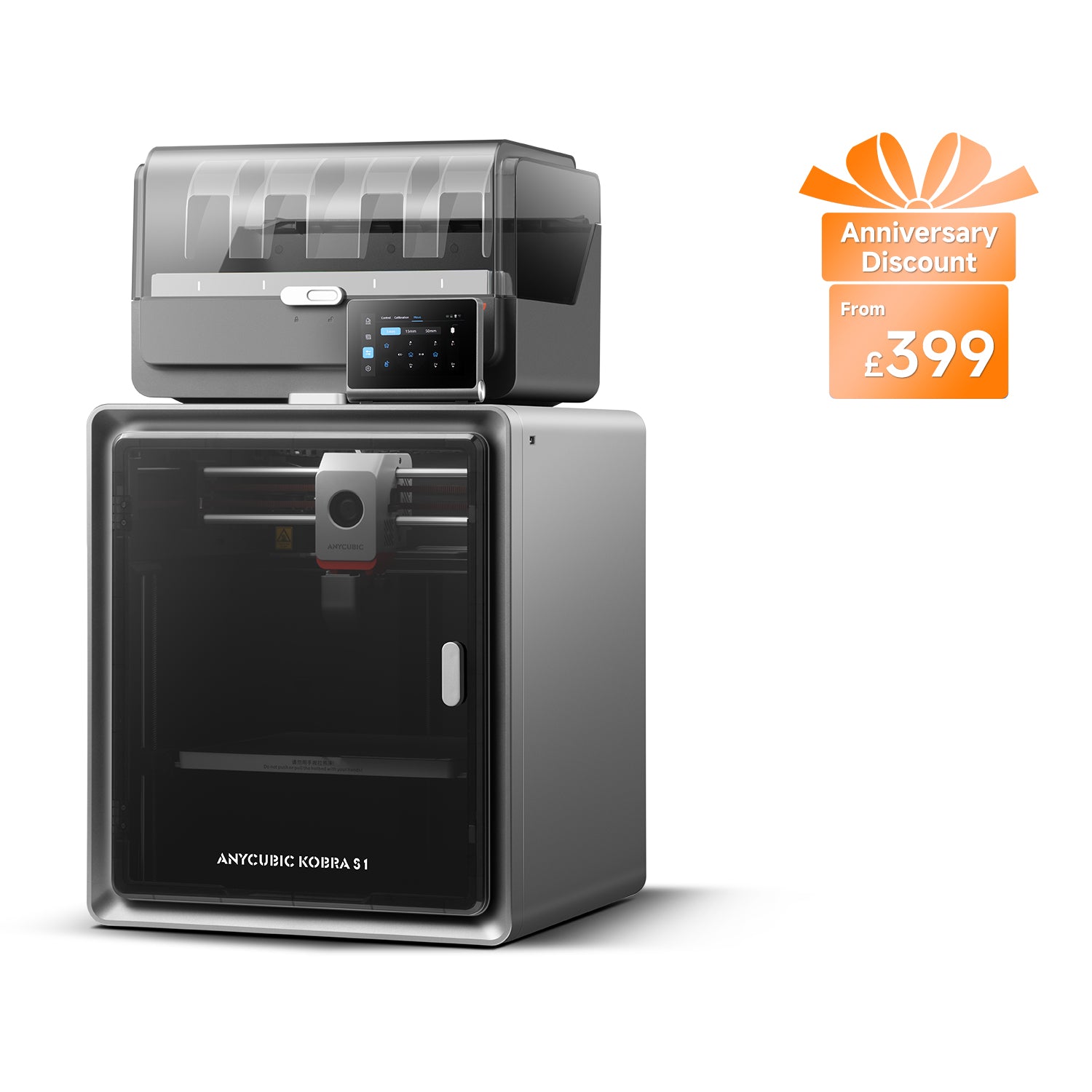
Anycubic Kobra S1 Combo
Kobra S1 Combo (enclosed CoreXY supplied with the 4-colour ACE Pro — not the Kobra S1 standalone, the Kobra S1 ACE 2 Pro Combo, the 8-colour two-ACE bundle or the Kobra S1 Max Combo)
A fully enclosed CoreXY printer with four-colour printing in the box, a hotter nozzle and plate than its open-frame sibling, and ABS and ASA on Anycubic's own materials list. Heavy, and the multicolour purge needs somewhere to go.
- Build volume
- 250 × 250 × 250 mm
- Technology
- FDM (FFF)
- Max speed
- Recommended 300 mm/s; maximum 600 mm/s; maximum acceleration 20,000 mm/s² (manufacturer maxima)
- Enclosed
- Yes — fully enclosed CoreXY construction
- Multi-colour
- Yes — 4 colours with the supplied ACE Pro; 8 with a second ACE Pro unit
- Auto levelling
- Yes — LeviQ 3.0 automatic levelling with Z-axis offset
What we like
- Fully enclosed CoreXY, which is what puts ABS and ASA on the materials list
- Hotter at both ends: 320 °C at the nozzle and 120 °C at the plate
- Cheaper than the Kobra 3 Combo in the UK, and in stock
- Manufacturer figures of 44–46 dB, helped by the closed box
What we don’t
- 18 kg and 490 mm tall — a permanent appliance, not a desk machine
- Multicolour purge is ejected rather than collected, so it needs a catcher
- One-year warranty, shorter than some rivals at this money
- An out-of-stock order may arrive as the ACE 2 Pro version instead
It suits someone whose printing is going to grow. PLA is where nearly everyone starts, and if that is the end of the list then the enclosure is money spent on a door you never open. But the list usually grows — a bracket that sits in a car in July, an outdoor fitting. That is where ASA and ABS arrive, and where an open frame stops.
The specifics: a fully enclosed CoreXY frame, PLA, ABS, ASA, PETG and TPU on the list, and a 120 °C plate holding the first layer down while the chamber works. Anycubic quotes 46 dB in standard mode and 44 dB in quiet mode — its own best case under conditions it has not published.
Two things to plan for: it is 400 × 410 × 490 mm and 18 kg, a permanent appliance on a solid surface, and multicolour makes filament waste — covered below.
Buy this if you want one machine that will still be right when your printing moves past PLA, or want multicolour and ABS without running two printers.
Skip this if your list stops at PLA and PETG and the money matters more than the headroom, or you have nowhere to keep a heavy machine permanently set up.
Anycubic Kobra 3 Combo: who it suits
Read the other way round — the Anycubic Kobra 3 Combo vs the Anycubic Kobra S1 Combo — this machine has a real case, worth making before availability ends it.
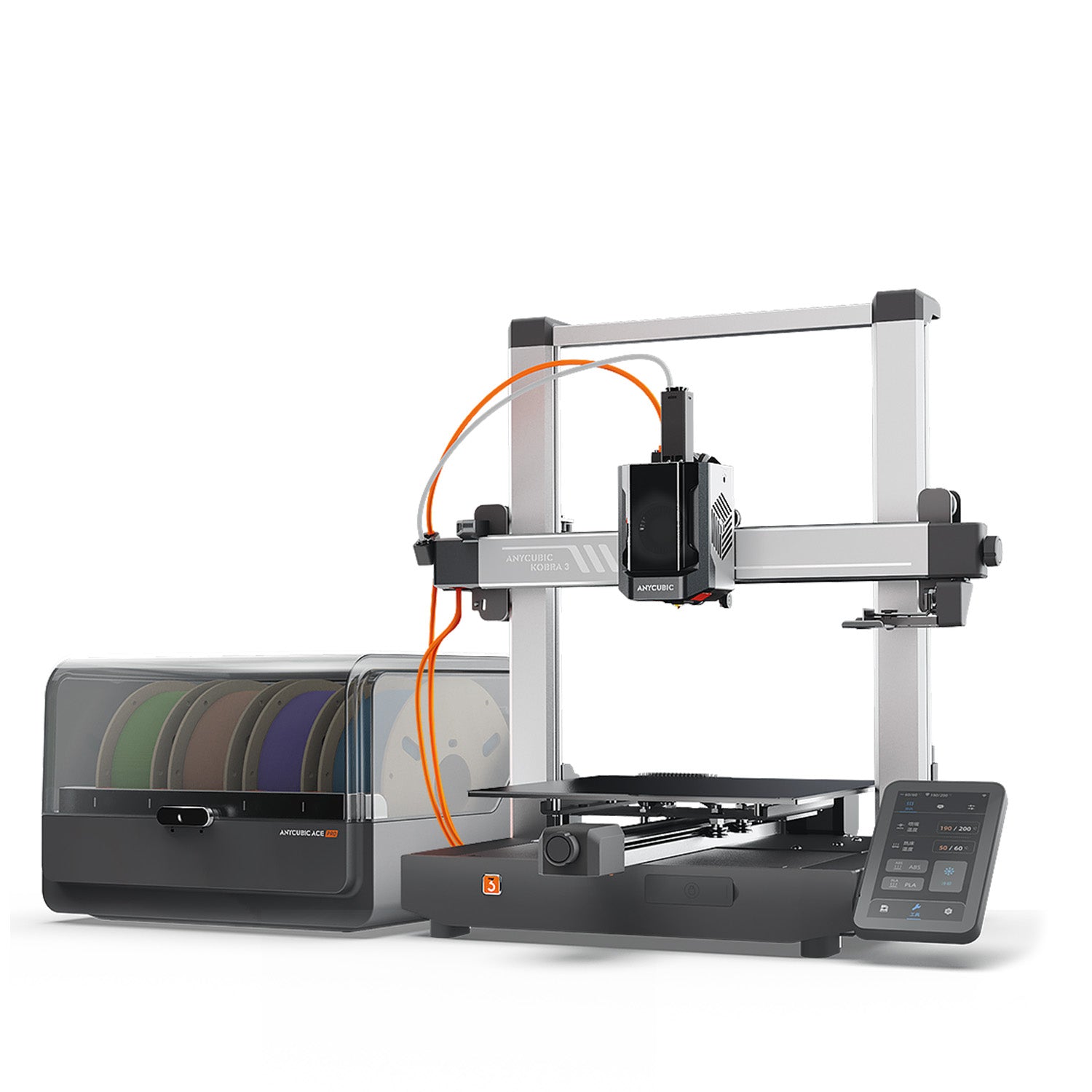
Anycubic Kobra 3 Combo
Kobra 3 Combo (open-frame Kobra 3 supplied with the 4-colour ACE Pro — not the Kobra 3 standalone, the Kobra 3 V2 Combo, the Kobra 3 Max Combo or the Kobra 4 Combo)
The same four-colour ACE Pro workflow and automatic levelling on an open-frame gantry, with a fractionally taller plate. Limited to PLA, PETG and TPU by Anycubic's own list, and sold out across the UK routes checked.
- Build volume
- 250 × 250 × 260 mm (16.25 L)
- Technology
- FDM (FFF)
- Max speed
- Recommended 300 mm/s; maximum 600 mm/s; recommended acceleration 10,000 mm/s², maximum 20,000 mm/s² (manufacturer maxima)
- Enclosed
- No — open frame, no enclosure and no chamber heating
- Multi-colour
- Yes — 4 colours with the supplied ACE Pro; 8 with a second ACE Pro unit
- Auto levelling
- Yes — LeviQ 3.0 automatic levelling with Z-offset
What we like
- Same four-colour ACE Pro workflow and LeviQ 3.0 automatic levelling
- Slightly taller plate at 250 × 250 × 260 mm
- Lighter at about 9.2 kg, so it is easier to move
- Open frame runs cooler, which suits PLA
What we don’t
- No enclosure, so ABS and ASA are off Anycubic's list for it
- TPU cannot be fed through the ACE Pro
- Sold out at Anycubic UK and both UK retailers checked
- An out-of-stock order is filled with a Kobra 4 Combo instead
An open frame is not only a cost saving: it runs cooler, which suits PLA. The printer is about 9.2 kg, with the ACE Pro a separate box beside it, and the plate is marginally taller at 250 × 250 × 260 mm.
The limit is the materials list, and it is Anycubic's own: PLA, PETG and TPU, with TPU excluded from the ACE Pro. Flexible filament must be fed directly, so on this machine TPU and multicolour are alternatives, not a combination.
The purge problem is not the enclosed machine's alone. Owner reports describe the same filament waste at colour changes on both machines, since they share the ACE Pro module, and a recurring theme is owners adding their own catcher for the purged material.
Then the part that overrides the rest. Anycubic's UK store shows it sold out, one UK retailer no longer sells it and another shows it out of stock, and Anycubic's EU store ships a Kobra 4 Combo instead at no extra cost. A newer printer free is not a bad outcome — but it is a different printer, not verified here.
Buy this if you already have one in front of you at a clearance price, you print PLA and PETG, and you want four-colour printing for the least money.
Skip this if you are buying new in the UK. If neither suits, the best FDM printers guide covers other brands.
Living with either: the patterns that repeat
No specifications here. What follows is drawn from brand feedback pages, community-published accessories and Anycubic's own troubleshooting material, and describes patterns rather than verified performance. Access was narrower than usual on this run — the forums that carry the richest long-term accounts could not be reached — so treat the confidence as moderate at best.
The multicolour purge is the loudest theme, and it belongs to the ACE Pro rather than either printer. Owner reports repeatedly mention filament waste at colour changes, and a recurring theme is that owners print their own chute or bin to catch the purged material because the machine ejects it rather than collecting it.
Feeding is the second theme, and a milder one. Owner reports describe filament tangles and feeding stoppages in the ACE Pro as a routine annoyance to manage rather than a common failure, and Anycubic publishes its own troubleshooting steps for them, though this is not consistent across all reports.
The third is about Anycubic rather than either model. Owner reports about Anycubic's after-sales support are mixed but lean positive: a recurring theme is quick replies and free replacement parts, while a smaller but persistent strand describes hardware faults such as hotend, touchscreen and control-board failures, and some owners describe difficulty getting a full warranty resolution. This is not consistent across all reports.
Hold those halves together: parts do fail, and the company is generally quick to replace them — a reasonable bargain, provided you will fit the part yourself.
What each costs to run in the UK
Electricity is the cost people worry about; filament is the cost they pay. The Kobra S1 Combo is rated at 1500 W on UK mains; the Kobra 3 Combo has a 400 W supply. Neither is what the machine draws while printing. Both are ceilings — what the supply must deliver when a cold plate and hotend heat together — and Anycubic publishes no steady-state figure for either. The larger rating reflects a bigger, hotter plate heating from cold, not a printer using four times the electricity.
What follows is an estimate built on a stated assumption, not a measurement. For a desktop machine of this class, an average of 100 W to 200 W once up to temperature is reasonable, and well under either rated ceiling.
At about 26p per kWh under the Ofgem price cap, that is roughly 2.6p to 5.2p an hour. Thirty hours of printing in a month comes to somewhere around 80p to £1.60, on either printer — a difference that disappears into the rounding on a quarterly bill.
Filament is the number that moves. Ordinary PLA runs roughly £14 to £18 a kilogram from UK retailers, and ABS and ASA cost more. One spool is worth several months of electricity.
Multicolour changes that arithmetic in a way no spec sheet shows. Every colour change purges material to clear the nozzle, and with frequent swaps the purge can rival the part itself for weight. Budget accordingly if you print in colour often; in one colour, the ACE Pro costs nothing extra.
UK price, availability, warranty and support
This is where the Anycubic Kobra S1 Combo versus the Anycubic Kobra 3 Combo in the UK stops resembling the comparison you will read elsewhere. Most of those pages are written to US pricing, where the open-frame machine is comfortably cheaper. Here, it is not.
On Anycubic's own UK store the Kobra S1 Combo was shipping within a day when this page was checked, and an authorised UK retailer had it in stock with free delivery to Great Britain; together they put it around the £350 to £400 mark.
The Kobra 3 Combo was sold out on that same UK store, listed there above the S1 Combo's price. Of the two UK retailers checked, one had dropped the product altogether and the other showed it out of stock at a reduced price. Where listings survive they range from well under the £300 mark to around the £500 mark — what a product looks like on the way out, rather than a market price.
Then the substitution, the most useful thing on this page. Anycubic's EU store states that because the Kobra 3 Combo is out of stock, a Kobra 4 Combo ships instead at no additional cost. Generous, and a genuine problem for a buyer who has done their research: you cannot order the machine you compared and be confident of receiving it.
Warranty is the same on both: one year on the printer, with a 30-day after-sales guarantee and a 14-day return through Anycubic's UK store — shorter than the two years some competitors offer at similar money.
Spares route through Anycubic or UK retailers, and both share the ACE Pro, so consumables are not model-specific. Buying the discontinued machine does not strand you for parts — only for the machine.
Three ways buyers get this choice wrong
Assuming the name on the listing is the machine you compared. Anycubic's Kobra range is large and the suffixes are not decoration. Kobra 3, Kobra 3 V2, Kobra 3 Max, Kobra 4, Kobra S1, Kobra S1 Max — different printers, different build volumes, different materials lists, and a Combo differs again from the standalone. Both machines here carry a substitution notice. Read the variant on the order, not the one in the review.
Buying the open-frame machine to save money without checking UK stock. That saving is the premise of most comparisons of these two, and it does not survive a British checkout.
Expecting either to be a composites machine. Anycubic's lists stop at PLA, ABS, ASA, PETG and TPU for the S1 Combo and at PLA, PETG and TPU for the Kobra 3 Combo. Fibre-reinforced filament grinds through a brass nozzle and chews drive gears; a hardened nozzle is the least of what it needs.
The verdict
Choosing between the Kobra S1 Combo or the Kobra 3 Combo used to be a question of money against materials. In the UK it is not close — and not in the direction most comparisons assume.
The Kobra S1 Combo wins on the criteria that separate them and on the one that decides them. It is the enclosed machine, which is what puts ABS and ASA on its materials list; it is the one in stock in the UK; and it is the cheaper of the two here. There is no criterion on which the Kobra 3 Combo is clearly ahead — the taller plate is 10 mm of height, and the lower price is a US price.
- Buy it if
- You want multicolour printing and any chance of ABS or ASA later — the Kobra S1 Combo is enclosed, runs hotter at nozzle and plate, and in the UK costs less than the open-frame machine it is compared with.
- Skip it if
- You already own a working Kobra 3 Combo, or you find one at a genuine clearance price and print nothing but PLA and PETG — in that case the older machine still does the job it was bought for.
That is a verdict about buying new in Britain. Where the Kobra 3 Combo is still stocked and genuinely cheaper, and you print PLA and PETG, it remains a sensible buy. Nothing about it has become bad; it has become hard to buy.
If neither fits — composites, a larger plate, a longer warranty — the best FDM printers guide is the better starting point.
How this article was researched
This comparison is research-based: no first-hand printing, measurement or photography was carried out. Specifications come from Anycubic's own product pages for each exact Combo variant, with an authorised UK retailer's table used only where Anycubic published no figure. UK price and stock were checked at Anycubic's UK store and two UK retailers on 11 September 2026, and are given as bands because they move. Owner experience is drawn from brand feedback pages and community-published accessories, and is labelled wherever it appears. Where a figure could not be confirmed from a primary source, it was left out rather than estimated.
Common questions
- Which is better, Anycubic Kobra S1 Combo or Anycubic Kobra 3 Combo?
- For a UK buyer purchasing new, the Kobra S1 Combo. It is the enclosed machine, which is what allows ABS and ASA, and it is currently both cheaper and in stock here while the Kobra 3 Combo is not. Which is better between the Anycubic Kobra S1 Combo or the Anycubic Kobra 3 Combo only becomes a close question if you print PLA and PETG exclusively and find the older machine heavily discounted.
- Which has better print quality and reliability?
- Neither has a published advantage in print quality: they share the same levelling system, the same recommended speed and the same multicolour module, so on PLA there is little to separate the output. Reliability is harder to call honestly, because no first-hand testing was done and the long-term owner discussion for both is thin. The enclosed machine has the practical edge on consistency for materials that dislike draughts, which is a design difference rather than a measured one.
- Which offers better value for UK buyers?
- The Kobra S1 Combo, and not marginally. On Anycubic's UK store it was listed below the Kobra 3 Combo while offering an enclosure, a hotter nozzle and a hotter plate. Most comparisons of these two are written to US pricing, where the older machine really is the budget option — that framing does not hold in Britain.