Creality K2 Plus vs Creality K2 Pro
In the UK the K2 Pro Combo costs less than a K2 Plus on its own. What the bigger, hotter machine really buys you — and when the smaller one wins.
Independent and reader-funded. We earn a commission if you buy through our links, at no extra cost to you. How this works.
Creality K2 Plus vs Creality K2 Pro looks like the easy kind of comparison: same enclosed CoreXY platform, same heated chamber, one machine bigger than the other. Then you check the UK prices. The K2 Pro sold with its multi-colour unit included costs less here than the K2 Plus does as a single-colour printer on its own.
That turns the question around. It is not whether the bigger machine is worth more money — it is whether a 350 mm cube of build volume and a hotter nozzle are worth giving up four-colour printing for, at the same outlay. The rest of the gap is narrower than the price suggests: both run the same actively heated chamber and both peak at the same speed. The K2 Pro gives up 50 mm on each axis, some acceleration headroom and a few quieter conveniences.
| Specification | 1 Creality K2 Plus The larger, hotter machine | 2 Creality K2 Pro The better-value route in |
|---|---|---|
| Best for | Big parts and engineering plastics | Multi-colour on a sensible budget |
| Build volume | 350 × 350 × 350 mm | 300 × 300 × 300 mm |
| Max nozzle temperature | 350 °C | 300 °C |
| Max bed temperature | 120 °C | 110 °C |
| Heated chamber | Yes — actively heated to 60 °C | Yes — actively heated to 60 °C |
| Max acceleration | 30,000 mm/s² | 20,000 mm/s² |
| Chamber camera | 1080P | 720P |
| Wi-Fi | 2.4 GHz and 5 GHz | 2.4 GHz only |
| UK price band, printer alone | £800–£900 | £500–£560 |
| UK availability | In stock at both Creality UK routes | Combo in stock; base printer pre-order at one route |
How these two were compared
No printing was carried out for this page. The Creality K2 Plus compared with the Creality K2 Pro is desk research, and the basis is worth setting out.
Specifications come from Creality's own K2-series comparison table and its K2 Pro support page — the one source listing both machines against the same row labels, so the figures are like for like rather than stitched together from two differently worded product pages. Where Creality publishes nothing, this page says so instead of borrowing a retailer's number.
This compares the base printers, without the CFS filament unit, because the Combo bundles are priced separately and conflating them is the commonest error in comparisons of these two.
Size is the difference you buy
Fifty millimetres per axis sounds like a rounding error and is not. The K2 Plus gives you a 350 mm cube; the K2 Pro a 300 mm cube. Because build volume is three-dimensional, that is roughly a third more space, and it shows up as whole objects rather than marginally larger ones — a helmet shell in one piece instead of two, a drone frame that does not need splitting. If your work fits the smaller envelope, none of this is worth paying for.
The machine scales with the plate. The K2 Plus occupies 495 × 515 × 640 mm and weighs 35 kg; the K2 Pro is 445 × 477 × 573 mm and 23.7 kg. The heavier one is a two-person lift onto a bench that has to be genuinely solid.
There is also a cost to the bigger plate that Creality does not advertise, and it is the most-repeated complaint among that machine's owners. A recurring theme among K2 Plus owners is that a plate this size is hard to keep flat once it is hot, and that large flat parts are where it shows; the responses they describe are a long bed soak before starting, a denser levelling mesh and re-levelling before each big print.
This is physics rather than a Creality failing — every large heated plate fights the same battle, and a wider one has more room to lose. But it reframes the upgrade: the extra volume asks for setup discipline on the big flat parts you bought it for.
On resolution rather than size, the K2 Plus lays finer layers, from 0.05 mm, where the K2 Pro starts at 0.1 mm. For functional parts this rarely matters. For smooth curved surfaces, it does.
Heat is the other difference
Temperature ceilings decide which materials a printer can legitimately run, and this is where the two separate cleanly. The K2 Plus reaches 350 °C at the nozzle over a bed that goes to 120 °C. The K2 Pro stops at 300 °C and 110 °C.
Fifty degrees at the nozzle is the gap between "most things" and "nearly everything". Creality's published list for the K2 Plus runs PLA, ABS, PETG, PET, ASA and the carbon-filled PLA-CF, PA-CF and PPA-CF, and its chamber guidance additionally names PC, PAHT-CF, PET-CF, PPS and PPS-CF as materials a heated chamber is for. Those last few genuinely need the hotter nozzle, and only one of these two machines is on the list for them.
The K2 Pro's own list covers PLA, ABS, PETG, PET, ASA, TPU95A and the carbon-filled PLA-CF, PA-CF and PPA-CF. For the overwhelming majority of printing — prototypes, functional parts, ABS enclosures, carbon-filled brackets — that is the same list.
One asymmetry is worth pulling out: Creality names TPU95A on the K2 Pro's list and not on the K2 Plus's — a difference in what the manufacturer publishes rather than in hardware, but if flexible filament matters to you, the smaller machine is the one Creality has put in writing.
The hotend hardware tracks the ceilings: a 100 W heater on the K2 Plus against 70 W on the K2 Pro. More heater power means faster recovery when a thick, fast extrusion pulls heat out of the nozzle — which is what lets the bigger machine hold its rated speeds on demanding material.
The chamber both machines share
The actively heated chamber is the K2 line's headline feature, and the one specification here that does not separate the two machines at all. Both hold up to 60 °C.
A heated chamber is not an enclosure. An enclosure traps whatever warmth the bed and hotend give off; a heated chamber puts heat in deliberately and holds a set temperature. For ABS, ASA and the carbon-filled engineering plastics, that steady warm air is what stops a tall part cracking between layers or curling off at the corners. So if the chamber is why you are looking at the K2 series, it is not a reason to spend more on the K2 Plus.
It is also not the unqualified upgrade the marketing implies, and Creality is unusually candid about this. For PLA, PETG, TPU and other low-temperature materials it recommends setting the chamber to 30–35 °C rather than running it hot, because a hot chamber softens those filaments and can jam them in the extruder. Given that PLA and PETG are what most of these machines will actually print, the headline feature spends much of its life turned down — correct advice rather than a criticism, but it should temper how much of the price you assign to the chamber.
Creality adds a caveat that is easy to miss: running the chamber heater for long periods may affect the machine's service life. That applies to both, and belongs in any plan for continuous high-temperature production.
Speed, motion and the things that differ quietly
Both machines quote the same headline: up to 600 mm/s. That number sells printers and describes almost nothing — no real print sustains it beyond a few straight infill moves.
Acceleration is the honest difference. The K2 Plus is rated to 30,000 mm/s², the K2 Pro to 20,000 mm/s². Acceleration is how hard the head can change direction, and since a typical print is mostly corners, perimeters and short moves, it governs real print times far more than top speed does. Expect the K2 Plus to be quicker on detailed work — not by the ratio of those numbers, but noticeably.
Underneath that, the K2 Plus puts step-servo motors on the X, Y and Z axes and the extruder, and tensions its belts automatically. The K2 Pro has step-servos on X, Y and the extruder, and its belts are tensioned by hand. Belt tension drifts as belts bed in, and slack belts show up as ringing on vertical edges — a small recurring maintenance job on the K2 Pro that the K2 Plus does for you, rather than a quality ceiling.
The rest you notice weekly rather than daily. The K2 Plus runs two auxiliary cooling fans and two air filters where the K2 Pro has one of each — more part cooling for steep overhangs, more filtration for a machine running ABS in a room you sit in. Its chamber camera is 1080P against 720P, and both carry the nozzle AI camera that calibrates flow rate.
One difference is worth checking against your house first: the K2 Plus takes both 2.4 GHz and 5 GHz Wi-Fi, the K2 Pro only 2.4 GHz. Both have Ethernet — but a K2 Pro will not join a 5 GHz-only band.
Multi-colour, the CFS, and where it goes wrong
Both machines take the same Creality Filament System, and both scale to sixteen colours with four CFS units attached. Neither base printer includes one: bought plain, both print in a single colour. The K2 Pro bundled with a CFS lands below the price of a bare K2 Plus, so for a buyer who wants colour the smaller machine is the only one of the two that gets there at this budget.
But the CFS earns a caveat — the clearest pattern in the owner discussion for either machine.
Owner reports in Creality's own K2 Pro forum section repeatedly describe filament jamming on the path between the CFS and the extruder, and several owners note the same machine feeds without complaint from a plain spool holder — though this is a support forum, so it collects problems rather than a representative sample.The same theme runs through the other machine's forum. Owner reports in Creality's own K2 Plus forum repeatedly describe filament jamming in the extruder or failing to feed through the filament system, with the PTFE tubing and its connectors the usual suspects, although this is not consistent across all reports.
Two machines, two forum sections, one shared component — which points at the CFS feed path rather than at either printer. That is where the reports cluster, not a diagnosis. In practice, multi-colour on either of these is not yet the appliance-grade experience the product pages suggest, and the risk is roughly equal whichever you pick.
Buying either one in the UK: price, stock, warranty and support
This is the section that decides the page: Creality K2 Plus versus Creality K2 Pro in the UK does not read the way the specification sheet does. Checked at both of Creality's UK storefronts on the day of writing, the K2 Plus on its own sits between £800 and £900, the K2 Pro on its own between £500 and £560, and the K2 Pro bundled with a CFS unit between £690 and £730.
Read those bands together and the choice reshapes itself. The multi-colour K2 Pro Combo costs less than the single-colour K2 Plus: spending K2 Plus money on the K2 Pro buys four-colour printing and leaves change. Almost every comparison of these two is written to US or European pricing, where the K2 Pro reads as the budget sacrifice — and in Britain that is not what the prices say.
Stock, and which route to use
Both UK routes are Creality's own and ship from the same Leicester warehouse: no import charges, no customs wait, domestic returns. They did not agree on the day checked. The K2 Plus was in stock at both. The K2 Pro Combo was too, but the bare K2 Pro showed as pre-order with an early-October estimate at one storefront while the other offered the same variant against stock. No Amazon.co.uk listing was found for it. Check both before ordering, and treat a pre-order date as an estimate.
Warranty and support
Creality's UK warranty policy is brand-wide, so it is identical on both: twelve months of cover on a fully enclosed FDM printer, a fifteen-day window for a whole-unit replacement, and three months on the extruder kit. Returns must be raised within fourteen days of delivery. Twelve months is the short end at this money, and the extruder term is the one to note given how much of the owner discussion concerns the filament path.
What they cost to run
Here is a figure this page cannot honestly give. Electricity is the running cost people want quantified, and that needs the machine's rated power. Creality publishes a rated hotend power, but that is the heater cartridge, not the printer. For whole-machine power the sources disagree in a way that cannot be resolved by variant or region, so no per-hour or per-month electricity figure appears here for either machine. A number invented to fill the gap would be worse than its absence.
What can be said without guessing: the chamber and the bed are the two largest draws, both machines run the same chamber, and the K2 Plus additionally heats a larger plate to a higher ceiling. So the K2 Plus will cost more to run, and the gap will be widest on long jobs with the chamber working.
Which one to buy
Creality K2 Pro vs Creality K2 Plus resolves once you stop asking which is better and start asking what you print. Neither wins outright, and anyone saying one does has skipped the price.
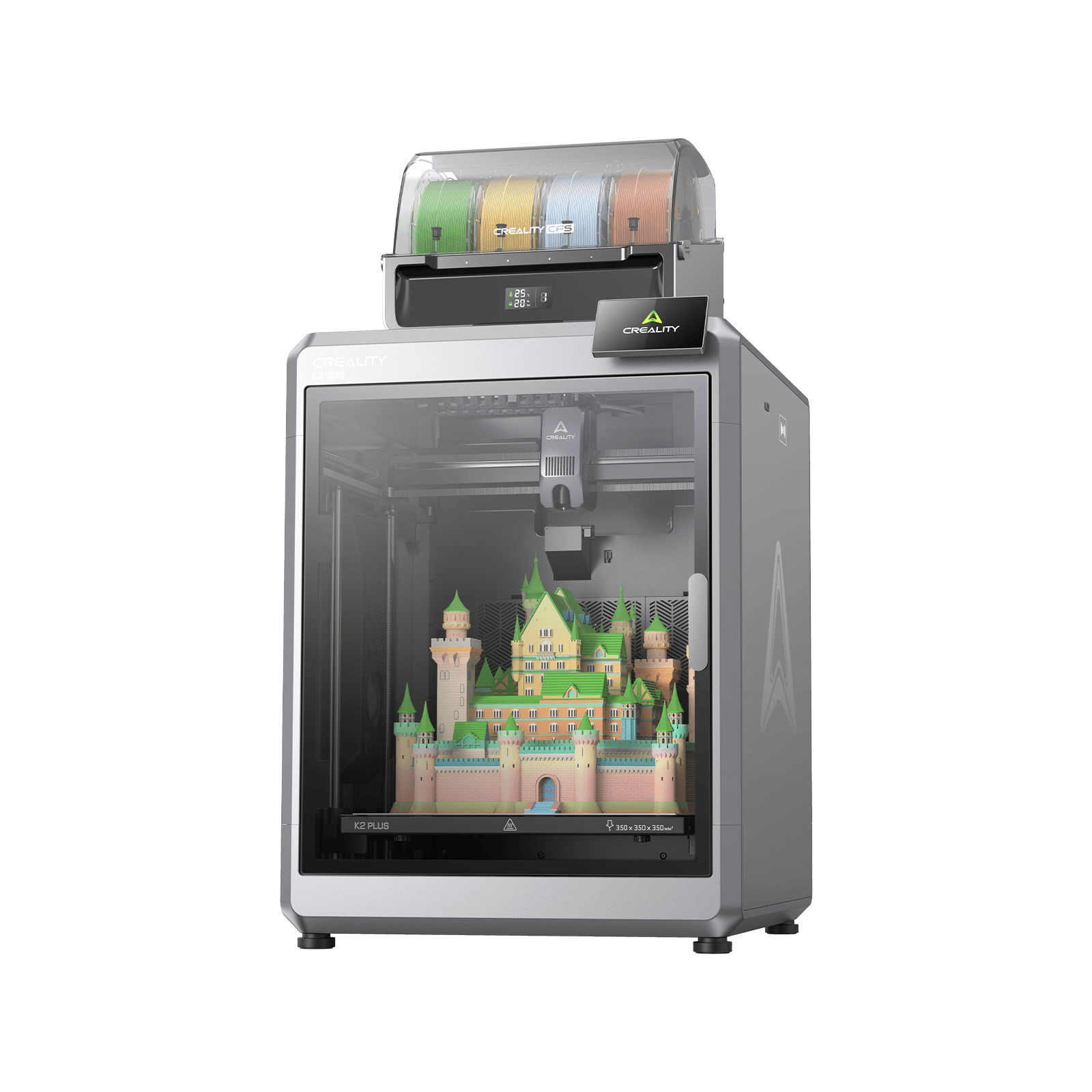
Creality K2 Plus
K2 Plus (base printer, without the CFS; not the K2, K2 Pro, K2 SE or K2 Plus Combo)
The 350 mm plate and the 350 °C nozzle are the whole argument. If you need either, nothing else here substitutes — and if you need neither, you are paying for headroom you will not reach.
- Build volume
- 350 × 350 × 350 mm
- Technology
- FDM
- Max speed
- ≤600 mm/s (≤30,000 mm/s² acceleration)
- Enclosed
- Yes — with active chamber heating to 60 °C
- Multi-colour
- Optional — up to 16 colours with four CFS units; the base machine is single-colour
- Auto levelling
- Yes — full-auto levelling, with a separate calibration AI camera
What we like
- A 350 mm cube of build volume — roughly a third more space than the K2 Pro
- 350 °C nozzle and a 120 °C bed, which is what puts polycarbonate and high-temperature nylons on Creality's list
- 30,000 mm/s² acceleration against 20,000, which governs real print times more than top speed
- Automatic belt tensioning, two auxiliary fans, two air filters and a 1080P chamber camera
What we don’t
- 35 kg and 495 mm wide — a two-person lift onto a bench that has to be solid
- Owners report the 350 mm plate is hard to keep flat when hot, which shows on large flat parts
- In the UK it costs more on its own than the K2 Pro does with a multi-colour unit included
- Twelve-month warranty, with only three months on the extruder kit
Choose the K2 Plus if your parts genuinely exceed the smaller machine's envelope, or if polycarbonate and the high-temperature nylons are on your list rather than your wishlist. When those needs are real the K2 Pro cannot be persuaded into them: its ceiling is its ceiling. The faster acceleration, the second filter and the automatic belt tensioning are real but secondary. Skip it if you are buying the big plate speculatively — capacity you use twice a year is expensive storage.
Creality K2 Pro
K2 Pro (base printer, without the CFS; not the K2, K2 SE, K2 Plus or K2 Pro Combo)
The same enclosure, the same 60 °C heated chamber and the same CoreXY platform, 50 mm smaller on each axis — and in the UK it reaches four-colour printing for less than the K2 Plus costs in one colour.
- Build volume
- 300 × 300 × 300 mm
- Technology
- FDM
- Max speed
- ≤600 mm/s (CoreXY, ≤20,000 mm/s² acceleration)
- Enclosed
- Yes — with active chamber heating to 60 °C
- Multi-colour
- Optional — up to 16 colours with four CFS units; the base machine is single-colour
- Auto levelling
- Yes — smart auto levelling, with a nozzle AI camera for auto flow-rate calibration
What we like
- Identical actively heated chamber to the K2 Plus, at 60 °C
- The Combo lands below the price of a bare K2 Plus in the UK, so colour is not an upgrade you postpone
- Same CoreXY frame and the same 600 mm/s ceiling
- 23.7 kg rather than 35 kg, and TPU95A is on Creality's list for it
What we don’t
- A 300 mm cube — there is no growing into a build volume
- 300 °C nozzle and 110 °C bed, so polycarbonate and the high-temperature nylons are off its list
- Belts are tensioned by hand, and it has one auxiliary fan and one air filter rather than two
- 2.4 GHz Wi-Fi only, and the bare printer showed as pre-order at one UK route
Choose the K2 Pro if your work fits a 300 mm cube, which for most people it does, and especially if you want colour. This is where the UK pricing does the arguing: the Combo lands below a bare K2 Plus, so colour stops being an upgrade you postpone. Skip it if that envelope is already tight — there is no growing into a build volume.
If neither reads like your machine — if the heated chamber is more printer than you need — the best FDM printers roundup covers the alternatives at both ends of this bracket.
These are not a good printer and a compromised one. They are the same platform at two sizes: the enclosure, the heated chamber, the CoreXY frame and the top speed are common to both. What separates them is volume, nozzle temperature and a set of quieter conveniences — and in Britain, a price gap wide enough to buy a multi-colour unit.
That is why the recommendation splits. Size and heat are needs you either have or you do not; when they are real the K2 Plus is the only answer here, and when they are not, paying K2 Plus money for a single-colour machine buys less printer.
- Buy it if
- Your parts exceed a 300 mm cube, or polycarbonate and high-temperature nylons are genuinely on your list — then the K2 Plus, and nothing else here substitutes.
- Skip it if
- Your work fits a 300 mm cube and you want colour — then the K2 Pro Combo, which in the UK costs less than a bare K2 Plus and gives up nothing that matters at that size.
How this article was researched
This comparison is research-based. No first-hand printing, measurement or photography was carried out, and nothing here is a test result.
Specifications were researched from Creality's own K2-series comparison table and K2 Pro support page for the exact variants named — the base K2 Plus and base K2 Pro, not the Combo bundles — and each figure cites its ledger entry. Where Creality's own sources contradict each other and the conflict cannot be settled by variant or region, no figure is given: that is why this page states no whole-machine power draw and works no electricity cost.
Owner-reported patterns were researched from threads in Creality's own community forum and are labelled wherever they appear. No customer review is quoted and no rating reproduced. UK prices and stock were checked at both Creality UK storefronts on 22 September 2026, and are given as bands.
Common questions
- Which is better, Creality K2 Plus or Creality K2 Pro?
- Neither is better outright, and the honest answer depends on two questions. Do your parts exceed a 300 mm cube, and do you need polycarbonate or the high-temperature nylons? If either is a yes, the K2 Plus is the only one of the two that reaches, because its larger plate and hotter nozzle are precisely what it sells. If both are no — which covers most people — the K2 Pro gives you the same enclosure, the same heated chamber and the same CoreXY platform for less money.
- Which has better print quality and reliability?
- On output quality there is little between them for ordinary work: the same platform, the same chamber and the same nozzle camera calibrating flow rate. The K2 Plus lays finer minimum layers and accelerates harder, so it is quicker on detailed prints and marginally better on smooth curved surfaces. Reliability cannot be called honestly from here, because no first-hand testing was done — but the owner reports that cluster for both machines concern the multi-colour feed path rather than either printer, and K2 Plus owners additionally report that a plate that size is hard to keep flat when hot.
- Which offers better value for UK buyers?
- The K2 Pro, and not by a small margin. Checked at both of Creality's UK storefronts, the K2 Pro bundled with its multi-colour unit costs less than the K2 Plus does as a single-colour printer on its own. Most comparisons of these two are written to US or European pricing, where the K2 Pro reads as the budget sacrifice; in Britain it is the machine that reaches four-colour printing at the price the larger one charges for one colour. Value only swings to the K2 Plus if you genuinely need the size or the heat.