Creality Ender-3 V3 SE Review
A UK review of the Creality Ender-3 V3 SE: the 180mm/s typical speed Creality publishes, what it costs to run, and the cheaper rival that outspecs it.
Independent and reader-funded. We earn a commission if you buy through our links, at no extra cost to you. How this works.
The Creality Ender-3 V3 SE is a 220 × 220 × 250 mm open-frame printer on an i3 gantry, the layout where the bed slides back and forth under a fixed-height nozzle. The machine here is the SE specifically — not the Ender-3 V3, V3 KE or V3 Plus, which share the name and almost none of the specification.
What this Creality Ender-3 V3 SE review adds is what the product page has no reason to volunteer. The headline is 250 mm/s; Creality's own manual puts the typical figure at 180, then quotes per-filament speeds lower still. Nothing was printed, handled or measured here. If you have not settled on this machine, the best FDM 3d printer uk guide ranks the wider field.
Which Ender-3 V3 this is, and the Creality Ender-3 V3 SE UK stock position
Settle the name first: Creality has sold four machines called Ender-3 V3 and the badge is all they share. This is the SE, the cheapest and slowest — a nozzle stopping at 260 °C and a bed at 100 °C, where the plain V3 and the KE both reach 300 °C and move at least twice as fast.
Availability is the easy part. On 4 October 2026 the SE was in stock on two UK routes — Creality's own UK store, around the £150 mark with free shipping from a UK warehouse, and an authorised UK retailer at a similar figure. The voltage selector ships set to 230 V for British mains, and Creality still lists the machine as current.
The specification, and what each figure changes
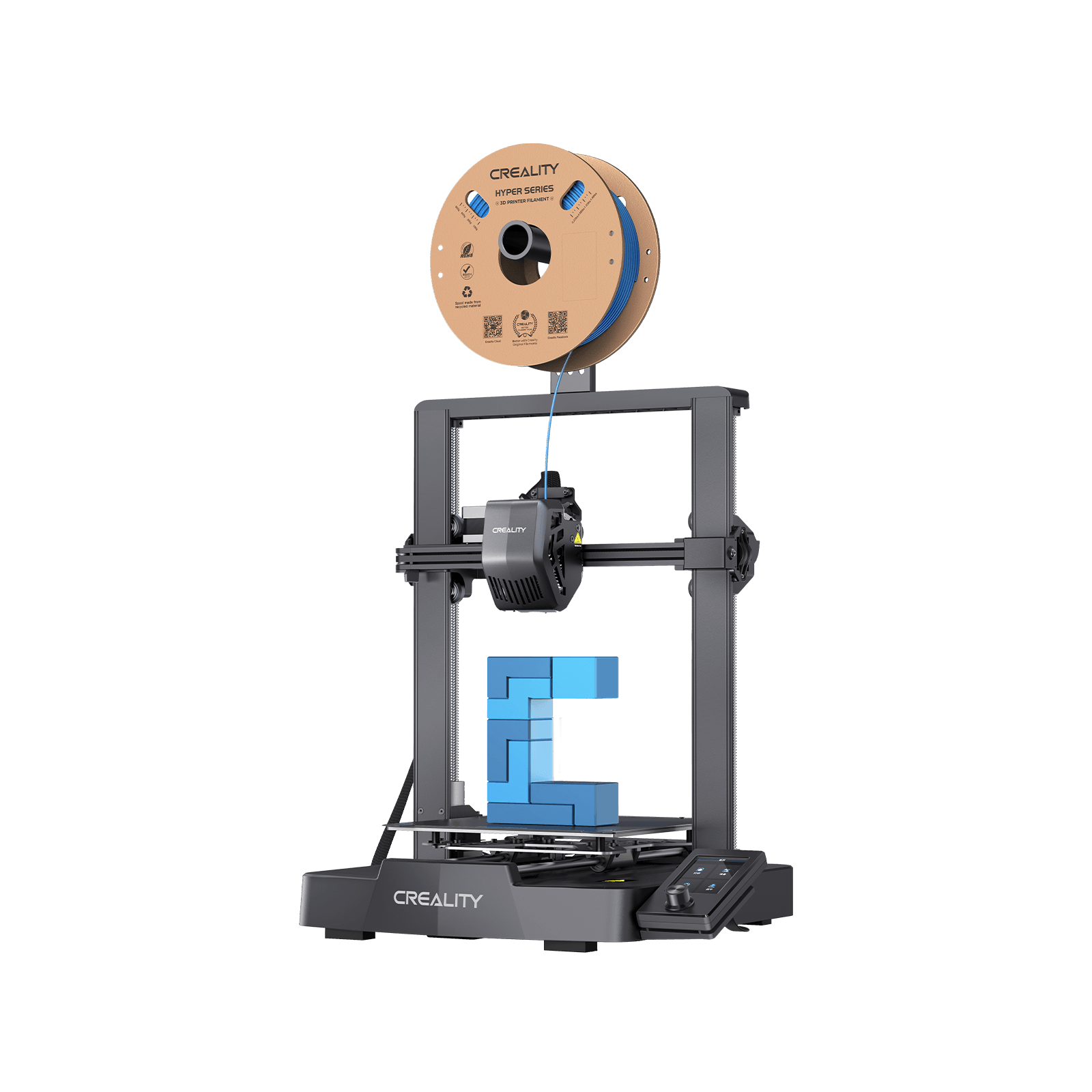
Creality Ender-3 V3 SE
The cheapest route to a good first print. Slower and narrower than its price now demands.
- Build volume
- 220 × 220 × 250 mm
- Technology
- FDM
- Max speed
- 250 mm/s (2,500 mm/s² acceleration)
- Enclosed
- No
- Multi-colour
- No
- Auto levelling
- Yes (CR Touch plus strain-sensor auto Z-offset)
What we like
- CR Touch probing with a strain-sensor Z-offset, so the first-layer apprenticeship older Ender machines demanded is not part of the purchase
- A stated precision of ±0.1 mm — tighter than the dearer Ender-3 V3's ±0.2 mm over 100 mm
- Dual Z lead screws and a pair of 8 mm steel Y-axis shafts, where budget machines usually fit plastic wheels
- A Sprite direct-drive extruder, which makes flexible TPU a realistic option rather than a project
- In stock on two UK routes at around the £150 mark, with spare nozzle kits under £10
What we don’t
- Creality's own manual puts typical speed at 180 mm/s, and recommends only 120 mm/s for PETG and 50 mm/s for TPU
- A brass nozzle and a 260 °C ceiling, so ABS, ASA, nylon and anything carbon-filled are all off the list
- Storage-card transfer only — no Wi-Fi, no LAN, and no printing from another room
- 2,500 mm/s² acceleration, a quarter of the A1 mini's figure and an eighth of the Neptune 4's
- A stated ambient range of 5 °C to 35 °C, which rules out an unheated UK garage in winter
- No acoustic rating published anywhere, so the noise question cannot be answered with a number
Start with the number everything hangs off. Creality advertises 250 mm/s; one line above it in the manual's parameter table sits a typical speed of 180 mm/s — the manufacturer publishing the realistic figure beside the marketing one.
Acceleration explains why: 2,500 mm/s², the honest limit of a frame that flings a 220 mm bed about, where the alternatives below are specified at four and eight times that. It is acceleration, not top speed, that governs a part full of corners.
The extruder earns the price. Creality's Sprite direct-drive unit puts the motor above the nozzle, which is what makes flexible TPU workable this cheaply. Behind it a metal hot end and one 0.4 mm nozzle — brass, soft enough that abrasive filament grinds it open from the inside. Temperature then sets the materials list: 260 °C and 100 °C cover Creality's three filaments and stop short of ABS, ASA, polycarbonate and nylon.
The chassis beats the price: two lead screws on the Z axis and 8 mm steel shafts on the moving axis, not the plastic wheels older Enders needed constant adjustment to keep true. Levelling is hands-off on paper — a CR Touch probe maps the bed, a strain sensor sets the Z-offset — filament loads from the menu, and power-loss recovery survives a cut.
The gaps are the connections. Files arrive on a storage card and nothing else, though firmware comes over the air: it fetches its own software but not your model. Then a 3.2-inch colour screen on a rotary knob, Creality Print or Cura, 350 W and one colour only.
What the Ender-3 V3 SE does well
Three strengths are real, and the headline speed is not among them.
It removes the part that used to put people off. Levelling with a sheet of paper and chasing a first layer for a fortnight was the apprenticeship older Enders demanded, and the reason plenty ended up in cupboards. Here a CR Touch probe and strain-sensor Z-offset do it from a menu, and filament loads itself. First-time owners frequently describe the V3 SE as easy to set up and capable of a good first print without tuning, which is why it is so often suggested as a starter machine.
The mechanical bones beat the price. Lead screws and ground steel are what stop a cheap printer drifting out of square, and exactly where budget machines economise.
It is a cheap mistake to make. This is the price at which a beginner can discover 3D printing is not for them without much regret. Which frames the Creality Ender-3 V3 SE pros and cons neatly: the strengths get a newcomer printing, the weaknesses arrive once they want more.
Where the Ender-3 V3 SE falls short
Four limitations matter, and the first decides the purchase.
The speed headline belongs to one filament. Creality's recommended-parameters table gives 180 to 250 mm/s for PLA, 120 mm/s for PETG and 50 mm/s for flexible TPU. The number on the box is a PLA figure at the top of a PLA range; PETG runs at under half of it, TPU at a fifth.
The nozzle is brass, and that closes doors. A soft tip and a 260 °C ceiling are why the list stops at three filaments. Decorative prints lose nothing; a bracket in a car or a part living outdoors is out, and no upgrade changes the limit.
Files only travel by card. No network of any kind means every job is a walk to the printer: mild irritation occasionally, the thing you resent daily.
It wants a warmer room than many British homes offer. The ambient range is 5 °C to 35 °C, and an unheated garage sits below that for much of a British winter — exactly where first printers get banished. There is no enclosure to help.
A number of owners suggest the V3 SE now makes most sense when discounted, since faster budget machines have narrowed the price gap.What owners consistently report
The basis here is recurring themes researched across Creality's community forum, owner threads and UK consumer review sites, in our own words. A support forum is where people go when something has gone wrong, so read this as the shape of the machine's problems rather than the odds of meeting one.
The most useful pattern contradicts the specification sheet, which says levelling is automatic and the Z-offset sets itself. Several owners describe needing to fine-tune the Z-offset by hand after the automatic routine, although others report the auto-levelling working without adjustment. Both can be true: the probe measures accurately, and the height it settles on is not always the one that gives a clean first layer.
Adhesion follows from it. Owner threads on the Creality community forum repeatedly link adhesion failures on the V3 SE to plate cleanliness and Z-offset rather than the machine, and some owners choose to replace the stock plate with a textured PEI sheet. Creality itself calls the plate a perishable part, so one that has stopped holding prints is behaving as documented rather than failing.
Then the genuine faults. Some owners report early hardware faults on the V3 SE such as power cycling or a dead SD slot, although this is not consistent across the reports seen. The power-cycling one is worth checking before calling support: the machine has a mains voltage selector and the manual warns that getting it wrong can damage the device. It ships set correctly for the UK, but a unit that restarts when the bed draws current is worth a look at that switch.
Setup and the first week with it
Getting it standing up is quick: Creality ships pre-assembled modules and puts reaching a first print at about twenty minutes — honest for the gantry, screen and spool arm, and not a figure that includes learning anything.
Calibration is where twenty minutes stops being the whole story. The routine runs from the menu and the Z-offset is set for you, removing the step that used to defeat beginners — but plan the first evening around the first layer anyway. The fix is a small manual nudge rather than a config file, so it is a job for a beginner, not a barrier to one.
Two things feel dated within a week. The knob, which is perfectly clear and perfectly slow; and the card, since every job means exporting and carrying it over — note the slot beside the screen upgrades the screen's firmware rather than taking models, which go in the slot on the base.
Creality Ender-3 V3 SE print quality and what it will really print
No printing was carried out for this review, so Creality Ender-3 V3 SE print quality is set out as what the machine is specified to do — not as a verdict on parts nobody here has held.
On paper it should be good for the money. A stated ±0.1 mm is the tightest figure in the range, better than the dearer V3's ±0.2 mm over 100 mm. Layers span 0.1 mm to 0.35 mm: the fine end for display pieces, 0.2 mm for almost everything, the coarse end where real time is saved — far more than at the speed slider.
Creality's recommended settings say more than its three-filament list does: PLA at 205 °C with a 60 °C bed, PETG at 230 °C and a 70 °C bed, TPU at 205 °C. Nothing there approaches the 260 °C ceiling, so the nozzle rating is not the constraint — the brass tip is. Creality also marks PETG as needing a dry box while PLA and TPU do not, warning in advance that PETG here is fussy about moisture.
So: good PLA parts at a useful speed, competent PETG at twice the time, TPU slowly but properly. Anything structural or heat-resistant is a different machine.
Noise, space, smell and safety in a UK home
Noise comes with an admission: Creality publishes no acoustic rating on its product page, support page or manual, no independent measurement was found, and the third-party decibel figures circulating are not reproduced here, because a number nobody can trace is worse than none. What can be said is narrow. Several owners describe the fans — the power supply and the hot end rather than the motors — as the loudest thing about the machine during the first few minutes of warm-up, quietening once a print is under way, and a few mention replacing fans sooner than they expected; the number of reports seen is small, so this is worth knowing rather than worth predicting.
Space needs reasoning about rather than looking up, because Creality publishes no external dimensions and the retailer figures disagree. Work from the geometry: the bed is 220 mm deep and it moves, so allow roughly double that depth front to back, plus gantry height and room behind for a spool. A desk is fine; a shelf with something directly behind it is not.
Ventilation is Creality's instruction, not our advice: the manual requires a ventilated, cool, low-dust spot away from flammable materials and an earthed socket. There is no enclosure or filter, so it vents into the room — though the absence of ABS and ASA from the list removes the worst of that. The manual also requires adult supervision for children under ten, which matters on an open frame whose hot nozzle and bed are unguarded. And temperature decides where it can live: the garage is the obvious place for a machine like this, and for much of a British winter the one place Creality's stated 5 °C to 35 °C range rules out.
What a Creality Ender-3 V3 SE costs to run in the UK
Electricity is the small cost. Creality rates the machine at 350 W — what the supply can deliver, not what the printer draws once going — and publishes no typical figure. So, the ceiling rather than an invented average: at the Ofgem price cap of about 26p per kWh, full rated power continuously is roughly 9p an hour, putting thirty hours of printing in a month at under £2.80 of electricity. A worked upper bound, not a measurement — the heaters cycle once up to temperature, so the real figure sits well below it.
Consumables matter more, and one is official: Creality calls the build plate a perishable part to be replaced regularly, so budget for one rather than treating a tired plate as a fault. Spares are cheap in the UK — under £10 for a nozzle kit, up to around the £33 to £40 mark for the ceramic heating-block kit, and a run-out sensor is extra. PETG also wants a dry box, and filament will outspend the electricity many times over.
Against all that, the Creality Ender-3 V3 SE price uk picture stays its strongest argument — around the £150 mark, with running costs low enough to be beside the point.
UK warranty, support and spare parts
The warranty needs care, because Creality states two different things. Its UK store listing advertises cover of up to twenty-four months, while the company's own after-sales policy sets a twelve-month standard term, with consumables covered for less and local rules allowed to override it. "Up to" is a marketing maximum, not a stated term, so twelve months is the number to plan around. Underneath it sit your statutory rights, which in the UK run against the retailer that sold you the machine rather than the manufacturer.
Which makes where you buy it a real decision — and the retailer route puts a UK company with its own returns process between you and the problem. Reviews of Creality on UK consumer sites repeatedly raise slow and unhelpful after-sales support, which is worth weighing against the low purchase price.
Spares are the genuinely good news. The SE shares its extrusion kit, nozzle kits and heating block with the V3 KE, so the fitment is wider than one model and the parts stay stocked in sterling. Add the plate Creality treats as a wear item and this is a machine you can keep running cheaply for years — provided you do the swapping yourself rather than rely on the support queue.
The Creality Ender-3 V3 SE alternatives worth your time
Two machines sit close enough in money to change the decision, and they pull in opposite directions.
| Specification | 1 Creality Ender-3 V3 SE The machine reviewed | 2 ELEGOO Neptune 4 More printer for the money | 3 Bambu Lab A1 mini The easiest life, and the real warranty |
|---|---|---|---|
| Best for | The cheapest competent first printer | Anyone who will still want it in two years | People who want to print, not tinker |
| Typical UK price | Around £150 | Roughly £165 to £215 | Roughly £170 to £270 |
| Build volume | 220 × 220 × 250 mm | 225 × 225 × 265 mm | 180 × 180 × 180 mm |
| Print speed | 250 mm/s maximum, 180 mm/s typical | 30 to 500 mm/s | 500 mm/s toolhead |
| Max acceleration | 2,500 mm/s² | 20,000 mm/s² | 10 m/s² |
| Max nozzle temperature | 260 °C | 300 °C | 300 °C |
| Max bed temperature | 100 °C | 110 °C | 80 °C |
| Materials listed by the maker | PLA, PETG, TPU 95A | PLA, PETG, TPU, ABS, ASA, nylon | PLA, PETG, TPU, PVA ideal; ABS, ASA, PC and composites not recommended |
| Nozzle as supplied | 0.4 mm brass | 0.4 mm, bi-metal throat | 0.4 mm stainless steel, all-metal hot end |
| File transfer | Storage card only | USB drive and LAN | Wi-Fi and micro SD |
| Firmware | Creality's own, no input shaping published | ELEGOO's build of Klipper, with input shaping | Bambu Lab's own, with Bambu Studio |
| Screen | 3.2-inch colour, rotary knob | 4.3-inch capacitive touch, removable | 2.4-inch IPS touch |
| Ambient range stated | 5 °C to 35 °C | 5 °C to 40 °C | Not published |
| Published noise figure | None published | Below 50 dB, the maker's own claim | None published |
| Warranty on the machine | 12 months per policy | 12 months per policy | 2 years |
The Neptune 4 is the one that makes this difficult. From about £15 more than the SE it wins on nearly every line of the table: twice the speed, 300 °C at the nozzle, a 110 °C bed, ASA and nylon on the materials list, Klipper with input shaping and files over the network. Warranty is the same twelve months, and it is in stock in sterling on ELEGOO's own UK store.
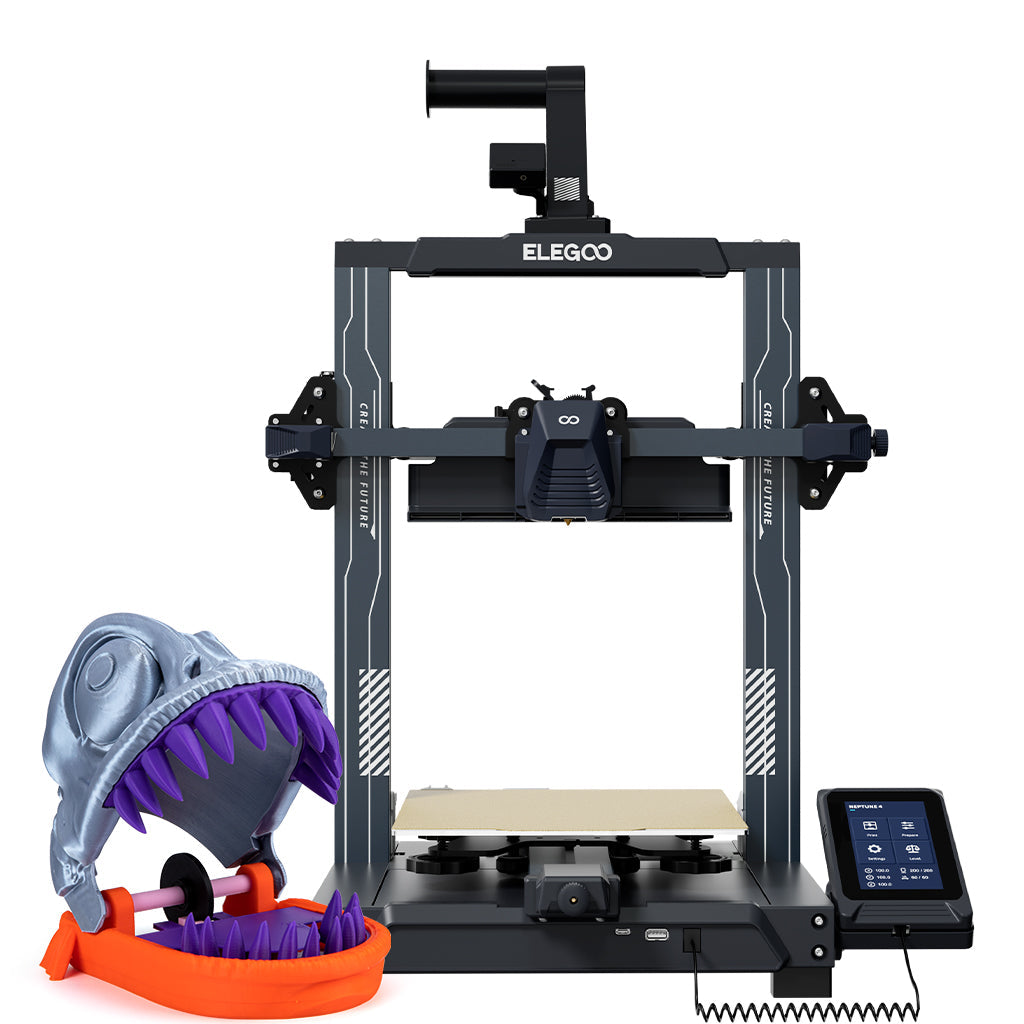
ELEGOO Neptune 4
Neptune 4 (standard 225 × 225 × 265 mm model — not the Neptune 4 Pro, Neptune 4 Plus, Neptune 4 Max, Neptune 3 Pro, or any bundle/pre-owned SKU)
Beats the SE on almost every published figure for a little more money.
- Build volume
- 225 × 225 × 265 mm
- Technology
- FDM, bed-slinger Cartesian, dual-gear direct-drive extruder, single nozzle
- Max speed
- 30–500 mm/s (ELEGOO recommends 250 mm/s); 20,000 mm/s² max tool-head acceleration
- Enclosed
- No — open frame, no enclosure offered
- Multi-colour
- No — single extruder, no multi-material unit offered for this platform
- Auto levelling
- Yes — 121-point (11 × 11) auto bed levelling, toggleable to 36 points, plus auxiliary hand-twist knob levelling under the bed
What we like
- A 30 to 500 mm/s speed range and 20,000 mm/s² acceleration, against 250 mm/s and 2,500 mm/s² on the machine reviewed
- A 300 °C nozzle and a 110 °C bed, both hotter than the SE's
- ASA and nylon on ELEGOO's own filament list, which the SE's three-filament list does not reach
- ELEGOO's build of Klipper with input shaping, plus USB drive and LAN file transfer
- A removable 4.3-inch capacitive touchscreen and 121-point mesh levelling
- The only machine here whose maker publishes a noise claim at all, at below 50 dB
What we don’t
- Twelve months on the machine, with the extruder limited to six and the plate and nozzle excluded altogether
- Klipper and a mesh-levelling menu are more to learn than the SE asks of anyone
- An open frame, so tall ABS and ASA parts will still warp despite the broader materials list
- Bigger on the desk at 475 × 445 × 515 mm, and it needs clearance to move
- Costs more than the SE at every point in its band
Buy it instead if you expect to still be printing in a year. Skip it if you want the simplest machine, or a mesh-levelling menu sounds like homework.
The A1 mini answers a different complaint. It is much the smallest here, a 180 mm cube, with the coolest bed at 80 °C. What that buys is polish and cover: Wi-Fi as standard, a stainless steel nozzle that will not wear as brass does, and two years of UK warranty against twelve. The catch is materials — Bambu Lab does not recommend ABS, ASA, polycarbonate or composites — so the ceiling is no higher than the SE's.
Bambu Lab A1 mini
A1 mini (standard, without AMS lite)
Smaller and no broader on materials, but twice the warranty and genuinely plug-and-play.
- Build volume
- 180 × 180 × 180 mm
- Technology
- FDM
- Max speed
- 500 mm/s toolhead (10 m/s² acceleration)
- Enclosed
- No
- Multi-colour
- Optional (AMS lite sold separately; up to 4 spools)
- Auto levelling
- Yes (fully automatic)
What we like
- Two years of UK warranty, against the twelve months Creality's own policy sets
- Wi-Fi as standard, so jobs travel over the network instead of on a card in your hand
- A stainless steel nozzle on an all-metal hot end, which will not wear open the way brass does
- A published hot-end flow figure of 28 mm³/s, measured on Bambu Lab's own test
- Wi-Fi and automatic levelling together, which is what the SE's recurring Z-offset complaint points at
What we don’t
- A 180 × 180 × 180 mm plate, well short of the SE's 220 × 220 × 250 mm
- An 80 °C bed, cooler than the SE's 100 °C
- Bambu Lab does not recommend ABS, ASA, polycarbonate or composites, so materials are no broader than the SE's
- A 2.4-inch screen, the smallest of the three
- No acoustic rating published in its specification sheet either
Buy it instead if a small plate is enough and two years of cover beat build volume. Skip it if you need the full 250 mm of height, or the lowest price.
One more without a card: Creality's own Ender-3 V3 KE, around the £220 mark, fixes most of the same complaints in the family — 500 mm/s, 300 °C, ASA, Wi-Fi and LAN, Klipper firmware. Its nozzle is brass too, and it leaves Creality's after-sales record where it was.
Who should buy it, who should not, and the verdict
So is the Creality Ender-3 V3 SE worth it? It comes down to one question: is the lowest price the point, or merely convenient?
If it is the point, this is still the machine — around the £150 mark, in stock, the first-layer hurdle taken care of and spares cheap enough to keep it going for years. For a curious beginner, a school on a tight budget, or anyone finding out whether 3D printing sticks before spending properly, it does the job.
If it is merely convenient, look up: around £15 to £65 more buys a machine that is faster, hotter, better connected and broader on materials, and the case for it is built from the SE's own documentation rather than anyone's opinion.
It suits nobody needing ABS, ASA, nylon or carbon-filled filament, nobody printing from another room, and nobody putting a printer in an unheated garage. Each has somewhere to go: the Neptune 4 for materials, the A1 mini for a quiet life, and failing both, the best budget 3D printers UK guide covers the band underneath £300.
Still the cheapest route to a good first print, which is a real achievement. No longer the best thing you can buy for the money, because Creality's rivals have moved and the SE has not.
- Buy it if
- The lowest sensible price is the whole point, you print PLA and the odd bit of PETG, and you would rather spend the difference on filament than on specification you may never use.
- Skip it if
- You want ABS, ASA or carbon-filled filament, you expect to print from another room, the machine must live somewhere cold, or you can find £15 to £65 more.
How this article was researched
No printing, handling, measurement or photography was carried out for this review. Specifications come from Creality's own product page, support parameter page and user manual, recorded claim by claim with a source URL and an access date; comparison figures come from ELEGOO's and Bambu Lab's own parameter pages and warranty policies. UK price, stock and warranty were checked on 4 October 2026.
The basis for the ownership patterns is recurring themes researched across Creality's community forum, owner threads and UK consumer review sites, written in our own words: no customer review is quoted and no rating reproduced.
Several things were left out rather than estimated: the machine's weight and external dimensions, because the published figures disagree or do not exist; any noise rating, because none exists; the twenty-four-month warranty figure as a term, because Creality's own policy does not support it; and a typical power draw, which is why the running cost above is a labelled upper bound. Our approach is set out in the review methodology.
Common questions
- Is the Creality Ender-3 V3 SE worth buying?
- Yes, if the lowest sensible price is genuinely the point. Around the £150 mark buys a machine that levels itself, loads its own filament and will produce a usable PLA print on the first evening, and spare nozzle kits sit under £10 so it stays cheap to keep. The case weakens as soon as money stops being the deciding factor. ELEGOO's Neptune 4 starts about £15 above the SE and is faster, hotter, broader on materials and networked; Creality's own Ender-3 V3 KE fixes most of the same complaints around the £220 mark. The SE has not got worse — the machines beside it have got better, and at this price that is now the whole question.
- Who is the Creality Ender-3 V3 SE best for?
- Someone finding out whether 3D printing suits them. It is the right machine for a curious beginner, a school or club watching every pound, or anyone who wants PLA models and the occasional PETG part without learning a firmware ecosystem first. It also suits an owner of an older Ender replacing it in the same desk space who wants automatic levelling without changing anything else. It suits nobody who already knows they want engineering plastics, nobody who wants to send jobs from another room, and nobody who needs the printer to live somewhere cold.
- What are the main alternatives to the Creality Ender-3 V3 SE?
- Three, and two of them are better machines. The ELEGOO Neptune 4 is the serious one: from roughly £165 it brings a 300 °C nozzle, a 110 °C bed, ASA and nylon on the materials list, Klipper firmware with input shaping and network file transfer. The Bambu Lab A1 mini trades size for ease — a 180 mm cube and an 80 °C bed, but Wi-Fi, a steel nozzle and two years of UK warranty against Creality's twelve months. Creality's own Ender-3 V3 KE, around the £220 mark, doubles the speed and adds ASA and Wi-Fi while keeping you in the same family and the same support queue.
- How fast is the Ender-3 V3 SE really?
- Slower than the box says, and Creality has documented that itself. The parameter table in its user manual lists a typical printing speed of 180 mm/s directly above the 250 mm/s maximum, so the headline is a ceiling rather than a working figure. Speed also depends on the filament more than most reviews mention: Creality's own recommended-parameters table gives 180 to 250 mm/s for PLA, 120 mm/s for PETG and 50 mm/s for flexible TPU. The deeper limit is acceleration, capped at 2,500 mm/s² — a quarter of the Bambu Lab A1 mini's figure and an eighth of the ELEGOO Neptune 4's — and on a part full of corners acceleration governs the clock far more than top speed does.
- Can you put an Ender-3 V3 SE in a garage or shed?
- Not in a British winter, if you want to stay inside Creality's specification. The manual states an ambient operating range of 5 °C to 35 °C, and an unheated garage, shed or conservatory spends much of the colder half of the year below that. Cold also works against the printing itself: PLA and PETG shrink as they cool, and a cold draught across an open-frame machine with no enclosure is what lifts corners off the plate. The manual does ask for a ventilated, cool, low-dust spot away from flammable materials and an earthed socket, so a garage suits it in every respect except temperature — which makes an insulated room, or a heated one, the better answer.