Bambu Lab A1 vs Bambu Lab P1S
Same build volume, same 500mm/s headline. The enclosure, the screen and the colour ceiling decide it - plus UK prices, warranty and what each costs to run.
Independent and reader-funded. We earn a commission if you buy through our links, at no extra cost to you. How this works.
Put the two specification sheets side by side and the Bambu Lab A1 vs Bambu Lab P1S question looks like it should answer itself. It does not. Both build to 256 × 256 × 256 mm, both quote a 500 mm/s toolhead, and they share a nozzle ceiling, a bed ceiling and a slicer. The machines are genuinely different — but almost none of that difference shows up where buyers look for it.
Variants first: this page compares the standard A1, without the AMS lite, against the standard P1S, without an AMS. Not the A1 mini, not the open-frame P1P, not the P2S. Nothing here was printed in-house.
| Specification | 1 Bambu Lab A1 Best for most UK buyers | 2 Bambu Lab P1S Best for ABS, ASA and multi-colour beyond four |
|---|---|---|
| Best for | PLA, PETG and TPU work, on a desk you sit at | Engineering plastics, and colour work that will grow |
| Enclosure | Open frame | Enclosed — plastic and glass, with an activated carbon filter |
| Build volume | 256 × 256 × 256 mm | 256 × 256 × 256 mm |
| Max speed / acceleration | 500 mm/s, 10,000 mm/s² | 500 mm/s, 20 m/s² |
| Max hot end flow | 28 mm³/s | 32 mm³/s |
| Ideal filaments | PLA, PETG, TPU, PVA | PLA, PETG, TPU, PVA, PET, ABS, ASA |
| Carbon or glass fibre | Not recommended | Not recommended without an extruder and hotend upgrade |
| Screen and control | 3.5-inch 320 × 240 IPS touchscreen | 2.7-inch 192 × 64 screen, button control |
| Filament odometry | Built in | Optional, with an AMS |
| Multi-colour ceiling | Four colours — one AMS lite | Sixteen colours — four chained AMS units |
| Net weight | 8.3 kg | 12.95 kg |
| Dimensions | 385 × 410 × 430 mm | 389 × 389 × 458 mm |
| Max power | 1300 W at 220 V | 1000 W at 220 V |
| UK warranty | 2 years | 2 years |
| UK price band | Around £240–£320 | Around £330–£400 |
| UK availability | Bambu Lab UK store and 3DJake UK | Bambu Lab UK store and 3DJake UK |
How these two were compared
No printing was carried out for this page. Every specification comes from Bambu Lab's own technical specification sheet for the exact variant named — one document per machine, rather than figures assembled from retailer listings.
Owner experience is separate evidence, marked wherever it appears. Prices are bands, checked in September 2026.
What is actually different, and what only looks different
Start with the numbers that do not separate these machines.
The build envelope is identical, 256 × 256 × 256 mm on both, and so is the headline speed of 500 mm/s. Choosing the Bambu Lab A1 compared with the Bambu Lab P1S on build size or top speed means comparing two identical figures.
Acceleration and flow are where the speed difference lives. The A1 accelerates to 10,000 mm/s², the P1S to 20 m/s². More useful is maximum hot end flow, because on any part with real volume the melt rate caps throughput, not how fast the head can move. Bambu Lab measures both the same way — a 150 × 150 mm single-wall model in ABS at 280 °C — and gets 28 mm³/s from the A1 against 32 mm³/s from the P1S. About an eighth more, not a different class of machine.
Owners put the P1S at roughly a fifth quicker than the A1 on single-colour prints, and several add that the gap closes on multi-colour work because the A1 gets through a filament change faster, although reports vary with the model being printed.The frames differ too: the P1S drops its plate only downwards, the A1 shuttles it beneath the head. Owner opinion on the A1 moving bed is divided: several point to tall, narrow models as the case where it shows, while others report tall prints completing without trouble and put failures down to bed adhesion instead.
On whether the dearer machine prints better: owners who have used both families repeatedly describe the print quality as hard to tell apart on ordinary filament, with the differences they do notice usually traced to calibration or settings, although this is not consistent across all reports.
The enclosure, and the one thing it actually buys
This should decide the purchase, because the enclosure is the only difference here that buys a capability rather than a convenience.
An enclosure holds warm air around the print, and some plastics need that. ABS and ASA shrink as they cool; in a draught they shrink unevenly, so layers split partway up a wall and corners curl off the plate. The P1S names PLA, PETG, TPU, PVA, PET, ABS and ASA as ideal, behind an enclosed shell in plastic and glass with a chamber temperature regulator fan and an activated carbon filter. The A1 names PLA, PETG, TPU and PVA as ideal and puts ABS, ASA, PC, PA and PET on a not-recommended list, having nothing to hold heat in.
So if your work involves functional parts in ABS or ASA, the P1S is not the better buy — it is the only buy.
One belief needs correcting first. Buyers regularly expect an enclosed machine to take carbon fibre, which is where the P1S trips people up. Bambu Lab does not recommend fibre-reinforced filament on it before an extruder and hotend upgrade. The filter deserves the same honesty. A recurring theme among owners printing ABS and ASA indoors is that the built-in carbon filter is treated as a partial measure rather than a complete one, with several describing ducting the exhaust outside or adding filtration, although this is not consistent across all reports.
Bambu Lab A1: who it suits
The machine to buy if your filament shelf is PLA, PETG and TPU, and always will be.
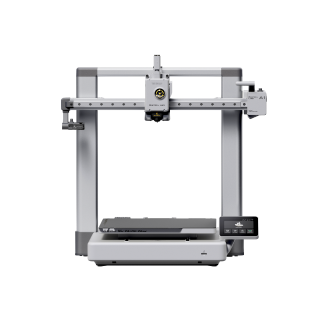
Bambu Lab A1
A1 (standard, without AMS lite)
Matches the P1S on build volume and headline speed, beats it on the screen, the odometry and the weight, and costs less. Gives up engineering plastics and stops at four colours.
- Build volume
- 256 × 256 × 256 mm
- Technology
- FDM
- Max speed
- 500 mm/s toolhead (10,000 mm/s² acceleration)
- Enclosed
- No
- Multi-colour
- Optional (AMS lite sold separately; up to 4 spools)
- Auto levelling
- Yes (fully automatic)
What we like
- A 3.5-inch 320 × 240 IPS touchscreen, where the dearer machine has a button
- Filament odometry built in, so it knows what is left on the spool
- The same 256 mm cube as the P1S, in the lower UK price band
- 8.3 kg, so one person can move it without planning the move
What we don’t
- Open frame — ABS, ASA, PC, PA and PET are all not recommended
- Stops at four colours, and the AMS lite fits no other Bambu machine
- Roughly an eighth less hot end flow than the P1S
- The moving bed is what tall, narrow models can object to
The case is easier to make than the price gap suggests. You get the same 256 mm cube, the same 500 mm/s toolhead and fully automatic bed levelling. Then the A1 wins the parts you actually touch: a 3.5-inch 320 × 240 IPS touchscreen, and filament odometry built in rather than bundled with an accessory, which tells you whether a spool will see the job out. At 385 × 410 × 430 mm and 8.3 kg it moves easily. The limits are all in one place: PLA, PETG, TPU and PVA are the ideal list, and the not-recommended list is where the P1S earns its money.
Long-term owner reports on the Bambu Lab forum repeatedly describe the A1 as reliable and low-maintenance, particularly compared with older budget printers they have moved from. Several A1 owners describe an X-axis belt tension warning appearing after a period of use, which is often cleared by re-tensioning the belt, although for some it recurs.For how it places against the wider field, see the best FDM printers guide.
Buy this if your work is PLA, PETG and TPU, or the lower price band is what makes the purchase happen.
Skip this if you need ABS or ASA, you expect more than four colours, or your models are consistently tall and narrow.
Bambu Lab P1S: who it suits
The machine to buy if the materials list is the point — and the one to skip if it is not.
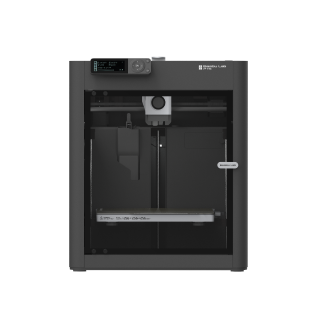
Bambu Lab P1S
P1S (standard, without AMS - not the P1P, P1S Combo or P2S)
Adds ABS and ASA to the ideal-materials list and chains four AMS units to sixteen colours. Pays for it with a button-driven screen, four and a half more kilograms and the higher price band.
- Build volume
- 256 × 256 × 256 mm (Bambu Studio defaults to 250 mm height)
- Technology
- FDM
- Max speed
- 500 mm/s toolhead (20 m/s² acceleration)
- Enclosed
- Yes (plastic and glass; chamber temperature regulator fan and activated-carbon filter)
- Multi-colour
- Optional (AMS or AMS 2 Pro sold separately or as a Combo)
- Auto levelling
- Yes (automatic bed levelling sensor)
What we like
- ABS, ASA and PET join PLA, PETG and TPU on the ideal-materials list
- Enclosed in plastic and glass with an activated carbon filter
- Sixteen colours available by chaining four AMS units
- 32 mm³/s hot end flow against the A1's 28, on the same test
What we don’t
- A 2.7-inch 192 × 64 screen with button control, not a touchscreen
- 12.95 kg and 458 mm tall — a two-hands machine that needs headroom
- Filament odometry only arrives if you also buy an AMS
- The higher UK price band, plus an oversize delivery surcharge
What the extra money buys sits on two lines. ABS, ASA and PET join the ideal list, held there by the enclosure, and this is the only one of the two that chains AMS units past four colours, to sixteen. The rest is quietly good: an all-metal hotend with a 0.4 mm stainless nozzle, 300 °C at the nozzle and 100 °C at the plate, automatic bed levelling and 32 mm³/s of flow.
Then the things nobody mentions. The screen is a 2.7-inch 192 × 64 panel driven by a button, with no touch control. Filament odometry is optional, arriving with an AMS, so a P1S bought alone cannot tell you how much filament is left. At 12.95 kg and 458 mm tall it wants a permanent home with clearance above it.
A recurring theme among buyers is that the machine goes from box to a successful first print inside an hour without changing slicer settings, with the automatic calibration routine taking up most of that time. And it is not about to be discontinued: Bambu Lab stated in February 2026 that the P1S continues in production, and that it was the open-frame P1P that reached end of life.
Buy this if you print ABS or ASA, or you want room to grow past four colours.
Skip this if your work is PLA and PETG, or carbon fibre was the attraction — that needs an upgrade here too.
Noise, desk space and where each one can live
Neither manufacturer publishes a noise rating, so this page gives no decibel figure. What exists is owner reporting, consistent about the cause.
Owners repeatedly trace the noise to the fans rather than the motion system, and a recurring theme is that the chamber fan is the loudest part of the machine when it is running PLA; several describe swapping the fans for quieter ones, and some say the machine is fine at reduced speeds. That points the wrong way for the dearer machine: the fans an enclosure needs are the fans you hear, and the A1 has no enclosure to regulate.
Where either can live follows from weight and height. The A1 is 385 × 410 × 430 mm and 8.3 kg; the P1S is 389 × 389 × 458 mm and 12.95 kg. Nearly the same footprint, but the P1S is 28 mm taller and half again the weight — sited once, not shuffled around. If the printer has to share a room you work or sleep in, the open-frame machine is the safer bet.
Multi-colour: the ceiling you pick at the till
Both machines print in multiple colours, and this is the one difference you cannot undo later.
The A1 takes exactly one AMS lite, which holds four spools and caps the machine at four colours. The P1S takes the original AMS, and up to four of those connect in parallel through a hub for sixteen.
What catches people is that the systems are not interchangeable. AMS lite is built for the A1 and A1 mini and does not fit a P1 series machine; the P1S takes the original AMS and not the lite. The multi-colour decision is therefore made on the day you choose the printer, not on the day four colours stops being enough.
For most people four is plenty. If you already know you want gradients or several support types, that ceiling is the strongest argument for the P1S here — and it has nothing to do with the enclosure.
What each costs to run in the UK
Anyone weighing Bambu Lab A1 versus Bambu Lab P1S UK running costs expects the bigger enclosed machine to be the thirstier one. The published figures say the opposite.
Bambu Lab rates the A1 at a maximum 1300 W at 220 V and the P1S at 1000 W at 220 V. The A1's heated bed is exposed to the room and has to fight it; the P1S keeps its heat in a box.
Treat both as ceilings, not draws — a maximum rating is what a machine pulls with the bed heating from cold, and neither publishes a steady-state figure. Taking the ceilings as an upper bound and a unit rate around 25p per kWh, an hour costs at most about 33p on the A1 and about 25p on the P1S, and real jobs sit well under that. A labelled estimate from rating plates, not a measurement.
Either way, electricity is the small number. Ordinary PLA runs between £14 and £18 a kilogram in the UK, so a 50 g model costs roughly 70p to 90p in plastic against a few pence in power.
UK price, availability, warranty and support
Put as Bambu Lab P1S vs Bambu Lab A1, the UK picture is a price gap of roughly a third, identical warranty cover, and one delivery charge that catches people out.
The A1 sits around the £240–£320 mark and the P1S around the £330–£400 mark. Both sell through Bambu Lab's own UK store and through 3DJake UK, in pounds, shipped domestically — no import duty and UK spare-parts listings for both. The P1S was in stock for UK delivery when checked in September 2026, and the retailer adds an oversize surcharge of around £45 per item because of its size and weight — real money on top of an already higher band.
Warranty is the same on both: two years for consumers in the covered regions, with some components carrying a limited three-month term. Not a tiebreaker.
Support is where the brand is weakest, equally on both machines. A recurring theme among buyers is slow warranty support, with owners describing tickets that sit open for weeks, although this is not consistent across all reports. No independent failure-rate data exists for either machine, so no reliability ranking is offered here.
Two ways buyers get this choice wrong
Paying for an enclosure you will never use. The P1S costs more, weighs more and has the worse screen, and all of that is the price of printing ABS and ASA. If your last year of printing was PLA and PETG and your next looks the same, it is a cost with no return. See the best 3D printers guide for the wider field.
Assuming you can add colours later. You can add an AMS lite to an A1, but only one, and four colours is the end of the road. Decide now, because this is the one choice here that cannot be revisited.
The verdict
Whether it should be the A1 or P1S comes down to one question: what will you print?
If the answer is PLA, PETG and TPU — which for most home printing it is — the A1 is the better machine and the cheaper one at once. It gives up only the materials you were not going to use. If the answer includes ABS or ASA, the comparison ends there: Bambu Lab lists those as ideal on the P1S and not recommended on the A1, and no saving makes an open frame hold heat. The same applies past four colours.
Two machines with the same build volume, the same headline speed and the same warranty. The enclosure is the only thing the price gap genuinely buys — so the question is not which is better, but whether you need the materials it unlocks.
- Buy it if
- Your printing is PLA, PETG and TPU, and you would rather have the touchscreen, the lighter machine and the lower price band than an enclosure you will not use. Take the Bambu Lab A1 — the better machine for most buyers as well as the cheaper one.
- Skip it if
- You print ABS or ASA, or you already know four colours will not be enough. Those are capabilities, not preferences, and only the Bambu Lab P1S has them. Budget for the oversize delivery surcharge and a permanent spot with headroom.
How this article was researched
This comparison is research-based. No first-hand printing, measurement or photography was carried out, and nothing here should be read as a test result.
Every specification was researched from Bambu Lab's own specification sheet for the exact variant named — the standard A1 without AMS lite, the standard P1S without AMS — and each figure carries a citation to its ledger entry. Where a manufacturer publishes no figure, none is given: neither sheet states a noise level, so this page makes no noise claim.
Owner-reported patterns were researched from manufacturer-forum threads and are marked wherever they appear. No customer review is quoted and no rating reproduced.
Common questions
- Which is better, Bambu Lab A1 or Bambu Lab P1S?
- Neither is better in the abstract, because they are not really competing on quality — they are competing on what you are allowed to put in them. For PLA, PETG and TPU work the A1 wins on every axis that is not the enclosure: a proper touchscreen instead of a button, filament odometry as standard, four and a half fewer kilograms, and a lower price band for the same 256 mm cube. The P1S wins outright, and without argument, in two situations: you print ABS or ASA, which an open-frame machine cannot hold heat for, or you want more than four colours. Work out which of those two describes you. If neither does, you are looking at paying roughly a third more for a worse machine to operate.
- Which has better print quality and reliability?
- On quality the honest answer is that this is not the axis to choose on. Owners who have used both families repeatedly describe the output as hard to tell apart on ordinary filament, and where they do see a gap they tend to trace it to calibration, belt tension or slicer settings rather than the frame. The P1S does hold an edge in throughput — 32 mm³/s of hot end flow against 28, and twice the acceleration — which owners put at roughly a fifth on single-colour prints, though that closes on multi-colour work because the A1 changes filament faster. On reliability, no independent failure-rate data exists for either machine, so no ranking is offered here. Long-term owner reports are mixed for both, and slow warranty support is a recurring theme across the brand rather than a mark against one model.
- Which offers better value for UK buyers?
- The A1, for most people, and the gap is wider than the price tags suggest. It sits around the £240–£320 mark against roughly £330–£400 for the P1S, and the P1S also attracts an oversize delivery surcharge at the UK retailer because of its size and weight — a cost almost no comparison mentions. Warranty is two years on both, so it is not a tiebreaker, and both sell in pounds through Bambu Lab's UK store and 3DJake UK with domestic shipping, so neither involves import costs. Running costs barely separate them either, and not in the direction people expect: the A1 carries the higher maximum power rating of the two, because its heated bed is exposed to the room. The P1S is good value only if you actually need the materials or the colour headroom.