Bambu Lab P1S Review
A UK review of the Bambu Lab P1S: whether it has been replaced, what it will and will not print, what it costs to run here, and how it compares to the P2S.
Independent and reader-funded. We earn a commission if you buy through our links, at no extra cost to you. How this works.
The Bambu Lab P1S remains the sensible enclosed printer for most UK buyers, and the machine assessed here is the standard P1S: the single-nozzle unit bought on its own, without an AMS. That matters: it is a different purchase from the P1S Combo, the open-frame P1P and the newer P2S, though all four get written about as one machine. It is a fully enclosed CoreXY printer that calibrates itself, and Bambu Lab lists ABS and ASA alongside PLA and PETG on its ideal-materials list — the capability the enclosure exists to buy. It sits around the £330 to £400 mark in the UK.
What this Bambu Lab P1S review adds is what a product page will not tell you: whether you are buying a model on its way out, what it costs to run on a British tariff, what it refuses to print, and where you stand when it breaks. Still choosing between filament machines in general? The best FDM 3D printer UK guide ranks it against six rivals.
Is the P1S still the machine Bambu Lab is selling?
Yes, and it is worth settling first. In February 2026 Bambu Lab retired a P1-series machine, and much of the coverage since has implied the P1S was the casualty. It was not. The machine that reached end of life is the P1P, the open-frame sibling, and Bambu Lab committed to spare parts and service for it until 2031. In the same announcement the company said the P1S will continue to be manufactured and sold, with no plans to phase it out.
The P2S muddied this further. It arrived as a companion model rather than a replacement, and the P1S stayed on sale beside it. The two are separated by roughly £120 at UK prices — the P2S sits around the £450 to £550 mark against £330 to £400 for the P1S — and by a list of refinements rather than a change of category.
So the question is not whether the P1S is obsolete, but whether the extra money buys something you will use.
The specification, and what each figure actually changes
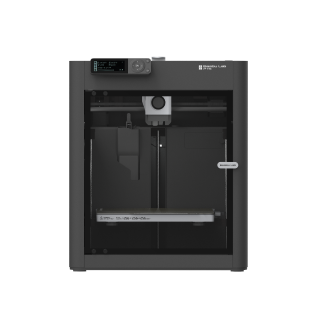
Bambu Lab P1S
P1S (standard, without AMS - not the P1P, P1S Combo or P2S)
An enclosed CoreXY printer that calibrates itself and opens up ABS and ASA, at the price open-frame machines used to cost. Loud, and not a composites machine without an upgrade.
- Build volume
- 256 × 256 × 256 mm (Bambu Studio defaults to 250 mm height)
- Technology
- FDM
- Max speed
- 500 mm/s toolhead (20 m/s² acceleration)
- Enclosed
- Yes (plastic and glass; chamber temperature regulator fan and activated-carbon filter)
- Multi-colour
- Optional (AMS or AMS 2 Pro sold separately or as a Combo)
- Auto levelling
- Yes (automatic bed levelling sensor)
What we like
- An enclosed CoreXY machine at the price open-frame printers used to cost
- ABS and ASA sit on Bambu Lab's ideal-materials list, which is what the shell buys you
- Calibrates itself, and owners consistently get a good first print the same evening
- Activated-carbon filter fitted as standard, and two years of UK warranty cover
- Still in production — Bambu Lab confirmed in February 2026 it is not being retired
What we don’t
- Loud, and it is the fans rather than the frame; no acoustic rating is published
- Fibre-reinforced filament is not recommended without an extruder and hotend upgrade
- The chamber is regulated, not heated, so nylon and polycarbonate remain a fight
- Proprietary parts and a single support channel, which owners criticise most often
- 389 mm deep and 12.95 kg, plus an oversize delivery charge in the region of £45
Start with the frame. The P1S is a CoreXY machine: the head moves in two axes while the plate only travels down, which is why it can be driven hard without the whole bed shaking. Bambu Lab quotes a maximum toolhead speed of 500 mm/s — a ceiling figure rather than what a detailed model will see, but the frame is what makes such a number mean anything.
The build volume is 256 × 256 × 256 mm, a cube rather than the tall, narrow shape budget machines tend to give you. It covers the overwhelming majority of what a home owner prints, and the limit you meet first is width, not height.
The hotend is all-metal, with a 0.4 mm stainless steel nozzle in the box and 0.2, 0.6 and 0.8 mm optional. All-metal is what allows a higher running temperature: the P1S tops out at 300 °C at the nozzle and 100 °C at the plate. The first decides which polymers flow properly; the second decides which stay stuck down long enough to finish.
Then the enclosure, the P1S's reason for existing. The shell is plastic and glass with a chamber temperature regulator fan and an auxiliary part cooling fan, plus an activated-carbon filter. Read that carefully: a regulator fan manages chamber air, it does not heat it. There is no active chamber heater, which is why nylon and polycarbonate sit on the capable list rather than the ideal one.
Levelling is automatic, handled by a sensor rather than by you and a sheet of paper. The machine is 12.95 kg and 389 × 389 × 458 mm — furniture, not something you shuffle aside.
Setup, and what the first week is like
This is what the P1S is genuinely good at, and it is the most consistent positive pattern in the sources reached. A recurring theme among buyers is that the machine goes from box to a successful first print inside an hour without changing slicer settings, with the automatic calibration routine taking up most of that time. It arrives largely built; what is left is removing transit packing, connecting the screen, binding it to the app and letting it calibrate itself.
On a machine without automatic levelling, the first week goes on learning to read a first layer, adjusting a nozzle gap by feel and reprinting the same test square. The P1S removes that apprenticeship, which is why it suits people who want objects rather than a hobby in calibration. What it does not remove is the curve above that — orientation, supports, which material suits which part. Those are printing skills, and no printer hands them to you.
Print quality, and what it will and will not print
Bambu Lab P1S print quality is not really in dispute, and the reason matters: the machine ships with profiles tuned for its own hardware in Bambu Studio, so the usual gap between a printer's potential and a new owner's results mostly closes on day one. Automatic levelling keeps the first layer consistent across the plate rather than good in the middle and poor at the edges. No first-hand printing was carried out for this article, so treat that as a description of the design, not a measurement.
The materials list is where the decision sits. Bambu Lab puts PLA, PETG, TPU, PVA, PET, ABS and ASA on the ideal list, with PA and PC listed as capable. ABS and ASA justify the price: both shrink as they cool and will warp or split on an open-frame printer, and a closed chamber of still, warm air is the fix. ASA also holds up outdoors, which suits garden fittings and bike parts.
Nylon and polycarbonate being merely capable is the honest limit. Both want an actively heated chamber, and the P1S regulates chamber air rather than heating it. You can print them; you will fight warping on anything large.
Now the trap. An enclosed CoreXY machine is widely assumed to mean carbon fibre is on the menu, and for the P1S that is wrong. Bambu Lab states that printing fibre-reinforced filaments such as glass fibre or carbon fibre is not recommended before an extruder and hotend upgrade has been done. The reason is abrasion: chopped fibre wears a standard nozzle and drive gears quickly. If composites are why you want an enclosed machine, the Creality K1C is built around them.
What owners consistently report
No specifications here. The basis is patterns repeating across manufacturer forum threads and long-term written accounts, researched rather than experienced first hand.
Noise is the dominant theme, and the useful detail is where it comes from. Owners repeatedly trace the noise to the fans rather than the motion system, and a recurring theme is that the chamber fan is the loudest part of the machine when it is running PLA; several describe swapping the fans for quieter ones, and some say they would not run it overnight in a room next to a bedroom. This is the clearest case on the page of manufacturer and owners not meeting: Bambu Lab publishes no noise rating for the P1S, so there is no figure to check the complaint against.
Support is the second theme, and it is brand-level rather than a P1S fault alone. A recurring theme among buyers is slow warranty support, with owners describing tickets that sit open for weeks, although this is not consistent across all reports. Reviewers repeatedly note that P1S replacement parts are proprietary, while setup ease and reliability are the dominant praise. Together those are the practical risk: not that it breaks often, but that fixing it routes through one company alone.
Then the ecosystem. Owner reports describe the printer as tied to Bambu Lab's cloud by default, with a local-network mode that prints reliably but gives up remote monitoring and app convenience, and several describe the slicer as sluggish without an internet connection. This is owner-reported rather than a specification we could confirm with Bambu Lab directly.
Long-term owner reports are mixed: several describe years of heavy use without a significant failure, while others describe motion-system parts giving out after long service, although this is not consistent across all reports. That is the state of the evidence rather than a verdict, and it is what the warranty exists to cover.
Noise, space and fumes in a UK home
Take the footprint first. At 389 × 389 × 458 mm the depth catches people out: a standard shelf is often shallower than the printer, and you need clearance behind it for the spool and cable and above it to lift the lid. Treat it as a permanent appliance on a solid surface.
On noise, be realistic. Bambu Lab publishes no acoustic rating for the P1S, so there is no figure here and no borrowed one either — but the enclosure is not sound insulation, and the fans are the objection. A rule of thumb: if the room has a door you can close and nobody sleeps behind it, you are fine. If the only place is a bedroom, this is the wrong machine — and the A1 is not the answer either, since the fix is distance.
Fumes are the part that gets glossed over. The P1S has an activated-carbon filter inside a plastic-and-glass shell with a chamber temperature regulator fan. Activated carbon adsorbs volatile organic compounds — the part of ABS and ASA smell most people notice. What it is not documented to do is capture ultrafine particles, and it is a consumable. So it reduces odour rather than making emissions a non-issue: print styrene-based materials in a room you can ventilate, and replace the filter on schedule. For PLA and PETG it is not a serious concern.
What a Bambu Lab P1S costs to run in the UK
The honest headline on running costs is that electricity is trivial and filament is not — but the figure on the specification sheet is not the figure you pay for.
Bambu Lab rates the P1S at 1000 W on UK mains. That is a rated maximum — what the supply must deliver when bed and hotend heat from cold — not what the machine draws for the rest of a print, and Bambu Lab publishes no steady-state figure for it. For the closely comparable P2S it publishes 200 W while printing PLA, which makes an average between 100 W and 200 W a reasonable working assumption for this class of machine. What follows is an estimate built on that assumption, not a measurement.
At the Ofgem price cap of about 26p per kWh, that range works out at roughly 2.6p to 5.2p an hour. Thirty hours of printing a month is therefore somewhere around 80p to £1.60. Even a heavy month barely registers on a UK electricity bill.
Filament is the number that moves. Ordinary PLA runs roughly £14 to £18 a kilogram from UK retailers, and ABS, ASA and the engineering polymers cost more. One spool outweighs a month of electricity several times over. That is the right way to think about the Bambu Lab P1S price in the UK: the machine is around the £330 to £400 mark, and what follows is almost entirely plastic.
UK warranty, spare parts and where it is in stock
Availability is straightforward. The P1S is sold through Bambu Lab's own UK store and through authorised UK resellers, and was listed in stock for UK delivery when this page was last checked. You are not importing anything.
One cost is easy to miss, and it sits in the delivery line rather than the price. Because of the machine's size and weight, an authorised UK stockist was applying an oversize surcharge of around £45 per unit on top of its usual free-shipping threshold. Check the basket total rather than the headline figure before ordering.
On warranty, Bambu Lab's policy states two years for consumers in the EU and several other regions, with some components carrying a shorter, limited period. That is competitive at this price; the caveat is not the length but the experience of claiming, which the section above deals with plainly.
Spares come through Bambu Lab's own store and its UK reseller channel — but they are Bambu Lab's parts, so this is not a machine you repair from a drawer of generic components.
Where the P1S falls short
The P1S has four real limitations rather than four manufactured ones.
It is loud, and the enclosure is not the fix. The most repeated complaint about the machine, and there is no published figure to argue about either way. Plan the room before you plan the purchase.
It is not a composites machine. Bambu Lab's own guidance is that fibre-reinforced filament is not recommended before an extruder and hotend upgrade, which puts carbon fibre behind a paywall of parts and work. Machines at the same money are built for it out of the box.
The chamber is regulated, not heated. The shell has a chamber temperature regulator fan, enough for ABS and ASA, but nylon and polycarbonate want an actively heated chamber, and on anything large you see the difference as warping.
You are buying into one company. Parts are proprietary, support routes through a single channel and the ecosystem leans on Bambu Lab's cloud by default. For most buyers the convenience is worth it — but it is the opposite of the repair-it-yourself proposition, and if that matters it should weigh heavily.
The P1S against the A1 and the P2S
Most Bambu Lab P1S alternatives worth considering are made by Bambu Lab, and the two that matter sit either side of it.
| Specification | 1 Bambu Lab P1S The machine reviewed | 2 Bambu Lab A1 Spend less | 3 Bambu Lab P2S Spend more |
|---|---|---|---|
| Best for | Enclosed printing on a budget | PLA and PETG only | Faster work and composites |
| Enclosed | Yes | No | Yes |
| Heated chamber | No — regulated only | No | No |
| Build volume | 256 × 256 × 256 mm | 256 × 256 × 256 mm | 256 × 256 × 256 mm |
| Max toolhead speed | 500 mm/s | 500 mm/s | 600 mm/s |
| ABS and ASA | Yes | Not recommended | Yes |
| Carbon fibre | Not without an upgrade | Not recommended | Listed as supported |
| Max bed temperature | 100 °C | 100 °C | 110 °C |
| Typical UK price | £330–£400 | £240–£320 | £450–£550 |
The A1 is the one to buy if your list stops at PLA and PETG. Same 256 × 256 × 256 mm plate, same 500 mm/s ceiling, for around the £240 to £320 mark. What it gives up is the shell: it is not enclosed, and Bambu Lab puts ABS, ASA, PC and PA in its not-recommended column. Open frames also run cooler and there is less fan to hear.
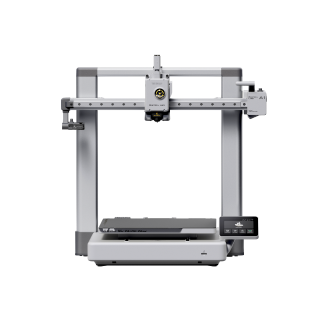
Bambu Lab A1
A1 (standard, without AMS lite)
The same plate and speed ceiling for meaningfully less, as long as PLA and PETG are the whole list.
- Build volume
- 256 × 256 × 256 mm
- Technology
- FDM
- Max speed
- 500 mm/s toolhead (10,000 mm/s² acceleration)
- Enclosed
- No
- Multi-colour
- Optional (AMS lite sold separately; up to 4 spools)
- Auto levelling
- Yes (fully automatic)
What we like
- The same 256 mm cube and the same speed ceiling for meaningfully less money
- Open frame runs cooler for PLA and is the easier machine to share a room with
- Fully automatic calibration, same Bambu Studio and MakerWorld ecosystem
- Multi-colour can be added later with the AMS lite
What we don’t
- No enclosure, so ABS, ASA, PC and PA are all in the not-recommended column
- Lower acceleration than the enclosed CoreXY machines
- Bed-slinger geometry limits how hard tall parts can be driven
- Firmware updates have been reported to unsettle calibration
Buy the A1 instead if PLA and PETG cover everything you print. Skip it if you can name a part you want in ABS or ASA — you will only buy the P1S a year later.
The P2S is for doing the same job faster, or for composites. It runs to 600 mm/s, takes the plate to 110 °C and — the meaningful difference — lists carbon- and glass-fibre composites among its supported materials. It is still an enclosure without an active chamber heater, so no more a nylon machine than the P1S. At around the £450 to £550 mark it refines the same idea rather than changing category, and it launched alongside the P1S rather than replacing it.
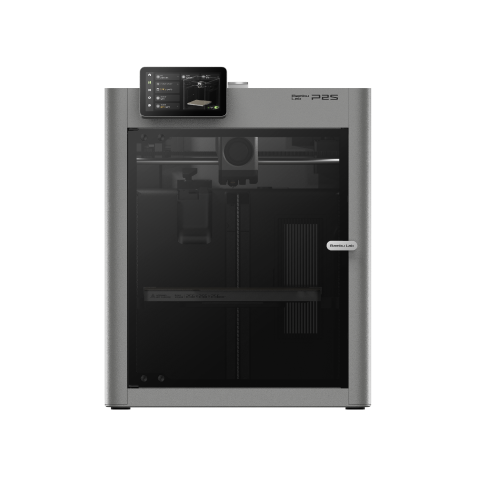
Bambu Lab P2S
P2S (standard, without AMS)
Faster, hotter at the plate, and it takes composites the P1S will not. Worth the gap only if one of those is a real requirement.
- Build volume
- 256 × 256 × 256 mm
- Technology
- FDM
- Max speed
- 600 mm/s toolhead (20,000 mm/s² acceleration)
- Enclosed
- Yes (fully enclosed; door sensor and activated-carbon air filter; no active chamber heater listed)
- Multi-colour
- Optional (AMS 2 Pro / AMS sold separately or in P2S Combo)
- Auto levelling
- Not confirmed
What we like
- 600 mm/s toolhead and a 110 °C plate, both a step past the P1S
- Lists carbon- and glass-fibre composites among supported materials
- Sharper camera and a full touchscreen rather than a monochrome panel
- Launched alongside the P1S rather than replacing it, so both are supported
What we don’t
- Around a third more money for a refinement rather than a new category
- Still no actively heated chamber, so nylon and PC are no easier than on the P1S
- Heavier at 14.9 kg, and it needs the same generous shelf
- Early owners report the usual new-model hardware niggles
Buy the P2S instead if fibre-reinforced filament is on your list, or the extra speed pays for itself. Skip it if you would be buying the newer badge.
If neither fits, the problem is the category rather than the model: the best 3D printers UK pillar covers resin too, and the best budget 3D printers UK guide goes below the A1.
Who should buy the P1S, and who should not
Whether the Bambu Lab P1S is worth it comes down to one question, and it is not about speed: can you name a material you want to print that needs an enclosure? If the answer is ABS or ASA, the P1S is the cheapest sensible way there, and everything else it does well comes along free. It suits someone printing functional parts — workshop jigs, electronics enclosures, outdoor fittings — and a small business that wants a machine rather than a project.
It is the wrong machine in four cases, each with somewhere better to go. If PLA and PETG are your whole list, buy the A1. If you need carbon or glass fibre, buy a machine built for abrasives rather than upgrading this one. If nylon or polycarbonate is the point, you want an actively heated chamber, which neither the P1S nor the P2S has — PA and PC sit on the capable list, not the ideal one. And if it has to live where someone sleeps, buy nothing until you have somewhere else for it.
The verdict
Three years on, the P1S is still the machine that makes enclosed printing affordable, and Bambu Lab has said plainly that it is not going anywhere. Around the £330 to £400 mark it asks you to accept one compromise — noise — and one boundary the marketing tends to blur: an enclosure is not a licence to print composites. Accept both and little else at this price does the same job as well.
The P1S earns its recommendation on one capability and one attitude: an enclosure that makes ABS and ASA realistic, and a setup routine that gets out of the way. It is loud, its parts are proprietary, and it will not print composites without an upgrade. For UK buyers who need a closed chamber, those are the right trade-offs at the right price.
- Buy it if
- You want ABS or ASA without fighting warping, you would rather own an appliance than a project, and you have a room with a door you can shut.
- Skip it if
- PLA and PETG are your whole list — the A1 costs less and runs quieter — or you need carbon fibre, nylon or polycarbonate.
How this article was researched
No first-hand testing, printing or measurement was carried out for this review. Specifications come from Bambu Lab's own store and product pages, captured on 9 and 11 September 2026 and recorded claim by claim with a source URL; every figure above carries one. UK price bands and stock were checked against an authorised UK retailer on 11 September 2026 and are quoted as bands, never live prices. The ownership patterns are recurring themes across Bambu Lab's community forum and long-term written accounts — no customer review is quoted and no rating reproduced. Where a fact could not be confirmed from a primary source it was left out rather than estimated. Our approach is set out in the review methodology.
Common questions
- Is the Bambu Lab P1S worth buying?
- If you can name a material you want that needs an enclosure, yes. ABS and ASA are the capability the closed chamber buys, and at around the £330 to £400 mark the P1S is the cheapest sensible route to them. If PLA and PETG are your whole list, the open-frame A1 does that work for less and makes less noise doing it, and the money saved buys a lot of filament.
- Who is the Bambu Lab P1S best for?
- Someone printing functional parts rather than collecting a hobby: workshop jigs, electronics enclosures, replacement fittings and outdoor parts in ASA. It also suits a small business that wants a machine that works from the first evening rather than a project to maintain. It suits nobody who has to put a printer in a bedroom.
- What are the main alternatives to the Bambu Lab P1S?
- The two closest are made by the same company. The A1 is the step down: same plate, no enclosure, notably cheaper. The P2S is the step up: faster, a hotter plate, and it takes composites the P1S does not. Outside Bambu Lab, the Creality K1C is the machine to look at if carbon fibre is the whole reason you are shopping for an enclosure.
- Has the Bambu Lab P1S been discontinued?
- No. The P1-series machine retired in February 2026 was the open-frame P1P, and Bambu Lab committed to spare parts and service for it until 2031. In the same announcement the company said the P1S would continue to be manufactured and sold with no plans to phase it out. The P2S launched as a companion model, not a replacement.
- Can the Bambu Lab P1S print carbon fibre?
- Not as it comes. Bambu Lab states that printing fibre-reinforced filaments such as carbon fibre or glass fibre is not recommended until the extruder and hotend have been upgraded, because chopped fibre is abrasive and wears standard parts quickly. An enclosure alone does not make a machine a composites printer, which is a common and expensive misunderstanding.