Creality K1C vs Creality K1 Max
Same nozzle, same 300 °C ceiling, same enclosure — so what does the K1 Max really add? The UK price, power draw and owner record, compared honestly.
Independent and reader-funded. We earn a commission if you buy through our links, at no extra cost to you. How this works.
Creality K1C vs Creality K1 Max is usually framed as a choice between a specialist and a giant: the small one that prints carbon fibre, the big one that prints big. That was accurate at launch. Creality's own specification tables no longer support it.
Read side by side today, the two share a nozzle material, a hotend type, a 300 °C nozzle ceiling, a 100 °C bed, a top speed and a stated accuracy. What separates them is 80 mm on each horizontal axis, a laser scanner watching the first layer, nearly three times the rated power draw, and roughly two hundred pounds.
| Specification | 1 Creality K1C (2025) The sensible default | 2 Creality K1 Max The one that fits the part |
|---|---|---|
| Best for | Enclosed CoreXY on a budget | Large single-piece parts |
| Build volume | 220 × 220 × 250 mm | 300 × 300 × 300 mm |
| Nozzle and hotend | Hardened steel, all-metal hotend | Hardened steel, all-metal hotend |
| Max nozzle temperature | 300 °C | 300 °C |
| Max bed temperature | 100 °C | 100 °C |
| Heated chamber | No — enclosed, active cooling | No — enclosed, active cooling |
| AI LiDAR first-layer scan | Not fitted | Fitted |
| Levelling | Strain gauge under the bed | Strain gauge in the nozzle |
| Rated power | 350 W | 1000 W |
| Net weight | 12.4 kg | 18.0 kg |
| Bench footprint | 355 × 355 mm | 435 × 462 mm |
| UK price band | £350–£420 | £560–£640 |
| UK availability | In stock at Creality UK | In stock at Creality UK; sold out at one specialist |
How these two were put side by side
No printing was done for this page. The Creality K1C compared with the Creality K1 Max is desk research, and the basis matters here, because the conclusion contradicts most of what is written about these machines.
Every specification below comes from Creality's own parameter tables — the ones its support site renders for each model, using identical row labels for both. That single source is what makes the comparison hold: the figures are like for like rather than stitched from two differently worded marketing pages, so where the tables differ, the difference is the manufacturer's. Where Creality publishes nothing, this page says so rather than borrowing a number from a shop.
The nozzle difference that is no longer a difference
If you have read anything else about these two, you have read that the K1C has the hardened steel nozzle while the K1 Max ships a softer copper-alloy tip that abrasive filament will chew through. That is what most comparisons use to justify the smaller machine, and Creality's own documentation no longer supports it.
Creality's parameter table for the K1 Max gives nozzle material as hardened steel and hotend material as all-metal, 0.4 mm as standard. The K1C's table gives the same three entries. Creality's K1 Max product page names a titanium alloy heatbreak alongside that nozzle — the same construction the K1C's quick-swap nozzle is sold on — and a UK specialist adds that the K1 Max now ships in its 2025 revision with that same quick-swap design.
This matters because hardness decides whether a printer survives carbon- and glass-filled filament without wearing its nozzle bore oval inside a few spools. Brass and copper alloy do that badly; hardened steel does it well. If both machines have the same tip in the same all-metal hotend, reaching the same 300 °C over the same 100 °C bed, the K1C's headline reason to exist has become something both share.
Two real differences survive, and neither concerns abrasion. Creality calls the K1 Max's extruder dual-gear direct drive where the K1C runs its Sprite unit — both grip the filament at the print head, which is what composites need. And the K1C's table specifies a PEI-coated spring steel plate where the K1 Max's says only "flexible build plate".
What Creality says each one will print
Here the tables diverge, in the direction nobody expects. Creality's published filament list for the K1C runs PLA, TPU95A, PA-CF, ASA, PLA-CF, PETG and ABS. Its list for the K1 Max runs PLA, TPU95A, PC, PA-CF, PA, ASA, PLA-CF, PET-CF, PETG, PET and ABS. Polycarbonate, unfilled nylon, PET and carbon-filled PET appear on the larger machine's list and not the smaller one's — although the two share a nozzle, a hotend and both temperature ceilings. Treat that as a statement about what Creality is willing to put in writing rather than a hardware finding: nothing published would explain it, and this page will not invent an explanation.
The overlap is the more useful part. Everything most people buy an enclosed printer for — ABS and ASA enclosures, PETG functional parts, carbon-filled PLA and nylon brackets, flexible TPU — sits on both lists, so materials do not separate these machines at all. Both also fit an activated carbon filter, which targets odour rather than the ultrafine particles a hot nozzle throws off — peer-reviewed measurements put those at 50 to 60 nm, worst with ABS, and a plain enclosure well short of ducting outdoors. Either way, styrene-based filament wants a ventilated room, not a sealed one.
If polycarbonate or unfilled nylon is genuinely on your list, one caution applies to both: neither heats its chamber. Creality describes both as enclosed with active cooling and publishes no chamber-heating parameter for either. An enclosure traps whatever warmth the bed gives off; a heated chamber puts heat in deliberately and holds it, which is what stops a tall polycarbonate part cracking between layers. Both will attempt those materials; neither gives them the warm air they want.
Build volume, bench space and the plate problem
This is the real decision. K1C or K1 Max comes down to whether your parts fit in 220 × 220 × 250 mm, because the K1 Max's 300 mm cube is the one thing no amount of clever slicing adds to the smaller machine.
Eighty millimetres on each horizontal axis does not sound transformative. It is roughly two and a half times the volume, and the gain is felt as whole objects: a helmet shell that needs splitting and bonding on the K1C comes off the K1 Max in one piece. If you routinely design around the smaller envelope, that is a tax on your time. If you never hit its edge, it is storage you are paying to heat.
The machine grows with the plate. The K1C occupies 355 × 355 mm of bench at 12.4 kg; the K1 Max takes 435 × 462 mm at 18.0 kg — an extra hand's width of desk depth, at a weight that makes moving it a deliberate act.
There is also a cost the specification tables do not record, and among K1 Max owners it is the most repeated complaint. A recurring theme among K1 Max owners is that a plate this size is hard to keep flat, and that large flat parts are where it shows; the responses they describe are a denser levelling mesh, a long bed soak and, for several, a thicker replacement plate — though this is not consistent across all reports.
That is physics before it is a Creality failing — a wider heated plate has more room to lose — but it reframes the upgrade: the extra volume is bought for big flat parts, and that is exactly where a big plate is hardest to keep true.
The AI LiDAR: the one thing only the K1 Max has
Strip out size and price and one feature is left on the K1 Max's side: a laser scanner, quoted at one-micrometre resolution, that reads the first layer as it is laid down, pauses the print and reports a fault if something has gone wrong. The K1C has no equivalent.
It is a good idea. The first layer is where most long prints are lost, and the failure stays invisible until hours of filament have gone on top of it. Both machines carry an AI camera watching for spaghetti and foreign objects once printing is under way, but only the K1 Max inspects the layer that decides whether the rest is worth printing. They also level differently: the K1 Max's strain gauge sits in the nozzle, the K1C's under the bed.
Then there is what owners report, and it is this article's strongest argument against paying the difference. Owner reports in Creality's own forum repeatedly describe the AI LiDAR failing its calibration, and a common response — including from forum staff — is to switch the LiDAR off and print without it, which owners describe as working normally; this is not consistent across all reports.
The causes converge on the mundane — a marked calibration sticker, a dirty lens, a cable working loose — and several are ten-minute fixes. What makes the pattern worth knowing is that the workaround is to disable the feature. Price it accordingly: a useful extra that some end up running without. That does not make the LiDAR worthless. It makes it a bonus rather than a reason to spend.
Everything that is identical, and why that matters
A comparison is only useful if it is honest about what is not a difference, and here that list settles the answer.
Both are CoreXY machines — the belt layout that keeps the heavy motors on the frame and moves only the print head — rated to the same 600 mm/s ceiling and the same 20,000 mm/s² acceleration. Since acceleration is where a faster machine normally pulls ahead on real print times, and these two are rated identically, there is no speed argument for the larger one. Resolution matches too: the same 0.1 to 0.35 mm layer range and the same ±0.1 mm over 100 mm accuracy, on top of a shared slicing workflow.
One small difference runs the K1 Max's way: its file transfer options include RJ45 Ethernet, where the K1C's list names no Ethernet socket. Worth a thought for a workshop with poor wireless.
What each one costs to run in the UK
This is the difference nobody puts in the comparison tables, and for a machine that may run overnight it earns a place. Creality rates the K1C at 350 W and the K1 Max at 1000 W — very nearly three times the draw, which comes of having a much larger bed to hold at temperature.
One caveat before the arithmetic. A rated figure is a ceiling, not a consumption measurement: both printers spend most of a job well below it, because the bed and hotend cycle once at temperature, and neither publishes a typical draw. So what follows is a worked upper bound, labelled as one.
Take the Ofgem price cap unit rate, roughly 26 pence per kWh for a typical direct debit customer in England, Scotland and Wales. At its rated ceiling the K1C would cost about 9p an hour in electricity and the K1 Max about 26p an hour — roughly 90p against £2.60 over a ten-hour print, or about £9 against £26 across a hundred hours of printing in a month.
Real figures land below both, and the gap narrows while the machines idle rather than heat. The ranking does not change, and it scales with use: a few evenings a month and you will never notice; most nights and it is a meaningful annual difference on top of the higher purchase price. Worth holding on to when these two are compared on shelf price alone. A 1000 W ceiling is well within a UK socket's capability, but not one to daisy-chain through a loaded extension lead.
UK price, availability, warranty and support
Checked at Creality's own UK storefront on the day of writing, the K1C sits in the £350–£420 band and the K1 Max in the £560–£640 band. Both prices observed were promotional, shown against higher list prices, so treat the bands as where these machines have been trading rather than as fixed figures. Creality K1C versus Creality K1 Max in the UK is a narrower gap than the specification sheets imply — and a wider one than the shelf price suggests.
Where to buy, and what was in stock
Creality's UK storefront had both in stock, the K1 Max quoted for delivery inside about a week. One major UK specialist listed it lower but had none in the warehouse, with restock stated and no date attached, and no Amazon.co.uk listing was found. The cheaper route for the larger machine is the one that could not supply it.
Neither model is at the end of its life: Creality still sells both, names no successor, and its own page data marks the K1 Max as in stock rather than discontinued. Worth confirming, because the K2 series above them makes the K1 line look retired.
Warranty, support and spares
Warranty is identical, because Creality sets it by brand rather than model: up to 24 months bought through its UK store. That is generous for this bracket, and an argument for buying direct rather than chasing a grey import.
Support is the weak point, equally. Creality's own support is the dominant complaint on UK review sites, described as slow to respond and slow to resolve faults, with experiences of the machines themselves sharply split.
Spares compensate. Both are K1-series machines, so nozzles, cameras, plates and hotend parts are shared across the range and stocked in the UK — including the replacement plate some K1 Max buyers end up wanting.
Which one to buy
Creality K1 Max vs Creality K1C stops being difficult once you accept it is not a question about capability. One of them is simply bigger.
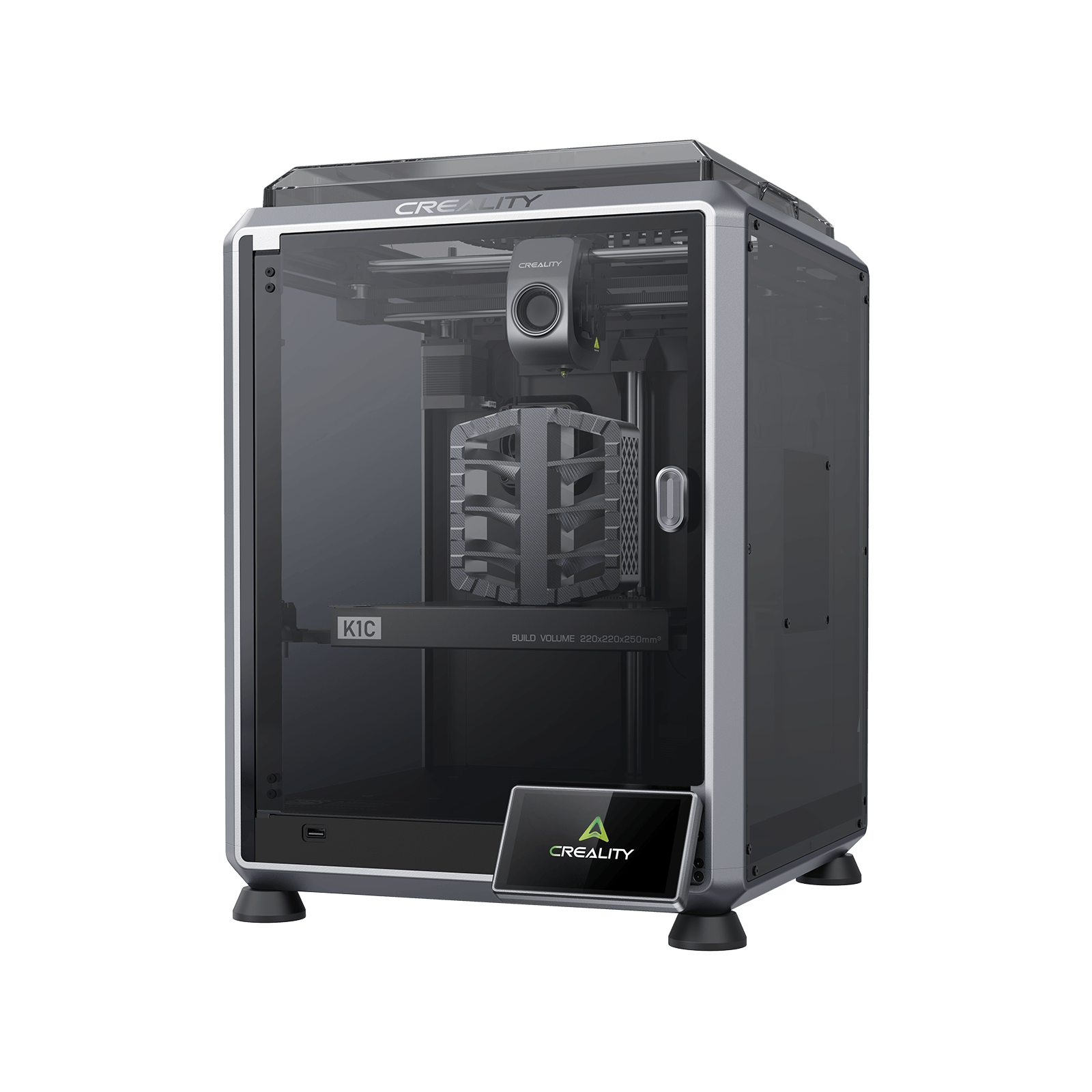
Creality K1C (2025)
K1C 3D Printer (2025 Version) - not the K1, K1 Max or K1 SE
The same hardened nozzle, the same 300 °C ceiling and the same CoreXY frame as its larger sibling, in a machine that costs less to buy and around a third as much to run.
- Build volume
- 220 × 220 × 250 mm
- Technology
- FDM
- Max speed
- 600 mm/s (CoreXY, 20,000 mm/s² acceleration)
- Enclosed
- Yes (die-cast aluminium unibody, tinted glass sides, acrylic lid)
- Multi-colour
- Optional (Creality CFS-C multi-colour kit sold separately)
- Auto levelling
- Yes (hands-free automatic levelling)
What we like
- The same hardened steel nozzle and all-metal hotend Creality now lists for the K1 Max, so abrasive and carbon-filled filament is not a reason to pay more
- Rated at 350 W against the K1 Max's 1000 W — about a third of the electricity ceiling for the same printing
- 355 mm square on the bench and 12.4 kg, so it fits a shelf and moves without help
- A PEI-coated spring steel plate, small enough to stay flat, at roughly two hundred pounds less
What we don’t
- 220 × 220 × 250 mm is the hard limit, and there is no growing into a build volume
- No AI LiDAR first-layer scan — the camera watches for failures, but nothing inspects layer one
- Creality's published filament list omits polycarbonate and unfilled nylon, which appear on the K1 Max's
- No Ethernet port on Creality's list, and owner reports single out fan noise in normal running
Buy the K1C if your parts fit inside 220 × 220 × 250 mm, which for most people they comfortably do; if you want carbon-filled filament without paying a premium; or if the printer lives where you also work or sleep, where a 350 W ceiling and a smaller footprint both count.
Skip the K1C if you would be designing around its envelope — splitting parts, rotating them to fit, bonding them afterwards. That is a tax on every project.
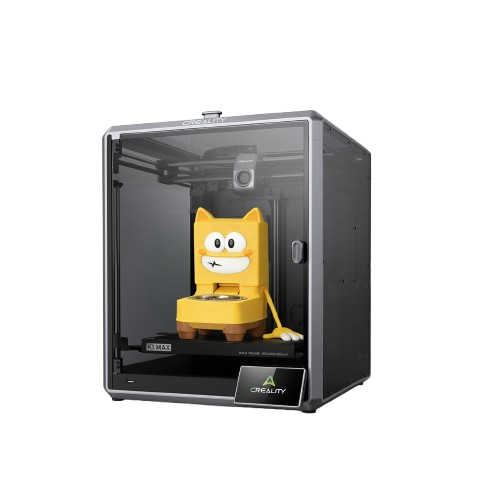
Creality K1 Max
K1 Max (2025 version as shipped; not the K1, K1 SE or K1C)
A 300 mm cube and a first-layer laser scan on the same platform, for roughly two hundred pounds more and nearly three times the rated power. Worth it only when the part will not fit.
- Build volume
- 300 × 300 × 300 mm
- Technology
- FDM
- Max speed
- 600 mm/s (CoreXY, ≤20,000 mm/s² acceleration, max 32 mm³/s flow)
- Enclosed
- Yes (enclosed frame, active cooling — no chamber heating published)
- Multi-colour
- Optional (supports Creality's CFS filament system; the base machine is single-colour)
- Auto levelling
- Yes (nozzle strain gauge levelling, plus a 1 μm AI LiDAR first-layer scan)
What we like
- A 300 mm cube — roughly two and a half times the volume, which shows up as whole objects rather than slightly larger ones
- An AI LiDAR that scans the first layer and stops the print if it goes wrong, which the K1C has no equivalent of
- Creality's own filament list for it adds polycarbonate, unfilled nylon, PET and carbon-filled PET
- An RJ45 Ethernet port alongside Wi-Fi, useful in a workshop with poor wireless
What we don’t
- Rated at 1000 W, so it costs meaningfully more to run as well as to buy
- Owners repeatedly report the 300 mm plate is hard to keep flat, and large flat parts are where it shows
- The LiDAR draws a recurring stream of calibration failures, and the common workaround is to turn it off
- 18 kg and 435 × 462 mm of bench, and no heated chamber despite polycarbonate being on its list
Buy the K1 Max if your work genuinely needs the 300 mm cube — helmets, large enclosures, drone frames, batches that fill a plate — or if polycarbonate and unfilled nylon matter enough that you want the machine Creality has put them in writing for. Budget for a better plate, and treat the LiDAR as a bonus.
Skip the K1 Max if you are buying the bigger plate speculatively. Capacity you reach twice a year is expensive storage, and here it costs you every hour it runs.
If neither is quite it — if you want an actively heated chamber, or another brand's enclosed CoreXY — the best FDM printers roundup covers both sides of this bracket.
These are not a capable machine and a compromised one. On Creality's own current figures they are the same printer at two sizes: same hardened steel nozzle in an all-metal hotend, same ceilings, same CoreXY frame, same speed, and neither with a heated chamber.
When the only real variables are volume, power and price, the default goes to the cheaper, cooler-running machine, and the case for the larger one has to be made by a part that will not fit on the smaller. If you can name that part, buy the K1 Max. If you cannot, the K1C is the better purchase.
- Buy it if
- Your parts fit a 220 mm-square plate: take the K1C. Same nozzle, same ceilings, same speed, at a lower price and a third of the rated power.
- Skip it if
- Your parts do not fit: take the K1 Max, accept that its plate will want attention, and treat the LiDAR as a bonus.
How this article was researched
This comparison is research-based. No printing, measurement or photography was carried out, and nothing here is a test result.
Specifications were researched from Creality's own parameter tables for the two named variants — the K1C 2025 Version and the K1 Max as currently shipped — because those tables publish both machines against the same row labels. A few details absent from them come from Creality's product pages and are cited separately. Where the manufacturer publishes nothing, this page gives nothing: hence no noise comparison, and a running-cost section worked as a ceiling from rated power rather than a consumption estimate.
Owner-reported patterns were researched from threads in Creality's own community forum, summarised in our own words and labelled wherever they appear. No customer review is quoted and no rating reproduced. UK prices and stock were checked at Creality's UK storefront and one UK specialist on 25 September 2026, and are given as bands rather than figures.
Common questions
- Which is better, Creality K1C or Creality K1 Max?
- For most buyers, the K1C — and the reason is that the gap between them has narrowed to one thing. Creality's current specification tables give both machines a hardened steel nozzle in an all-metal hotend, a 300 °C nozzle, a 100 °C bed, the same rated speed and acceleration, the same layer range and the same stated accuracy. What the K1 Max adds is build volume, an AI LiDAR and an Ethernet port; what it costs is roughly two hundred pounds, nearly three times the rated power and a good deal more bench space. So the honest test is a single question: can you name a part you need to print that will not fit on the smaller machine? If yes, buy the K1 Max. If no, the K1C does the same work for less.
- Which has better print quality and reliability?
- On output quality there is nothing to choose between them on paper: the same CoreXY platform, the same 0.1 to 0.35 mm layer range and the same ±0.1 mm over 100 mm accuracy claim. Reliability cannot be called from here, because no first-hand testing was done for this page and neither machine was in our hands. What can be said is what owners in Creality's own forum keep returning to, and the two patterns point in different directions: K1 Max threads cluster on a 300 mm plate that is hard to keep flat and on AI LiDAR calibration failures, while K1C threads cluster on fan noise and on rebuilding slicer profiles for composite filament. Both are support forums, so they collect faults rather than a representative picture.
- Which offers better value for UK buyers?
- The K1C, on two counts rather than one. It sits a band lower at Creality's UK store, and because it is rated at 350 W against 1000 W it also costs substantially less per hour of printing — a difference that compounds for anyone running a machine most nights. Warranty is identical, because Creality sets it by brand rather than by model, so there is no protection premium in the higher price. Value only swings to the K1 Max when the build volume is doing real work: at that point the smaller machine cannot do the job at any price, and the comparison stops being about money.