FDM Printer Buying Checklist
The checks that decide an FDM printer purchase in the UK: flow rate over headline speed, the material tier, usable build area, and what a year really costs.
The short answer
Check the flow rate rather than the top speed, check the material tier rather than the material list, and check the room before the machine. An FDM printer buying checklist that settles those three tells a UK buyer more than a week of comparing headline figures.
FDM printers — fused deposition modelling, sold by most makers as FFF — trace a part with a heated nozzle that melts plastic filament. The nozzle is the bottleneck, not the motors, which is why the number predicting print time is the hot end's flow: 28 mm³/s on one widely sold open-frame machine against 32 mm³/s on its enclosed sibling . Neither figure appears on the box.
Seven checks follow, in the order that decides the outcome.
Check the flow rate, not the headline speed
The speed on the box is a ceiling for how fast the toolhead can move, not a rate at which parts appear.
Compare what the makers publish. One open-frame machine is rated at 500 mm/s ; its enclosed sibling carries the same figure . A rival CoreXY claims 600 mm/s , a budget bed slinger 250 mm/s . You would expect the 600 to halve the 250's time. It does not.
What bounds a print is how fast the hot end melts plastic — volumetric flow, in cubic millimetres a second. The two same-speed siblings diverge there: 28 mm³/s against 32 mm³/s, measured by the maker on the same 150 × 150 mm single-wall model in ABS at 280 °C . Roughly a seventh more material a second.
Flow is layer height times line width times speed, so top speed is reachable only on thin, narrow lines. Ask for a thicker layer and the rate falls to whatever the hot end can feed — the most useful line on a specification sheet, and the one most often missing.
Owners put the enclosed machine at roughly a fifth quicker than the open-frame one on single-colour prints.Check the material tier, not the material list
Every FDM printer specifications sheet lists filaments. The tier beside each name is the useful part.
Makers grade their own materials. One brand marks PLA, PETG, TPU and PVA ideal on its open-frame machine and puts ABS, ASA, PC, PA and fibre-reinforced filaments under not recommended ; the enclosed machine in the same range promotes ABS and ASA to ideal . A third grades ABS and PC superior but the PPS and PPA families merely capable . One word, "supported", covering four different promises.
So what to look for in an FDM printer starts with the filament you intend to use, then works back to three things. Hot-end temperature: both siblings stop at 300 °C , enough for PLA, PETG, ABS and ASA, while engineering machines reach 350 °C . Nozzle material: filled filaments are abrasive and chew through brass, so a machine rated for them pairs that heat with a hardened steel nozzle . And an enclosure where the material needs one: ASA resists temperatures up to 93 °C but wants a bed of at least 100 °C, an enclosure and ventilation .
The trap is assuming these travel together. That enclosed 300 °C machine is one its maker does not recommend for fibre-reinforced filament until the extruder and hot end are upgraded . Buyers regularly expect an enclosed machine to take carbon fibre, which is exactly where this one trips people up. An enclosure buys warping control, not abrasion resistance.
Check the motion system against the room
Two layouts dominate. A bed slinger moves the build plate back and forth on one axis while the toolhead handles the other; a CoreXY machine fixes both motors to the frame, so the only thing accelerated is the toolhead .
The service documentation tells you which you are looking at. One maker's repair guide puts its open-frame machine's Y-axis belt, motor and rail in the bottom base, under the heatbed, and asks for that rail to be lubricated monthly . That is a bed slinger, and it comes with a monthly job. Its enclosed sibling is a CoreXY design , as is a competitor whose motors drive X and Y independently on linear rods .
CoreXY vs bed slinger buying decisions are usually argued on speed, the weakest ground: input shaping closes much of the gap . Three better reasons:
Desk depth. A bed slinger needs room to sling. For the same build volume it takes 385 × 410 × 430 mm against the CoreXY machine's squarer, taller 389 × 389 × 458 mm .
Tall, narrow parts. Owner opinion on the moving bed is divided: several point to tall, narrow models as the case where it shows, while others report tall prints completing without trouble.
Whether an enclosure is possible. A moving bed has to travel, so enclosures cluster on CoreXY machines. If the material check pointed you at ABS or ASA, this one is already made for you.
Check the build area, and what multi-colour takes from it
The number on the box is the space between the endstops, not the space the slicer will let you fill — and the gap is documented by the makers.
Take the 256 × 256 × 256 mm cube quoted for a popular open-frame machine and its enclosed sibling . The maker's own knowledge base puts the default printable height at 250 mm and excludes an 18 × 28 mm patch at the front-left corner to protect the filament cutter's stopper — and the full volume is unavailable while the multi-colour unit is attached.
That unit takes a second bite: the prime tower cleaning the nozzle after each filament change is on by default and stands on the plate itself . It costs filament too: a machine changing colour must clear the old from the hot end and purges it, on one manufacturer's own account . That maker's advice for reducing the waste says plainly it is managed rather than eliminated. Bought separately the colour units run from about £175 to £320 .
Owners repeatedly note that multicolour printing generates significant purge waste, which slicer settings can reduce but not remove.So measure the largest thing you want to print, add a margin, then compare — and if most of your work is single-colour, the colour unit is the first line to cut.
Check where it will live
Prints run for hours, often overnight. Of all the filament printer features on a specification sheet, the ones deciding whether the machine is tolerable get weighed last.
Noise. Two makers both publish 45 dB or less — against the World Health Organization's guideline of under 30 dB(A) in a bedroom at night for good sleep . Fine in a spare room; wrong beside a bed. Owners repeatedly trace the noise to the fans rather than the motion system, and a recurring theme is that the chamber fan is the loudest part of the machine.
Particles and smell. Here the usual advice is measurably half right. Peer-reviewed measurement puts a plain rigid enclosure at a minimum control efficiency of 67.3 to 80.2% for particulate matter, against 98.35 to 99.95% for ducting outdoors . The particles are ultrafine , and the same study calculated no control efficiency at all for gases . An enclosure with a carbon filter is worth having and is not a sealed box. A recurring theme among owners printing ABS and ASA indoors is that the built-in carbon filter is treated as a partial measure rather than a complete one.
Heat. An enclosed chamber with no chamber heating still gets warm, and PLA dislikes that. Owner reports repeatedly describe PLA heat-creep clogs in an enclosed chamber, particularly in warm rooms, with opening the door or vent the commonly shared remedy.
Check the year, not the price
The purchase price is the smallest interesting number. A first FDM printer checklist should price twelve months, because that decides whether the machine gets used or shelved.
Filament is the real running cost — ordinary PLA runs roughly £14 to £18 a kilogram from a UK retailer , and someone printing steadily gets through several kilograms a year. This line, not electricity, is what a year costs.
Electricity is smaller than people expect. Rated power is a peak while heating rather than a continuous draw — 1,300 W at 220 V on one machine , 1,000 W on another . At the Ofgem price cap unit rate of about 26p per kWh , an hour at the second machine's full rated draw costs about 26 pence, and real jobs sit well below that because the heaters cycle. Against a daily standing charge of about 55p , a hobby printer is not what moves a bill. Treat it as an upper bound: it assumes a ceiling no print sustains.
Wear parts are modest, this technology's quiet advantage: nozzle and hot-end kits from one maker's UK store run from under £10 up to around the £33 to £40 mark . A recurring response among owners asking what a machine costs to run is to measure it with a plug-in energy monitor rather than work from the rating plate.
Check what UK law gives you
This is the check the competing guides omit, and it is worth more than the warranty page it sits behind. In Great Britain your position on a faulty machine does not depend on what the maker offers.
The Consumer Rights Act 2015 gives a short-term right to reject faulty goods for 30 days after delivery, and an agreement trying to shorten that does not bind you . For the first six months the law assumes a fault was there from the start, so it is not for you to prove it . That runs against the retailer who sold you the machine — one good reason to buy from a UK-based seller. Warranties sit on top, two years being common, some parts shorter . A recurring theme among buyers is slow warranty support, although this is not consistent across all reports.
Then two costs to anticipate. Goods sent from abroad attract Customs Duty above £135 , and above the same threshold a courier collects import VAT before handing the parcel over, charged on shipping and duty too . Printers are bulky, besides: one UK retailer adds a surcharge of around £30 on an open-frame machine and around £45 on a larger enclosed one .
Three things buyers get wrong
That a CoreXY machine prints better than a bed slinger. It prints faster, on the right job. Owners who have used both families repeatedly describe the print quality as hard to tell apart on ordinary filament, with any difference usually traced to calibration. Pay for the architecture because of the material, the room or the height of your parts — not for smoother walls.
That automatic levelling means the bed no longer matters. Levelling is near-universal now, from a simple sensor to 121-point mapping . But the firmware documentation is careful: software correction can only approximate the shape of a bed, not achieve perfect results . It compensates for a bed; it does not replace a flat one.
That an enclosed machine is a heated one. These are separate specifications and usually only one is present: one enclosed machine's own parameter list publishes a bed temperature and a nozzle temperature and no chamber-heating figure at all . If a listing says enclosed, check whether it says heated, because it usually does not.
The same checklist against two machines
Two worked examples one step apart, sharing a build volume and a headline speed, so every difference is attributable. Neither is a recommendation.
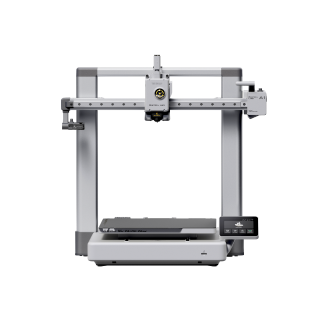
Bambu Lab A1
A1 (standard, without AMS lite)
A worked example rather than a pick: its own filament table rules out everything needing an enclosure.
- Build volume
- 256 × 256 × 256 mm
- Technology
- FDM
- Max speed
- 500 mm/s toolhead (10,000 mm/s² acceleration)
- Enclosed
- No
- Multi-colour
- Optional (AMS lite sold separately; up to 4 spools)
- Auto levelling
- Yes (fully automatic)
The bed-slinger case, between about £240 and £320 , passes most of the checks above. The one it fails is material: its own maker marks ABS, ASA, PC, PA and fibre-filled as not recommended , which settles the purchase before anything else gets a say.
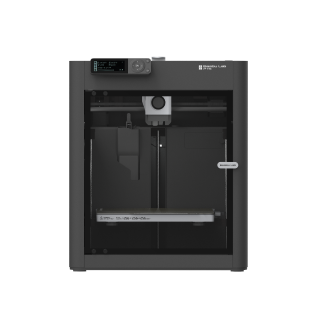
Bambu Lab P1S
P1S (standard, without AMS - not the P1P, P1S Combo or P2S)
A worked example of the tier above: the enclosure changes which filaments are on the table, and still does not make this a carbon-fibre machine.
- Build volume
- 256 × 256 × 256 mm (Bambu Studio defaults to 250 mm height)
- Technology
- FDM
- Max speed
- 500 mm/s toolhead (20 m/s² acceleration)
- Enclosed
- Yes (plastic and glass; chamber temperature regulator fan and activated-carbon filter)
- Multi-colour
- Optional (AMS or AMS 2 Pro sold separately or as a Combo)
- Auto levelling
- Yes (automatic bed levelling sensor)
The enclosed CoreXY case buys the materials the first refuses, promoting ABS and ASA to the maker's ideal list . What it does not buy is abrasion resistance: fibre-reinforced filament still wants a hardware upgrade first . Between about £330 and £400 .
| Specification | Bambu Lab A1 | Bambu Lab P1S |
|---|---|---|
| Flow, not headline speed | 28 mm³/s — same 500 mm/s rating | 32 mm³/s — same 500 mm/s rating |
| Material tier | ABS, ASA, PC, PA, fibre-filled: not recommended | ABS and ASA ideal; fibre-filled still needs an upgrade |
| Motion system | Bed slinger — Y-axis rail, monthly lubrication | CoreXY — belts rather than a moving bed |
| Build area | 256 mm cube, less a corner and 6 mm of height | Same cube, same documented limits |
| Multi-colour ceiling | One unit, four colours | Up to four units, sixteen colours |
| Where it will live | Open frame — no filtration, no chamber | Enclosed with an activated-carbon filter |
| Desk footprint | 385 × 410 × 430 mm — deeper, to sling the bed | 389 × 389 × 458 mm — squarer and taller |
| Price band | Between about £240 and £320 | Between about £330 and £400 |
Owners who print mostly PLA and PETG repeatedly describe a bed slinger as the better buy for that work. Which is the checklist in miniature: the cheaper machine is not the lesser one unless your material says so.
Where to go next
If the seven checks have settled what you need, the shortlist is the next step. The best FDM 3d printer uk roundup ranks current machines on exactly these criteria — flow rather than headline speed, material tier rather than material list, and the room the machine has to live in.
If the year-of-ownership check gave you pause, start at the other end: the best budget 3d printers shortlist covers machines whose price leaves room for filament. If you are still weighing filament against resin, the best 3d printers uk pillar covers both.
Nothing above tells you whether you will use the thing. The buyers who get their money's worth already have something specific they want to make.
How this article was researched
This guide is research-based. No printer named here was bought, tested, measured or photographed by us, and nothing here is offered as something we observed.
Every figure comes from a manufacturer specification sheet, a maker's service or knowledge-base documentation, firmware documentation, a peer-reviewed measurement, GOV.UK, legislation.gov.uk or a UK retailer listing, each recorded with the date checked. Prices are bands because exact figures go stale; the product figures were last checked in September 2026.
Three things could not be verified from a primary source and are absent rather than estimated. No maker publishes what a machine draws across a real print rather than its rated maximum, so the electricity line rests on the rated ceiling and is labelled an upper bound. None publishes a duty cycle or maximum daily run . And the open-frame machine's motion architecture is not named on its own specification sheet — the bed-slinger description rests on service documentation placing the Y-axis assembly beneath the heatbed.
Passages describing what owners find are marked as such, and summarise recurring patterns across forums, long-term independent reviews and retailer questions rather than quotations.
Common questions
- What should UK buyers know about an FDM printer buying checklist?
- Mostly that the two things which matter most in Great Britain are not on the specification sheet at all. The first is legal: the Consumer Rights Act 2015 gives a short-term right to reject faulty goods for 30 days after delivery, and for the first six months the law assumes a fault was present from the start rather than asking you to prove it — a stronger position than most manufacturer warranty pages describe, and one that runs against the retailer who sold you the machine rather than the brand. The second is financial: buying from a non-UK store means Customs Duty applies above £135 and the courier collects import VAT before handing the parcel over, charged on the shipping and any duty as well as the printer, and UK retailers add a bulky-goods surcharge to machines of this size. Beyond that, the UK-specific checks are a cold spare room rather than a warm one, a mains supply these machines are all rated for, and the fact that filament rather than electricity is what a year of ownership actually costs.
- Which factors change the answer for FDM and resin users?
- Nearly all of them, because the two technologies fail in opposite directions. A filament machine traces every part with a nozzle, so the bottleneck is how fast that nozzle can melt plastic and the useful question is which materials the hot end and nozzle will take. A resin machine exposes a whole layer at once, so extra models beside the first are nearly free and only height costs time — which is why resin speed is quoted as a height per hour rather than a travel speed. Build volume inverts too: filament buyers should ask whether their largest single object fits, while resin buyers should ask how tall it is. The handling is not comparable either. Filament needs a room and some ventilation; resin needs gloves, eye protection, a washing and curing step and a lawful route for the waste. And the running costs differ in kind — a filament owner buys spools and the occasional nozzle, while a resin owner buys resin, alcohol, release film and eventually a replacement screen. Anyone weighing the two should compare the workflows rather than the machines.
- What practical checklist should a buyer follow?
- Seven checks, in the order they decide the outcome. One, find the hot end's volumetric flow in cubic millimetres a second and treat the headline speed in millimetres a second as a ceiling rather than a rate. Two, find the filament you actually intend to print on the maker's own tier table, because 'supported' covers everything from ideal to not recommended, and check the nozzle material and hot-end ceiling against it. Three, pick the motion system on desk depth, part height and whether you need an enclosure — not on print quality, where the gap has largely closed. Four, check the usable build area rather than the advertised one, and decide whether you print in colour often enough to pay for it in filament, time and plate area. Five, check the room: noise against what you can live with overnight, and ventilation if ABS or ASA is on your list. Six, price twelve months rather than the machine, with filament as the largest line. Seven, check what the law gives you — a thirty-day right to reject, a six-month presumption, and the import VAT and duty that apply above the £135 threshold when you buy from outside the UK.