Fastest FDM 3D Printers UK
Six of the fastest FDM 3D printers on sale in the UK, and why the filament in the spool — not the mm/s on the box — sets the speed you will actually get.
Independent and reader-funded. We earn a commission if you buy through our links, at no extra cost to you. How this works.
Ask which is the fastest FDM 3D printer in the UK and the answer arrives as a number on a box. Every machine below publishes one, from 500 mm/s at the modest end of this selection to 600 mm/s at the top. Almost none of them will print your part at it, and the reason has nothing to do with the printer.
A hotend can only melt so much plastic a second. Prusa Research calls that the maximum volumetric speed and publishes the relationship plainly: the fastest the head can move is that volumetric limit divided by the cross-section of the bead it is laying down. It can only ever slow a requested speed down.
What makes this worth a page is the second figure Prusa publishes. Typical volumetric speeds, by material: 12 to 20 mm³/s for PLA, 8 to 15 for PETG, 10 to 16 for ABS and ASA, and 2 to 5 for TPU. Set those against the fastest hotend here, rated at 40 mm³/s. On a spool of PETG the plastic gives up around a third of the way to the machine's limit, and it would do so on any of these six.
Between these machines, then, the headline speed is close to a formality. What separates them is which materials each can reach and whether a long print survives to the end.
The six, laid out on what the makers actually publish
One row below is the one most comparisons leave out. Published hotend flow sets the ceiling, and only two of these makers print it. Where it is missing the cell says so, because a blank would read as a weakness and it is not one — it is a gap in the documentation.
| Specification | 1 Bambu Lab P2S All three figures published | 2 Creality K1C (2025) Abrasive filament, cheaper | 3 ELEGOO Centauri Carbon 2 Hot materials, least money | 4 Creality K1 Max 600 mm/s on a 300 mm plate | 5 Prusa CORE One L+ Prints that finish | 6 ELEGOO Centauri 2 Budget CoreXY |
|---|---|---|---|---|---|---|
| Best for | Checking the claim before you buy it | Carbon-fibre filament without a nozzle bill | Engineering plastics at the lowest price here | Large or batched parts at speed | Long jobs you need to come back to finished | A first CoreXY that is honest about speed |
| Published headline speed | 600 mm/s toolhead | 600 mm/s | 500 mm/s | 600 mm/s | No print speed published; 500 mm/s travel | 500 mm/s rated, 250 mm/s recommended |
| Published hotend flow | 40 mm³/s | Not published | Not published | 32 mm³/s | Not published | Not published |
| Max acceleration | 20,000 mm/s² | 20,000 mm/s² | 20,000 mm/s² | 20,000 mm/s² | Not published | 20,000 mm/s² |
| Acceleration as shipped | Not published | Not published | 10,000 mm/s² | Not published | Not published | 10,000 mm/s² |
| Build volume | 256 × 256 × 256 mm | 220 × 220 × 250 mm | 256 × 256 × 256 mm | 300 × 300 × 300 mm | 300 × 300 × 330 mm | 256 × 256 × 256 mm |
| Enclosure and chamber | Enclosed, no active heater | Enclosed, active cooling only | Enclosed | Enclosed, active cooling only | Enclosed, heated to 60 °C | Open frame |
| Nozzle ceiling | 300 °C | 300 °C | 350 °C | 300 °C | 290 °C, or 400 °C with the HT hotend | 350 °C |
| UK warranty | 2 years | Up to 24 months | 12 months | Up to 24 months | 1 year | 12 months |
| Typical UK price | £450–£550 | £350–£420 | £280–£310 | £560–£640 | £1,500–£1,750 | £230–£260 |
Read the second row against the third: three machines carry a 600 mm/s headline and only two makers will say how much plastic the hotend can melt, which is the number the headline depends on. Then the fourth row against the fifth — where a maker publishes both a maximum and the figure the machine ships at, the shipped figure is half the maximum.
How these six were chosen, and what is not claimed here
Nothing here was bought, opened, plugged in or timed. The basis is documentary: specifications from each manufacturer's own product page, sheet or manual, UK price and stock checked at British retailers during September 2026, and warranty terms from each company's published policy rather than a retailer's summary. Our full approach is set out in the review methodology.
A machine earned its place by holding a role none of the others could, and by being genuinely buyable in Britain. One was cut for the second reason alone: QIDI's Max4 publishes the highest toolhead speed found anywhere in this research, and a UK specialist states plainly that it cannot deliver one to Great Britain. A printer you cannot get is not fast.
Every selection is CoreXY, which is where the market went rather than a preference: a high acceleration CoreXY printer does not have to fling a heated plate back and forth to go quickly. Bed slingers still make excellent first machines, and the best FDM 3d printer uk roundup covers them.
Four of the six have no flow rate listed here, because none could be retrieved from a manufacturer source. Figures circulate in search results but are not traceable to a primary document, so they are left out rather than repeated.
Which hotends sustain high flow, and what that is worth
Two makers here put a number on the melt rate. Bambu Lab rates the P2S hotend at 40 mm³/s and, unusually, publishes the conditions: a 250 mm round model with a single outer wall, in its own ABS, at 280 °C. Creality rates the K1 Max at up to 32 mm³/s from a ceramic heater reaching 200 °C in 40 seconds. Both are maximums under favourable conditions — a single-wall cylinder is about the easiest shape a hotend ever extrudes.
They are high figures. Prusa's own classification puts a standard all-metal hotend at 8 to 12 mm³/s and a high-flow hotend at 25 to 40, so any fast filament printer bought today has a top-class melt system in it. Set against PETG's 8 to 15 mm³/s, though, a hotend of that quality is working at under half its rating on an ordinary spool. The melt system stopped being the bottleneck; the plastic became it.
Owners reach the same place without the specification sheet. Owners repeatedly describe settling well below the published maximum for work they intend to keep, and name the hotend's flow rate rather than the motion system as the limit they meet first. Two machines a third apart on paper finish the same job in much the same time.
1. The one machine here whose speed claim can be checked
For the buyer who wants the figures to add up before the money leaves the account.
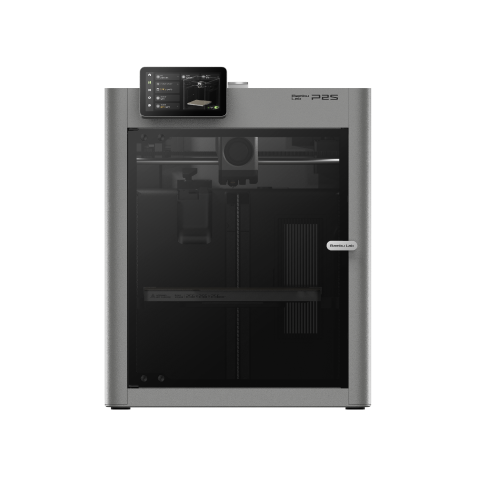
Bambu Lab P2S
P2S (standard, without AMS)
The only machine here publishing a toolhead speed, an acceleration figure and a hotend flow rate together — and the only one that says how the flow was measured. Enclosed, two years of UK cover, no active chamber heating.
- Build volume
- 256 × 256 × 256 mm
- Technology
- FDM
- Max speed
- 600 mm/s toolhead (20,000 mm/s² acceleration)
- Enclosed
- Yes (fully enclosed; door sensor and activated-carbon air filter; no active chamber heater listed)
- Multi-colour
- Optional (AMS 2 Pro / AMS sold separately or in P2S Combo)
- Auto levelling
- Not confirmed
What we like
- 600 mm/s toolhead, 20,000 mm/s² and 40 mm³/s of hotend flow, all published by the maker
- The flow figure comes with its test conditions stated, which no other maker here does
- 300 °C nozzle over a 110 °C bed, rated for ABS, ASA, PC, PA and fibre-reinforced grades
- Two years of UK cover, the longest term on this page
What we don’t
- No active chamber heating — the thing the Prusa charges for
- Owner reports describe the advertised benchmark time as needing a non-default profile
- A 256 mm plate, where two machines here offer 300 mm
- The flow test is a single-wall cylinder, about the easiest shape a hotend ever extrudes
Three numbers decide a filament printer's throughput and this is the one machine that prints all three: a toolhead rated at 600 mm/s, acceleration at 20,000 mm/s², and a hotend at 40 mm³/s with its test conditions stated. That last disclosure is rare, and it is why this ranks first.
A 300 °C nozzle over a 110 °C bed covers PLA, PETG, ABS, ASA, TPU, PC, PA and fibre-reinforced grades inside a fully enclosed chamber with carbon filtration, on a 256 × 256 × 256 mm plate. Two years of UK cover is the longest term here.
Two limitations bear on speed. There is no active chamber heater — what the Prusa below charges for, and what ABS wants on a big part. And the published figure is not a setting anyone uses: owner reports on this maker's own forum repeatedly describe the advertised benchmark time as reachable only by overriding the shipped profile, at a visible cost to surface finish, although this is not consistent across all reports.
Buy this if you want the best-documented throughput here and print mainly PLA, PETG and the occasional ABS part, around the £450–£550 mark. Skip this if you need a regulated hot chamber, or a plate wider than a shoebox.
2. The same headline pair, built for the filament that eats nozzles
For the buyer whose fast jobs are in carbon-fibre filament, where speed is cheap and wear is not.
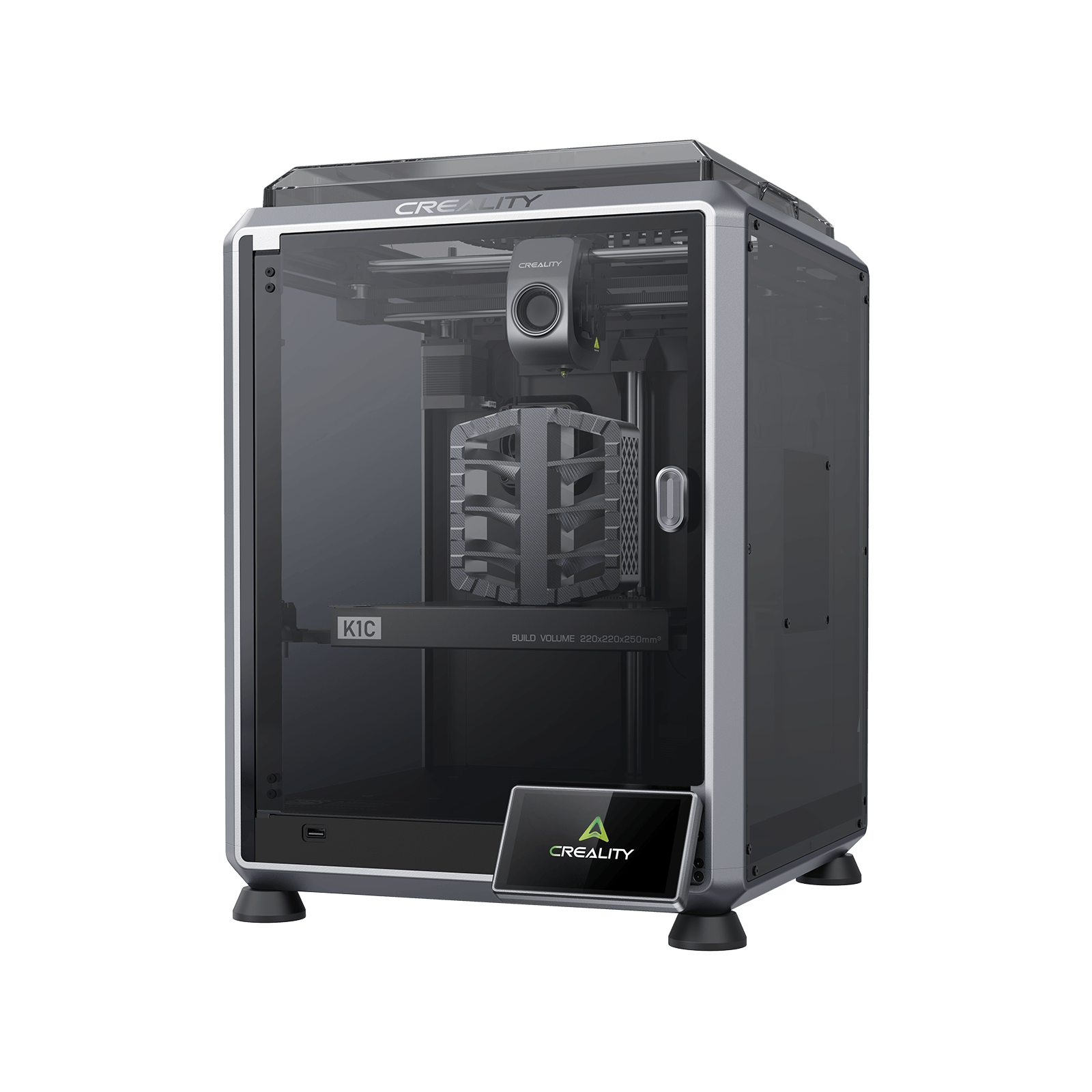
Creality K1C (2025)
K1C 3D Printer (2025 Version) - not the K1, K1 Max or K1 SE
Matches the top machine's speed and acceleration figures for less money and spends the difference on a hardened tri-metal nozzle. Creality publishes no flow figure, and the tuning for composite filament is left to you.
- Build volume
- 220 × 220 × 250 mm
- Technology
- FDM
- Max speed
- 600 mm/s (CoreXY, 20,000 mm/s² acceleration)
- Enclosed
- Yes (die-cast aluminium unibody, tinted glass sides, acrylic lid)
- Multi-colour
- Optional (Creality CFS-C multi-colour kit sold separately)
- Auto levelling
- Yes (hands-free automatic levelling)
What we like
- 600 mm/s and 20,000 mm/s² on a CoreXY frame, the same pair as the machine above it
- Tri-metal quick-swap nozzle with a hardened steel tip, designed around carbon-fibre filament
- Die-cast aluminium unibody enclosure, with run-out detection and power-loss recovery standard
- Up to 24 months of cover, stocked from a UK warehouse
What we don’t
- Creality publishes no hotend flow rate, so the speed claim cannot be checked
- The smallest build volume on this page at 220 × 220 × 250 mm
- Active cooling only — no chamber heating, despite the composite focus
- Owner reports repeatedly single out fan noise, and composite profiles are built by the owner
Abrasive filament is the usual reason a UK buyer wants a fast enclosed machine, and it is what turns a brass nozzle into a consumable. This machine was designed around that material and fits a tri-metal quick-swap nozzle with a hardened steel tip and titanium alloy heatbreak, behind an all-metal direct drive extruder.
The motion matches the machine above it: up to 600 mm/s on a CoreXY frame with 20,000 mm/s² of acceleration, inside a die-cast aluminium unibody. Creality lists PLA, PETG, ABS, ASA, TPU95A, PLA-CF and PA-CF over a plate reaching 100 °C in a 220 × 220 × 250 mm volume, the smallest here, with run-out detection and power-loss recovery standard.
Three limitations. No hotend flow rate is published, so the 600 mm/s cannot be checked the way the P2S's can. The enclosure has active cooling and no chamber heating. And the composite work it is sold for is not turnkey: owners printing carbon-fibre filled filament frequently describe building their own slicer profiles rather than using a supplied preset, although experiences vary by material. Then noise: owner reports on Creality's own forum repeatedly single out fan noise, and several describe it as too loud for a shared room, although this is not consistent across all reports.
Buy this if fibre-filled filament is a regular part of your work and you are happy tuning, around the £350–£420 mark. Skip this if you want a machine that is quiet, large, or correct out of the box for composites.
3. The cheapest way to reach a speed you can use in hot materials
For the buyer who wants engineering plastics without the price that usually attaches to them.
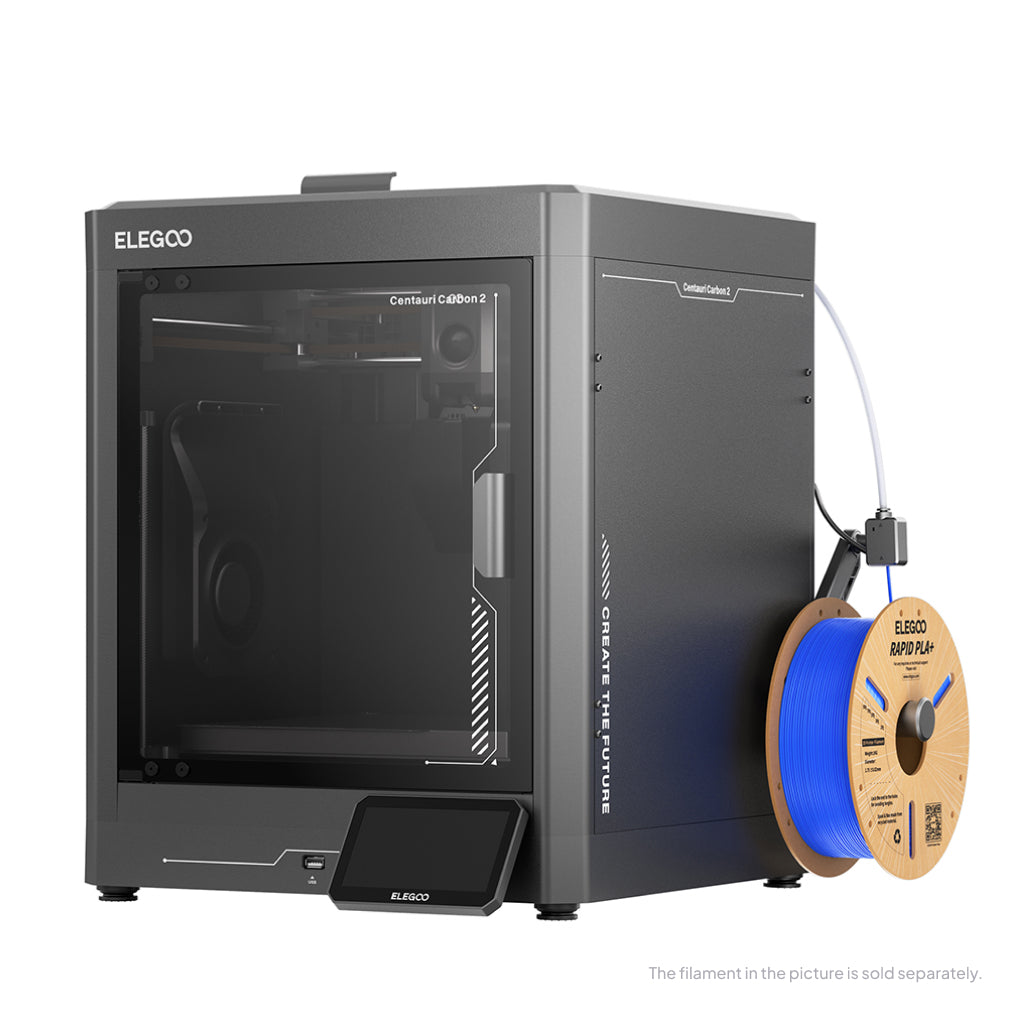
ELEGOO Centauri Carbon 2
Centauri Carbon 2 (standard, without CANVAS - not Combo)
Rated slower than the two above it and it barely matters — the 350 °C nozzle opens up materials they cannot reach, at the lowest enclosed price here. The only maker on this page that publishes the acceleration its machine actually ships at.
- Build volume
- 256 × 256 × 256 mm
- Technology
- FDM
- Max speed
- 500 mm/s (CoreXY)
- Enclosed
- Yes (thermally regulated enclosure)
- Multi-colour
- Optional (CANVAS 4-colour system; included only in the Combo; standard unit can be upgraded)
- Auto levelling
- Yes — full-auto calibration with 121-point auto-levelling and partial bed-levelling
What we like
- 350 °C nozzle over a 110 °C bed, the hottest standard hotend in this selection
- ELEGOO rates it superior with ABS, ASA, PET, PETG-CF, PC and PA — the widest list here
- The only maker on this page that publishes the acceleration the machine actually ships at
- The lowest price of any enclosed CoreXY in this selection
What we don’t
- Rated at 500 mm/s rather than 600, and no flow figure is published
- Owner reports describe getting the best from it at speed as a calibration job
- A recurring theme among owners and reviewers is flaky connectivity, with USB the fallback
- 12-month warranty, with build plate, nozzle and PTFE tube excluded as consumables
A speed figure is only worth something in a material you can print. The nozzle reaches 350 °C, the hottest standard hotend in the group, over a bed rated to 110 °C inside a fully enclosed CoreXY chamber. ELEGOO says the hardened steel nozzle takes PC, PET and fibre-reinforced filament, and rates the machine superior with ABS, ASA, PET, PETG-CF, PC and PA — a wider list than anything else here.
The rated maximum is 500 mm/s, below the two machines above, and that gap costs most buyers less time than it looks like it should. What ELEGOO gives instead is candour: a default acceleration of 10,000 mm/s² alongside a maximum of 20,000 — a manufacturer stating in its own table that the machine ships at half its headline figure.
The limits are software, not metal. A recurring theme among owners is that getting the best out of the machine at speed is a calibration job rather than something the shipped profile does for them, although reports differ on how much is needed. Connectivity is the other — a recurring theme among owners and reviewers is flaky connectivity between printer, slicer and app. The warranty runs 12 months, with the build plate, nozzle and PTFE tube excluded as consumables.
Buy this if you want ABS, ASA, PC or fibre-filled work in an enclosure: around the £280–£310 mark for the standard unit, with the Combo dearer. Skip this if you want it to work without calibration.
4. Speed with somewhere to put it, and a flow figure behind it
For the buyer whose time goes on batches and big parts rather than single small ones.
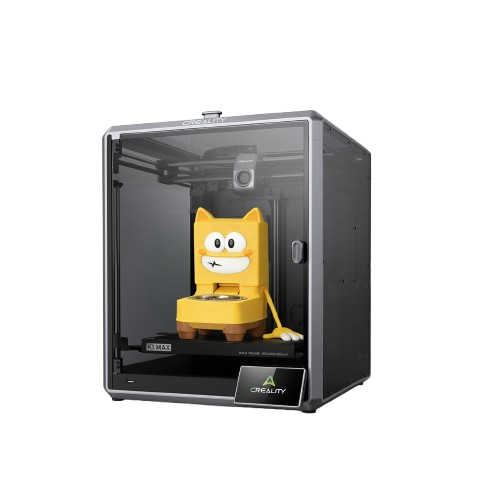
Creality K1 Max
K1 Max (2025 version as shipped; not the K1, K1 SE or K1C)
The only other machine here with a published flow figure, applied across a 300 mm cube — the combination that shortens a working week rather than a single print. Held back by the most repeated complaint in Creality's own forum: keeping a plate this size flat.
- Build volume
- 300 × 300 × 300 mm
- Technology
- FDM
- Max speed
- 600 mm/s (CoreXY, ≤20,000 mm/s² acceleration, max 32 mm³/s flow)
- Enclosed
- Yes (enclosed frame, active cooling — no chamber heating published)
- Multi-colour
- Optional (supports Creality's CFS filament system; the base machine is single-colour)
- Auto levelling
- Yes (nozzle strain gauge levelling, plus a 1 μm AI LiDAR first-layer scan)
What we like
- 600 mm/s and 20,000 mm/s² across 300 × 300 × 300 mm, the top speed bracket on a large plate
- 32 mm³/s of published hotend flow, from a ceramic heater reaching 200 °C in 40 seconds
- LiDAR first-layer scanning that stops the print, plus run-out sensing and power-loss recovery
- Up to 24 months of cover through Creality's UK store
What we don’t
- A dominant owner complaint that a plate this size is hard to keep flat
- Active cooling only, despite PC and unfilled nylon appearing on Creality's own filament list
- The price band reflects a promotional figure rather than a list price
- Creality's support is the dominant complaint about this brand on UK review sites
Throughput is parts per week, not millimetres per second, and the quickest way to raise it is often to stop printing one thing at a time. This machine is rated to 600 mm/s with up to 20,000 mm/s² of acceleration across a 300 mm cube of build volume — the only one here pairing the top speed bracket with a plate big enough to fill.
It is also the second of the two publishing a melt rate: up to 32 mm³/s, from a ceramic heater Creality says reaches 200 °C in 40 seconds, behind a hardened steel nozzle in an all-metal hotend. For unattended batch work the useful parts are protective: power-loss recovery, a run-out sensor and input shaping, plus a LiDAR that scans the first layer at 1 µm and stops the print if it goes wrong.
Then the problem, and it is this page's clearest example of why speed is the wrong thing to buy on. A recurring theme among owners is that a plate this size is hard to keep flat, and that large flat parts are where it shows; the responses they describe are a denser levelling mesh, a long bed soak and, for several, a thicker replacement plate — though this is not consistent across all reports. Those large flat parts are what the plate was bought for. The enclosure also has active cooling and no chamber heating, despite PC and unfilled nylon appearing on Creality's filament list for it.
Buy this if you print batches, or parts a 256 mm plate cannot hold — around the £560–£640 mark, a band reflecting a promotional price rather than a list one. Skip this if your work is large, flat and dimensionally fussy.
5. The machine that publishes no speed at all
For the buyer whose throughput problem is failed prints rather than slow ones.
Prusa CORE One L+
CORE One L+ (assembled; the refreshed CORE One L — not the original CORE One L, not the CORE One+)
Prusa publishes no maximum print speed for it, only a travel figure, and sells a heated chamber, two filament sensors and vibration correction instead. The most expensive machine here by some way, and the one whose throughput argument is about prints that finish.
- Build volume
- 300 × 300 × 330 mm (29.7 litres)
- Technology
- FDM
- Max speed
- Travel speed up to 500 mm/s (Prusa publishes travel speed, not a maximum print speed)
- Enclosed
- Yes (fully enclosed CoreXY; Active Convection Chamber up to 60 °C, heated from the underside of the AC heatbed by two fans)
- Multi-colour
- Optional (INDX tool-changer conversion kit, sold separately; the L+ is INDX-ready)
- Auto levelling
- Yes (automatic mesh levelling via load-cell sensor; ships pre-calibrated from the factory)
What we like
- Actively heated chamber to 60 °C over a 120 °C bed, the only real chamber heating here
- Quick-swap nozzle supplied with both a high-flow and an abrasive-resistant unit
- Two filament sensors and Input Shaper vibration correction across just under 30 litres
- Just under 30 litres of build volume, the largest on this page
What we don’t
- By far the most expensive machine here
- One year of UK warranty, against two years for consumers in the EU
- ABS, ASA, HIPS and PA are listed only with the separately sold Advanced Filtration unit
- Owner reports describe the 60 °C chamber as a figure owners work towards, not one it holds
Every other maker leads with a speed. Prusa does not. The specification table gives travel speeds of up to 500 mm/s — how fast the head moves between extrusions, not while laying plastic down — and stops there.
What is published is the apparatus for finishing a long job. The chamber is actively heated to 60 °C over a 120 °C bed, which is what stops a tall ABS part peeling off itself halfway up. The nozzle is a tool-free quick-swap supplied with both a brass high-flow unit and an abrasive-resistant one, and there are two filament sensors rather than one across just under 30 litres of build volume.
The limitations start with the price. UK buyers get one year of warranty against the two Prusa gives EU consumers. ABS, ASA, HIPS and PA are listed only with the separately sold Advanced Filtration unit fitted, so the materials the hot chamber exists for carry an extra purchase. Prusa calls the dimensional accuracy CT-scan-verified across the whole build volume but publishes no figure for it. And the chamber takes work: owner reports in Prusa's own forum describe the 60 °C figure as something owners work towards rather than a temperature the machine holds unaided, though at least one owner describes reaching it without added insulation.
Buy this if large engineering-plastic parts have to come out right first time and the £1,500–£1,750 band is within reach. Skip this if your jobs are small and mostly PLA — the Centauri Carbon 2 covers the same materials for a fraction of it.
6. Budget pick — the maker that admits the headline is not the setting
For the buyer who wants a fast CoreXY first machine without paying for ceilings they will never reach.
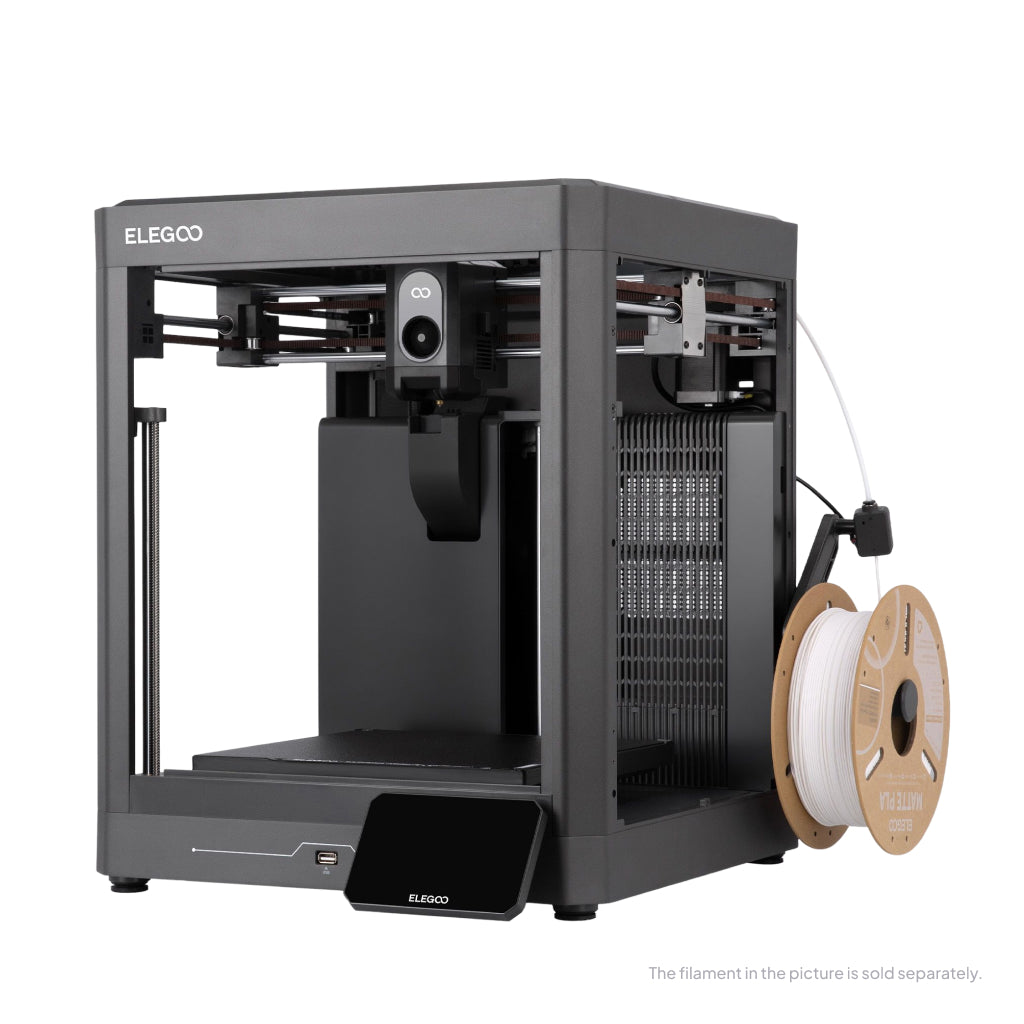
ELEGOO Centauri 2
Centauri 2 (standard open-frame unit, CANVAS not included — not the Centauri 2 Combo, the Centauri Carbon 2 or the Centauri Carbon 2 Combo)
The cheapest machine here, rated at 500 mm/s with a recommended 250 mm/s printed in the same table. Open-framed, so hot materials are out — but on PLA and PETG it gives up very little to machines costing twice as much.
- Build volume
- 256 × 256 × 256 mm
- Technology
- FDM / FFF CoreXY, dual-gear direct extruder, single nozzle
- Max speed
- ≤500 mm/s (ELEGOO recommends 250 mm/s)
- Enclosed
- No — open frame; ELEGOO lists no enclosure, and the chamber camera, air filter, smart exhaust grille and LED lighting are all optional expansions
- Multi-colour
- Not included on the standard unit; upgrade-ready for the CANVAS 4-colour system, which is sold separately or bundled in the Centauri 2 Combo
- Auto levelling
- Yes — full-auto calibration with 121-point auto-levelling and partial bed-levelling
What we like
- The lowest price in this selection, on a CoreXY frame
- ELEGOO publishes both its rated maximum and a recommended working speed
- Clog detection, run-out detection and power-loss recovery, absent from dearer machines here
- 256 × 256 × 256 mm, matching the mid-priced machines above it
What we don’t
- Open frame, so ABS, ASA, PET, PETG-CF, PA and PC are listed as not recommended
- The 350 °C nozzle is more capability than the open frame can use
- No operating sound figure is published, although one is for its enclosed sibling
- Owners and reviewers describe the top of the speed range as draft-grade
ELEGOO rates this at up to 500 mm/s and recommends 250 mm/s, with a default acceleration of 10,000 mm/s² against a maximum of 20,000. Both sit in the same parameter table — the plainest statement on this page of what the page is about, and it comes from the manufacturer rather than a reviewer.
The compromise is smaller than the price suggests. The build volume matches the two mid-priced machines above at 256 × 256 × 256 mm, the nozzle reaches 350 °C, and the sensor set is generous for the money: run-out detection, clog detection and power loss recovery. Clog detection in particular protects a long print, and it is absent from machines here costing more.
The real limit is the frame rather than the speed. ELEGOO lists no enclosure and its filament table reflects that: PLA, PETG, PLA-CF and TPU rated ideal, ABS, ASA, PET, PETG-CF, PA and PC listed as not recommended. The hot nozzle is more capability than the machine as a whole can use. On speed: owners and independent reviewers who state their settings consistently describe running well below the rated maximum for work they intend to keep, although some report reaching the rated figure without trouble.
Buy this if you print PLA and PETG, want CoreXY speed, and would rather have the £230–£260 band than a ceiling you will not use. Skip this if hot materials are in your plans — the Centauri Carbon 2 is the same machine with a lid on it.
How to benchmark a high speed FDM printer
Comparing headline figures compares marketing departments. Three things compare machines.
Benchmark the filament, not the printer. Prusa's advice for finding a working volumetric limit is to start conservative and raise it gradually, and it names the symptoms of going too far as extruder clicking, under-extrusion at speed and poor layer adhesion. That is the test, and it costs one evening and one spool. It also explains why two owners of the same machine report different limits: the results owners report from flow-testing a spool vary by brand and by material rather than tracking the machine's specification.
Convert the flow figure into a speed yourself. The arithmetic is published: the fastest the head can move is the volumetric limit divided by the cross-section of the bead being laid. A taller layer spends the same melt rate on more plastic, so it moves slower — which is why a draft at a 0.3 mm layer height is not three times quicker than the same part at 0.1 mm.
Benchmark the whole job. The time between deciding to make something and holding it includes heat-up, levelling and any restart. A machine that saves twenty minutes of extrusion and costs one failed eight-hour print has lost, which is why the owner evidence here concentrates on plates and clogs rather than motion systems.
What a fast FDM printer costs to run in the UK
Printing faster usually costs less electricity, not more.
The arithmetic below is an estimate and the assumptions are on the table: the Ofgem price cap unit rate of 26.32 pence per kWh for 1 October to 31 December 2026, an average for Direct Debit customers in England, Scotland and Wales, applied to an eight-hour print in PLA. Your tariff, your room and your part all move it.
Two makers publish what the machine draws rather than what the power supply is rated for. Bambu Lab gives the P2S about 200 W printing PLA against a 1,200 W peak while the bed heats; Prusa gives the CORE One L+ roughly 90 W on PLA. Eight hours at 200 W is 1.6 kWh, so about 42p of electricity, and the Prusa roughly 19p for the same hours. The other four publish a rated figure only — 350 W for the K1C, 1,000 W for the K1 Max and 1,100 W each for the two ELEGOO machines — which cover the worst moment rather than the steady state, and would overstate a bill several times over.
Nearly all that electricity becomes heat, and heat is drawn by the hour rather than by the millimetre. A machine finishing the same part in six hours instead of eight heats for two hours less, so it costs less per part even with a higher peak draw. Where speed does cost money is in failures: a print abandoned at hour seven has bought nothing. One cost no printer touches is the standing charge of about 55 pence a day under the price cap.
UK availability, warranty and spare parts
All six are buyable in Britain today without an import — less universal in this category than it ought to be, since the fastest filament printer found in this research is not.
Warranty separates them more than speed does. Bambu Lab's UK policy states two years from the warranty start date, the longest term here, sold through its own UK store and authorised resellers. Creality advertises up to 24 months on both its machines. ELEGOO states 12 months on the Centauri series, with the build plate, nozzle kit and PTFE tube excluded as consumables. Prusa is the surprise: UK buyers get one year against the two it gives consumers in the EU, Liechtenstein, Switzerland, Norway and Iceland — on the most expensive machine here, the shortest cover on it.
Supply routes are narrower than the brand names suggest. The K1C is stocked by Creality's UK store from a UK warehouse, and a major UK specialist no longer carries it. Both ELEGOO machines are sold in sterling by ELEGOO's official UK store, and the Prusa through more than one UK retailer with British delivery.
Support is where the owner record is most consistent and least comfortable. Creality's own support is the dominant complaint on UK review sites, described as slow to respond and slow to resolve faults, with experiences of the machines themselves sharply split. A long warranty is worth what the claims process makes it worth. On any fast machine, treat nozzles and plates as consumables rather than faults.
When a rapid FFF printer is the wrong thing to buy
You print mostly TPU or flexibles. Prusa's typical figure for TPU is 2 to 5 mm³/s against 12 to 20 for PLA. Flexible filament will not go fast on any machine made, and a high-flow hotend changes nothing about it.
You need quiet more than quick. Speed and noise come from the same place. Owner reports on Creality's own forum repeatedly single out fan noise, and several describe it as too loud for a shared room, although this is not consistent across all reports. If the machine lives where someone sleeps or works, that outweighs any throughput figure.
You want hot materials without the extra purchase. An enclosure is not a heated chamber, and a heated chamber is not always the whole requirement — Prusa lists ABS, ASA, HIPS and PA only with the separately sold Advanced Filtration unit fitted.
You print long PLA jobs in an enclosed machine. The enclosure that helps with ABS works against you here. Some owners describe the chamber running warm on long PLA prints, while others consider this normal enclosed-printer behaviour. An open-framed machine is the better tool for that, and cheaper.
A buyer with no material or volume requirement is probably not in a speed market at all, and the best FDM 3d printer uk guide is the better starting place.
The verdict
The Bambu Lab P2S takes it, and not because it is the fastest. It wins because it is the only machine here that publishes every figure its claim depends on, including how the flow rate was measured — and on a page where the headline number is the least reliable thing a manufacturer prints, that is worth more than another hundred millimetres a second.
- Buy it if
- You print PLA, PETG and occasional ABS, want the speed claim to be checkable, and can spend around the £450–£550 mark
- Skip it if
- Your work is large flat parts, or hot engineering plastics needing a chamber that holds temperature — pay for the Prusa, or drop to the Centauri Carbon 2 and accept the tuning
The broader conclusion matters more than the pick. The fastest hotend here is rated at 40 mm³/s and the plastics people actually buy give up between 2 and 20 mm³/s. Every machine on this page is faster than its own filament on most jobs, which is why the differences that survive a real print queue are material range, plate size and whether the thing finishes.
So: the Centauri Carbon 2 if hot materials matter and money is tight, the K1 Max if the plate must be bigger, the CORE One L+ if a failed engineering print costs more than the printer, the Centauri 2 if you print PLA and PETG, and the K1C if carbon fibre is a weekly habit.
How this article was researched
No machine here was bought, opened, run or measured. Every figure comes from a manufacturer's own specification sheet, product page, manual or warranty policy and is traceable through the citation beside it. Owner-experience passages summarise recurring forum patterns in our own words, never a quoted review or a rating. Flow figures that could not be confirmed from a primary source were left out, and are recorded in the quality report.
Common questions
- What is a realistic FDM speed?
- Well below the number on the box, and the limit is usually the plastic rather than the printer. Prusa Research publishes typical volumetric speeds by material — 12 to 20 mm³/s for PLA, 8 to 15 for PETG, 10 to 16 for ABS and ASA, 6 to 10 for polycarbonate and only 2 to 5 for TPU. Those are properties of the filament, not of any machine. The fastest hotend in this selection is rated at 40 mm³/s, so on an ordinary spool of PETG it is working at under half its capability and the extra rating buys nothing. Manufacturers occasionally say so themselves: ELEGOO rates the Centauri 2 at up to 500 mm/s and recommends 250 mm/s in the same parameter table, and gives both Centauri machines a shipping default acceleration of 10,000 mm/s² against a 20,000 maximum. Treat the headline as a specification of the hardware's ceiling and the maker's recommended figure, where one exists, as the setting you will actually use.
- Which hotends sustain high flow?
- Prusa groups them into classes and publishes a typical range for each: a standard all-metal hotend of the older E3D V6 type manages 8 to 12 mm³/s, its own Nextruder 15 to 20, a high-flow nozzle such as a CHT 20 to 35, and a full high-flow hotend 25 to 40. Two machines in this selection publish their own figure against those bands. Bambu Lab rates the P2S hotend at 40 mm³/s and, unusually, states the conditions — a 250 mm round model with a single outer wall, in Bambu Lab ABS, at 280 °C. Creality rates the K1 Max at up to 32 mm³/s from a ceramic heater it says reaches 200 °C in 40 seconds. Both sit in the top class. The other four makers here publish no flow figure that could be retrieved from a primary source, so none is stated for them on this page — which is a gap in their documentation rather than evidence of a slow hotend.
- How should fast printers be benchmarked?
- Not on the advertised figure, and not on somebody else's benchmark print. Prusa's own method for establishing a working volumetric limit is to start conservative and raise it gradually, watching for the symptoms of overshooting: extruder clicking, under-extrusion at speed and poor layer adhesion. That takes one evening and one spool, and it gives you a number that applies to your filament rather than to a test cylinder. Owners who do it report results that vary by brand and by material rather than tracking the machine's specification, which is why no published figure can substitute for it. Beyond that, benchmark the whole job rather than the extrusion: heat-up, levelling, the first layer and any restart all count, and a machine that saves twenty minutes of printing but loses an eight-hour job to a failure has gone backwards. Finally, treat a published benchmark time that needs a non-default profile, and produces a part you would not keep, as a demonstration rather than a measurement.