Fastest 3D Printers UK
Six of the fastest 3D printers on sale in the UK, ranked on the hotend flow figures their makers publish rather than the mm/s number on the box.
Independent and reader-funded. We earn a commission if you buy through our links, at no extra cost to you. How this works.
Two figures sit in the same specification table for the Bambu Lab X2D. One says the toolhead moves at up to 1000 mm/s. The other says the hotend melts at most 40 mm³ of plastic per second. Same manufacturer, same page, and only one can govern a line actually being laid down.
It is the second. The machine one rung below, the P2S, publishes the same 40 mm³/s against a toolhead figure of 600 mm/s — nearly half. One melt rate, headlines four hundred apart.
That is the problem with shopping for the fastest 3d printer uk buyers can order. The number on the box is a movement limit for an empty head. What decides when your print finishes is how much plastic the hotend can melt while that head is moving — and that figure is published too, in a row most people scroll past.
So this page ranks on it: six machines ordered by the flow rate their makers put in writing. Nothing here was bought or run, and where a figure is derived rather than published it says so.
The six, on the two numbers that decide this
Two rows below appear on no competing page. What the maker calls the figure quotes the label from the manufacturer's own table, because the label is where the honesty lives. Sustainable speed at 0.2 mm is arithmetic: the published flow figure divided by the cross-section of a standard extrusion, using the formula Prusa publishes for the purpose.
| Specification | 1 Bambu Lab P2S The flow ceiling, cheapest | 2 Bambu Lab X2D Highest headline figure | 3 Creality K2 Plus Highest acceleration | 4 QIDI Plus5 Engineering materials | 5 FlashForge Adventurer 5M Cheapest 600 mm/s | 6 Bambu Lab A1 Fastest bed slinger |
|---|---|---|---|---|---|---|
| Best for | The flow ceiling for the least money | Two materials, hot chamber, top figure | Big parts made of short moves | Speed held in engineering plastics | The lowest price that publishes 600 | A first fast machine on a budget |
| Published headline speed | 600 mm/s | 1000 mm/s | 600 mm/s | 600 mm/s | 600 mm/s | 500 mm/s |
| What the maker calls it | Max speed of toolhead | Max speed of toolhead | Printing speed | Max speed of tool head | Max travel speed, on its global page | Max speed of toolhead |
| Published hotend flow | 40 mm³/s | 40 mm³/s | 40 mm³/s | 40 mm³/s max, around 30 typical | 32 mm³/s | 28 mm³/s |
| Sustainable speed at 0.2 mm (calculated) | About 530 mm/s | About 530 mm/s | About 530 mm/s | About 530 mm/s, or 400 typical | About 425 mm/s | About 370 mm/s |
| Max acceleration | 20,000 mm/s² | 20,000 mm/s² | 30,000 mm/s² | 20,000 mm/s² | 20,000 mm/s² | 10,000 mm/s² |
| Build volume | 256 × 256 × 256 mm | 256 × 256 × 260 mm, 235.5 mm wide on two nozzles | 350 × 350 × 350 mm | 320 × 320 × 300 mm | 220 × 220 × 220 mm | 256 × 256 × 256 mm |
| Enclosure and chamber | Enclosed, no active heater | Enclosed, heated to 65 °C | Enclosed, heated to 60 °C | Enclosed, heated to 65 °C | Open frame | Open frame |
| UK warranty | 2 years | 2 years | 12 months, 3 on the extruder kit | 1 year | 12 months, 3 on extruder parts | 2 years |
| Typical UK price | £450–£550 | £560–£630 | £800–£900 | £650–£750 | £260–£400 | £240–£320 |
Read the second row against the fourth. Four machines publish an identical melt rate under headlines that differ by two thirds, and two share a single headline with flow figures a fifth apart.
How these six were chosen, and what a rapid 3d printer is being measured against
Nothing here was bought, opened or run. Every machine was researched against manufacturer specification sheets, product pages and warranty terms, with UK price and stock checked in September 2026; owner evidence comes from the makers' own forums, and the approach is set out in our review methodology. A machine earned its place by publishing a hotend flow figure, because without one there is nothing to rank — which is why Creality's K1C is absent, and why Prusa, publishing no single maximum print speed at all, appears here as a source rather than a product.
Then the labels, which no competing page mentions. Bambu Lab calls its headline number the maximum speed of the toolhead; QIDI uses almost the same phrase. FlashForge goes furthest, listing the Adventurer 5M's 600 mm/s on its own global page as a maximum travel speed — while the same company's UK store shows the identical figure with the word travel removed.
Three makers also publish what they recommend. QIDI states that high-speed PLA and ABS typically print around 30 mm³/s against its 40 mm³/s maximum. Anycubic recommends 300 mm/s on a machine rated to 600. ELEGOO recommends 250 mm/s on one rated to 500, with a default acceleration of half its own maximum. Each is a seller saying the headline is not the setting, and no competing page quotes any of them.
Owner reports on Bambu Lab's own forum repeatedly describe the advertised fast benchmark time as reachable only by overriding the shipped profile, with a visible cost to surface finish and overhangs, and describe the standard profile taking substantially longer; this is not consistent across all reports, and some owners treat the figure as a demonstration of a ceiling rather than a setting to use. Publishing a ceiling is legitimate; it is not a throughput promise.
Resin machines are out of scope: exposure and lift speed are not comparable with extrusion throughput. No commercial tiebreak was used, and the order runs against revenue — the most expensive machine is third. If throughput is not your deciding factor, the broader best 3d printer uk guide is a better start.
What actually sets the ceiling, worked through
A printer cannot lay plastic down faster than its hotend can melt it. Prusa names that limit — maximum volumetric speed, the most plastic in mm³ per second a hotend can reliably melt — and publishes the relationship in one line: maximum speed equals that limit divided by the cross-section of the extrusion, and it can only reduce a requested speed, never raise one.
So the arithmetic is yours. Take an ordinary job: a 0.4 mm nozzle laying a 0.42 mm line at a 0.2 mm layer height. Prusa models that cross-section as a stadium rather than a rectangle, giving a little over 0.075 mm². Divide the published flow figures by it. 40 mm³/s supports about 530 mm/s. A 32 mm³/s hotend supports about 425, and one at 28 mm³/s about 370.
These are calculations from published figures at one layer height, not measurements, and a thicker layer pulls each down further. The shape of the answer holds: the X2D's 1000 mm/s headline is roughly twice what its own hotend can feed, and every 600 mm/s machine here asks for more than its own flow figure supplies — which is also why the P2S at 40 mm³/s and the Adventurer 5M at 32 are not equally fast.
Acceleration decides small parts
Top speed is irrelevant to a move too short to reach it, and this is documented rather than inferred. The firmware family these machines are built on models every move as accelerate, cruise, decelerate, states that the cruising phase can be of zero duration, and by default lowers the top speed of short moves so at least half the distance is spent cruising. A bracket with holes and ribs is thousands of such segments, so what governs the job is how hard the machine can change direction — which is why a high acceleration 3d printer beats a high top-speed one on anything detailed, and why 30,000 mm/s² is more interesting than 1000 mm/s.
That also narrows the case for a fast CoreXY printer: the layout keeps a moving bed's mass out of the equation, but it does not melt plastic. Owners repeatedly describe settling well below the published maximum for work they intend to keep, and name the hotend's flow rate rather than the motion system as the limit they meet first; several who do run faster describe changing the nozzle or the hotend to get there.
1. The flow ceiling, for the least money
Buy this if you would rather pay for the figure that makes prints finish sooner than the figure on the box.
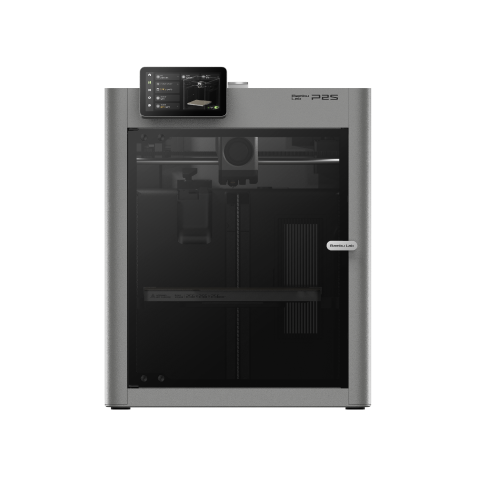
Bambu Lab P2S
P2S (standard, without AMS)
The highest hotend flow figure on this page, reached at roughly half the price of the two machines that match it. Enclosed, two years of cover. What it gives up is an active chamber heater.
- Build volume
- 256 × 256 × 256 mm
- Technology
- FDM
- Max speed
- 600 mm/s toolhead (20,000 mm/s² acceleration)
- Enclosed
- Yes (fully enclosed; door sensor and activated-carbon air filter; no active chamber heater listed)
- Multi-colour
- Optional (AMS 2 Pro / AMS sold separately or in P2S Combo)
- Auto levelling
- Not confirmed
What we like
- 40 mm³/s published hotend flow — the highest figure here, and the cheapest machine that reaches it
- 600 mm/s and 20,000 mm/s² inside a fully enclosed shell
- 300 °C nozzle over a 110 °C bed, rated for ABS, ASA and fibre-reinforced grades
- Two years of UK cover, the longest term on this page
What we don’t
- No active chamber heating — the reason the two machines above it cost more
- Owner reports on long PLA jobs describe the chamber running warm, with the airflow profile set automatically
- Bambu Lab's own label calls the 600 mm/s a toolhead speed; the flow supports roughly 530
- Bambu Lab's warranty handling draws recurring complaints from UK buyers
It takes first place on one comparison. The hotend is rated at 40 mm³/s, measured on a 250 mm single-wall model in the maker's own ABS at 280 °C — identical to the X2D below, and to two machines costing several hundred pounds more. Nothing here melts plastic faster.
That makes its 600 mm/s toolhead rating closer to meaningful than most, since the flow supports roughly 530 mm/s of it, with 20,000 mm/s² to use on detailed parts. A 300 °C nozzle over a 110 °C bed covers ABS, ASA and fibre-filled grades inside an enclosure, on a 256 × 256 × 256 mm plate. Two years of UK cover is the longest term here.
The honest limitation is thermal. There is no active chamber heater — exactly what the K2 Plus and the Plus5 charge for. Some P2S owners describe the chamber running warm on long PLA prints and adjust the airflow profile or open the door, while others consider this normal enclosed-printer behaviour. An enclosure that holds heat it cannot regulate is the wrong shape for long PLA jobs at full speed.
Buy this if you want the best documented throughput per pound and print mostly PLA and PETG. Skip this if you need a regulated hot chamber or a larger plate — the K2 Plus has both.
2. Highest headline figure on sale, and what it does not buy
The most striking specification in the category belongs here, and it is ranked second on purpose.
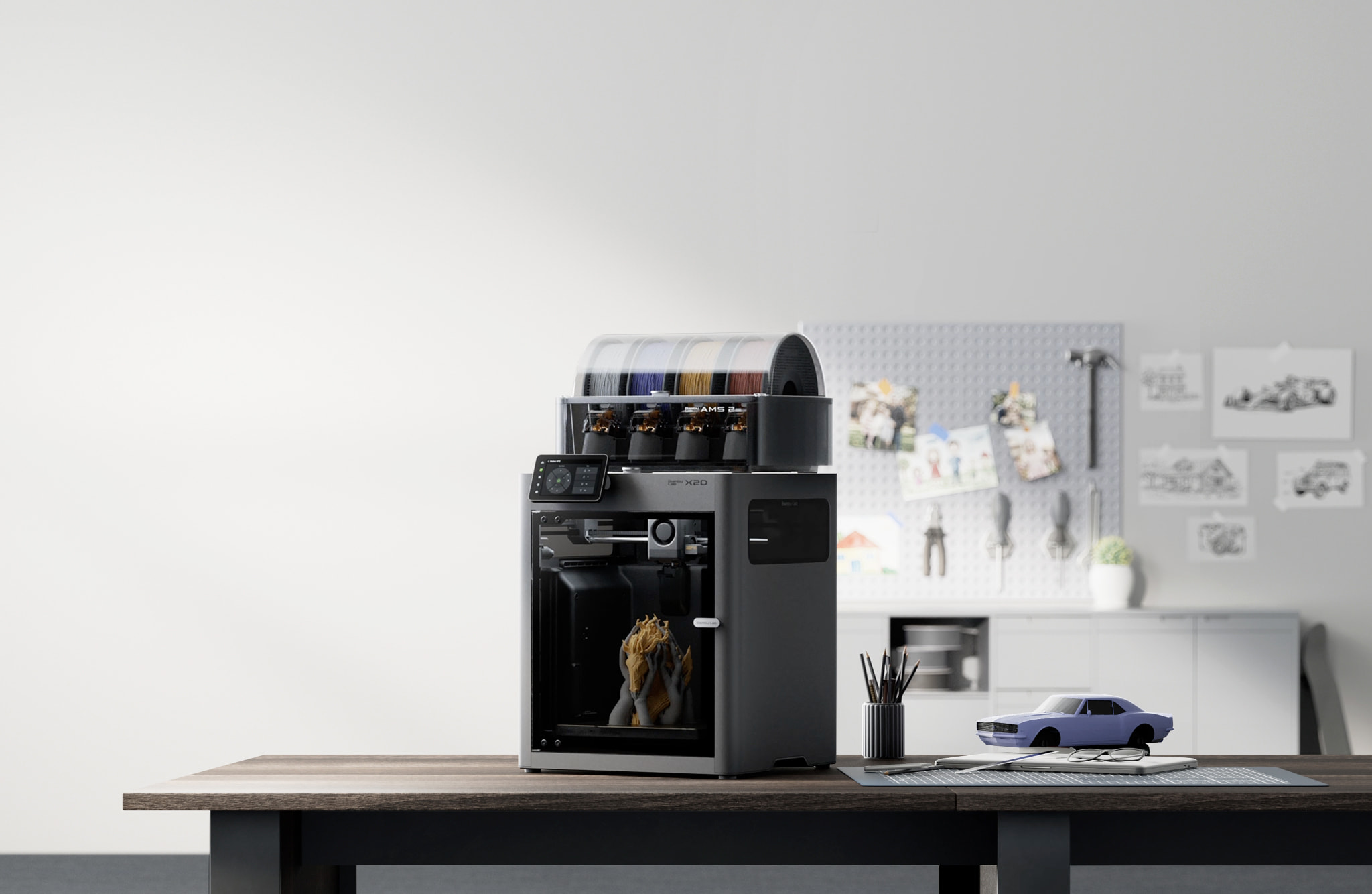
Bambu Lab X2D
X2D (standard unit, supplied without the AMS 2 Pro — not the X2D Combo, and not the P2S or the X1 series)
The only machine publishing a four-figure toolhead speed, and the clearest evidence here that the figure is not a print speed: its hotend flow matches the cheaper P2S. Buy it for the heated chamber and the second nozzle.
- Build volume
- 256 × 256 × 260 mm main nozzle; 235.5 × 256 × 256 mm auxiliary or dual nozzle
- Technology
- FDM / FFF, dual-nozzle toolhead with a mechanically switched auxiliary hotend; actively heated chamber. Bambu Lab's own specification sheet does not name a motion architecture; CoreXY rests on two secondary sources (C0959)
- Max speed
- 1000 mm/s — labelled by Bambu Lab as Max Speed of Toolhead, not a print speed (20,000 mm/s² max toolhead acceleration; 40 mm³/s max hotend flow)
- Enclosed
- Yes — outer frame of plastic, glass and metal, with a door sensor, an external exhaust fan and active chamber heating to 65 °C
- Multi-colour
- Dual nozzle on the standard unit, so two materials without an AMS; the X2D Combo adds the AMS 2 Pro and is a different SKU
- Auto levelling
- Yes
What we like
- 1000 mm/s published toolhead speed — the highest figure any maker here publishes
- Actively heated chamber to 65 °C over a 120 °C bed, the hottest combination on this page
- Two nozzles, so a support material or a second colour needs no filament changer
- G3 pre-filter, H12 HEPA and granulated coconut-shell carbon filtration fitted
What we don’t
- Hotend flow is 40 mm³/s — identical to the cheaper P2S, so the headline buys no extra throughput
- The plate drops from 256 mm to 235.5 mm of X travel as soon as the second nozzle is used
- PLA Silk, PETG-CF, ASA-CF and PA6-CF are flagged for caution on the auxiliary hotend
- No Ethernet, and too new to have an owner record worth quoting
1000 mm/s is what Bambu Lab publishes, under the heading Speed, labelled the maximum speed of the toolhead. The same table gives the hotend 40 mm³/s under stated conditions — the identical figure to the P2S. The headline nearly doubles; the melt rate does not move. That flow supports somewhere near 530 mm/s, so the specification asks the head to travel about twice as fast as the hotend can feed it.
What the extra money buys is thermal. The chamber is actively heated to 65 °C, which makes ABS and ASA behave rather than warp, over a bed reaching 120 °C — the hottest here — and two nozzles mean a support material or second colour without a filament changer.
The limitations are specific. The second nozzle costs build area: the plate drops from 256 mm to 235.5 mm of X travel the moment a dual-material job starts. Bambu Lab flags PLA Silk, PETG-CF, ASA-CF and PA6-CF for caution on that hotend and advises the main one for them, so a second nozzle bought for fibre-filled work is not what it appears. The nozzle stops at 300 °C, below both the K2 Plus and the Plus5, and the machine is too new for an owner record.
Buy this if you want a hot chamber and two materials in one machine. Skip this if you are buying the thousand — the P2S melts plastic just as fast for less — or need it to work in an unheated space, since the specified operating range stops at 30 °C.
3. Highest published acceleration, on the largest plate here
Detail costs time, and the machine losing least of it is the one that changes direction hardest.
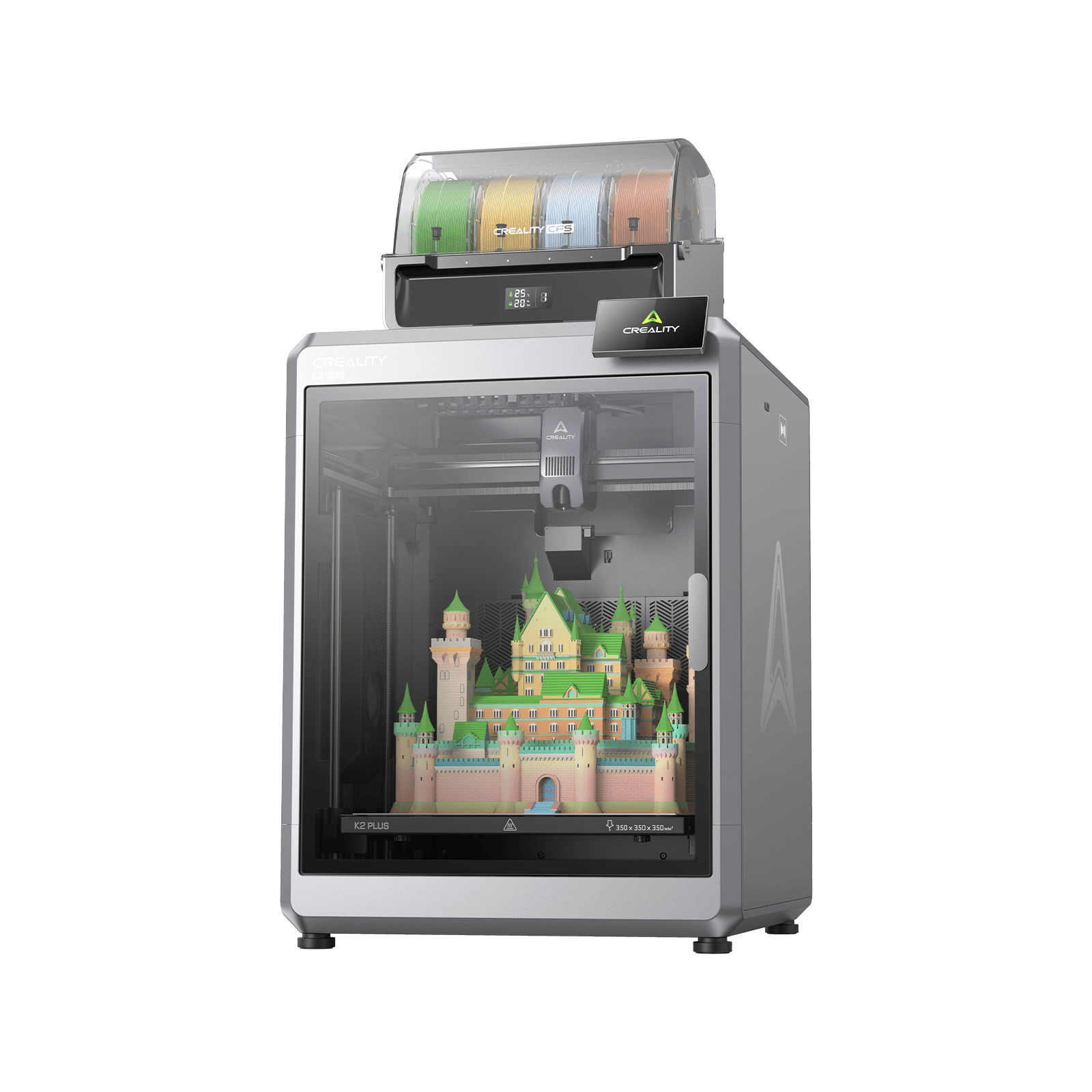
Creality K2 Plus
K2 Plus (base printer, without the CFS; not the K2, K2 Pro, K2 SE or K2 Plus Combo)
The highest published acceleration here by half again, matched to the largest plate — the combination that shortens a detailed print rather than a straight-line one. The most expensive machine on this page.
- Build volume
- 350 × 350 × 350 mm
- Technology
- FDM
- Max speed
- ≤600 mm/s (≤30,000 mm/s² acceleration)
- Enclosed
- Yes — with active chamber heating to 60 °C
- Multi-colour
- Optional — up to 16 colours with four CFS units; the base machine is single-colour
- Auto levelling
- Yes — full-auto levelling, with a separate calibration AI camera
What we like
- 30,000 mm/s² — half again the best acceleration any rival here publishes
- 350 × 350 × 350 mm, the largest plate on this page
- 40 mm³/s flow with a 350 °C hardened steel nozzle and a chamber heated to 60 °C
- Ships to UK buyers from a Leicestershire warehouse
What we don’t
- The most expensive machine on this page
- Owners repeatedly describe a plate this size as hard to keep flat once hot, which shows on large flat parts
- Owner reports on Creality's own forum describe extruder and filament-feed jams
- 12 months of cover, with the extruder kit at three
30,000 mm/s² is the figure, against 20,000 everywhere else, on a hotend Creality rates at 40 mm³/s tested with ABS at a 280 °C nozzle temperature — the same flow ceiling as the two Bambu Lab machines, under a comparable test. The melt rate is level with the best here; the ability to use it on short moves is not.
That matters because of documented firmware behaviour: on a short move the cruising phase can be of zero duration, and a default setting lowers the top speed of short moves further. A part covered in holes and ribs is made almost entirely of those moves, and half again the acceleration is the only specification here that shortens it.
It is also the biggest fast machine at 350 × 350 × 350 mm, with a 350 °C nozzle and a chamber heated to 60 °C covering PC and filled nylons, not just ABS.
The limitations are the price and the plate. A recurring theme among K2 Plus owners is that a plate this size is hard to keep flat once it is hot, and that large flat parts are where it shows; the responses they describe are a long bed soak before starting and a manual mesh. That lands hardest on the big flat prints the volume was bought for. Cover runs 12 months, the extruder kit three.
Buy this if you print large, detailed parts in engineering plastics. Skip this if your prints fit a standard plate, where the P2S gives the same flow for far less, or if a bed soak before every job is not something you want to schedule.
4. Speed held in engineering plastics, with a typical figure published
One manufacturer here says what its machine actually does, not only what it can do.
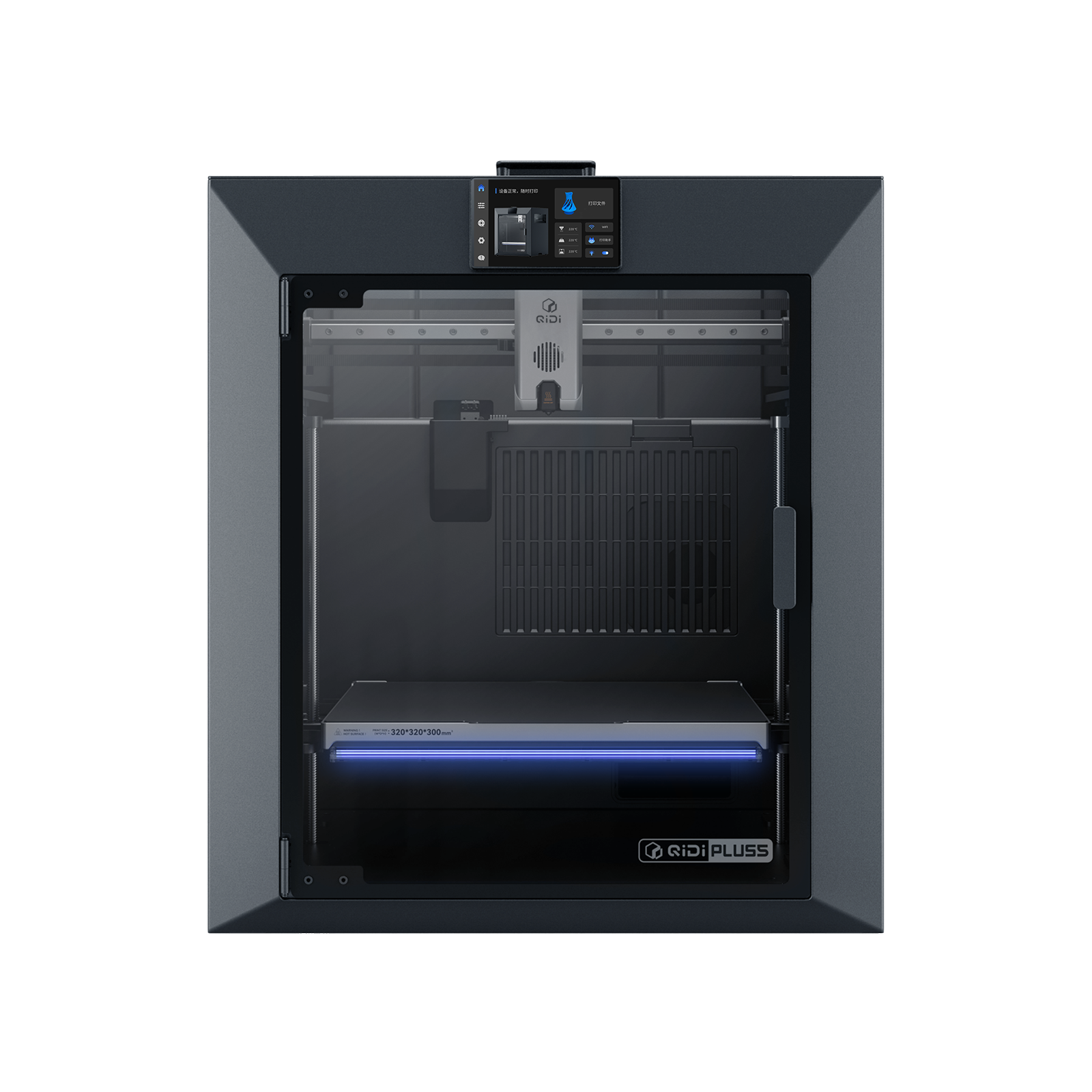
QIDI Plus5
QIDI Plus5 (standard, not the Plus5 Combo with QIDI Box, and not the Plus4)
The only maker here to publish a typical flow rate alongside a maximum, and the machine built to hold speed in ABS, ASA and filled nylon. A 370 °C nozzle and a regulated 65 °C chamber.
- Build volume
- 320 × 320 × 300 mm
- Technology
- FDM
- Max speed
- 600 mm/s toolhead (≤20,000 mm/s² acceleration)
- Enclosed
- Yes, with independent active chamber heating up to 65 °C (3rd generation)
- Multi-colour
- Optional (compatible with QIDI Box; the Combo bundles it for 16 colours)
- Auto levelling
- Yes (hands-free, loadcell sensor integrated into the hotend)
What we like
- The only maker here to publish a typical flow figure — around 30 mm³/s — beside its 40 mm³/s maximum
- 370 °C nozzle, the highest on this page
- Chamber independently and actively heated to 65 °C — regulated, not merely enclosed
- 320 × 320 × 300 mm, second only to the K2 Plus
What we don’t
- Owner discussion returns to heat creep on long jobs, the tension a hot chamber creates for the extruder above it
- Owners describe these machines as engineering tools rather than plug-and-play
- One year of cover, and 29 kg to reposition
- QIDI labels its headline 600 mm/s a tool head speed, not a print speed
The number that earns its place is the small one. QIDI rates the hotend at 40 mm³/s and states on the same page that high-speed PLA and ABS typically print around 30 mm³/s — a seller volunteering a quarter off its own headline, which converts to roughly 400 mm/s of sustainable line speed rather than 530. Every machine here has a figure like that; this is the only one that publishes it.
The hardware is built for heat rather than for a number. The nozzle reaches 370 °C, the highest here, and the chamber is independently and actively heated to 65 °C — regulated, not merely enclosed, which is the difference between ABS that warps and ABS that does not. The plate is 320 × 320 × 300 mm at 600 mm/s and 20,000 mm/s².
There is a tension in the design worth knowing first. Discussion of these heated-chamber machines keeps returning to the same tension — a chamber hot enough for engineering plastics also warms the extruder above it, and heat creep on a long job is what owners describe. A hot chamber and a high flow rate pull against each other on a long print, and that is the honest ceiling here rather than any published figure. Cover is one year.
Buy this if your fast prints are in ABS, ASA, PC or filled nylon. Skip this if you print PLA almost exclusively, where the P2S is faster per pound, or want a machine that is right out of the box.
5. The lowest price that publishes 600 mm/s
The cheapest route to the headline everything above shares, from the maker most candid about it.
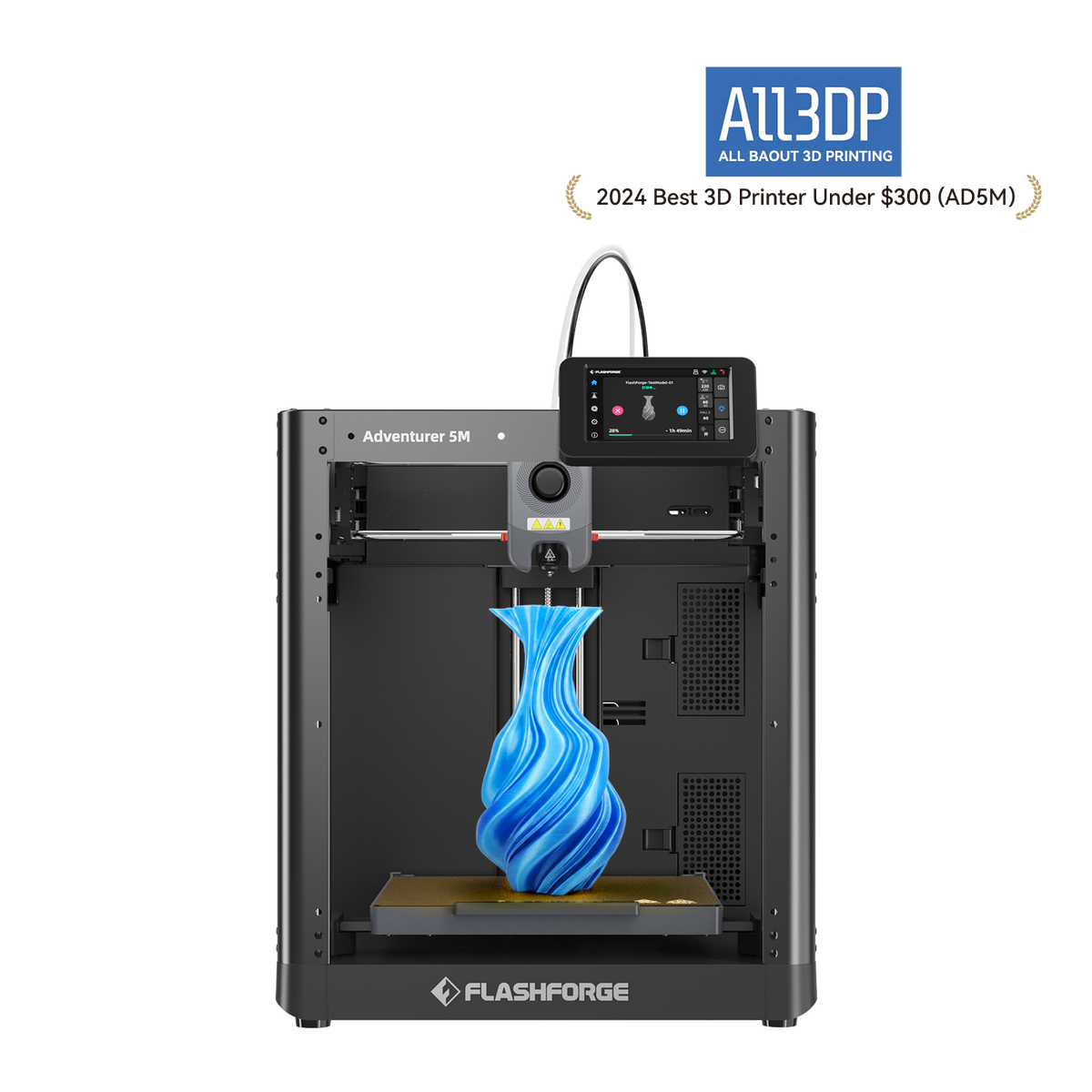
FlashForge Adventurer 5M
Adventurer 5M (open-frame standard model; not the enclosed 5M Pro)
Matches the headline speed of machines three times the price from around the £260 mark, and publishes the flow figure that shows what the gap buys: a fifth less plastic per second. Open frame, so PLA and PETG rather than ABS.
- Build volume
- 220 × 220 × 220 mm
- Technology
- FDM / FFF CoreXY, direct drive, single extruder
- Max speed
- 600 mm/s (20,000 mm/s² acceleration)
- Enclosed
- No (open frame; a DIY enclosure kit is sold separately)
- Multi-colour
- No
- Auto levelling
- Yes — FlashForge's Automatic Datum Management (ADM) auto-levelling
What we like
- 600 mm/s and 20,000 mm/s² at the lowest price band on this page
- FlashForge's own global page labels that figure a maximum travel speed — the most candid label in the category
- Ethernet alongside Wi-Fi and USB, the only wired network connection here
- 350 W rated, a fraction of what the enclosed machines pull
What we don’t
- 32 mm³/s flow, a fifth below the 40 the dearer machines publish
- Open frame with a 280 °C nozzle, so PLA and PETG rather than ABS or ASA at speed
- 220 × 220 × 220 mm, the smallest plate on this page
- Owner reports name the fans as the loud part, and reports on support are divided
600 mm/s at 20,000 mm/s² puts it level on paper with machines at three times the price. Then FlashForge labels that figure, on its own global product page, a maximum travel speed — and the flow figure shows why the honesty costs it nothing: 32 mm³/s, a fifth below the 40 the dearer machines publish, supporting roughly 425 mm/s rather than 530. That is what several hundred pounds buys here — about a hundred millimetres a second.
For the money it is unusually well equipped: a stated vibration-suppression algorithm compensating during high-speed printing, CoreXY motion on a frame FlashForge's own table lists as open, and Ethernet alongside Wi-Fi and USB — the only wired network connection here.
The limits are the frame and the noise. An open frame at 220 × 220 × 220 mm with a 280 °C nozzle means PLA, PETG and fibre-filled PLA rather than ABS or ASA at speed. Owner reports on the open-frame version of this machine repeatedly name the fans as the loud part and describe adding an enclosure as the fix, which is consistent with the figure the manufacturer publishes for its own enclosure kit. Cover is 12 months, three on extruder parts.
Buy this if you want the most throughput for the least money. Skip this if you need ABS or ASA, which an unheated open frame will not hold, or a bigger plate than it offers.
6. Budget pick — the fastest bed slinger with a published flow figure
One machine here moves its plate rather than only its head, and it is here to settle an argument, not lose one.
Bambu Lab A1
A1 (standard, without AMS lite)
The lowest published flow rate on this page at the lowest price, with two years of cover — and the machine that shows how much of the CoreXY speed argument is really about the hotend.
- Build volume
- 256 × 256 × 256 mm
- Technology
- FDM
- Max speed
- 500 mm/s toolhead (10,000 mm/s² acceleration)
- Enclosed
- No
- Multi-colour
- Optional (AMS lite sold separately; up to 4 spools)
- Auto levelling
- Yes (fully automatic)
What we like
- 28 mm³/s published flow at the lowest price band here
- 256 × 256 × 256 mm, the same plate size as the P2S
- Two years of UK cover, matching the machines several times its price
- Long-term owner reports describe it as reliable and low-maintenance
What we don’t
- The lowest flow figure on this page, supporting roughly 370 mm/s by calculation
- 10,000 mm/s² acceleration, half what most machines here publish
- Owner opinion on the moving bed divides over tall, narrow models
- Open frame, so ABS, ASA, PC and fibre-reinforced filaments are not recommended
28 mm³/s is the figure, measured the same way as the Bambu Lab machines above it and the lowest here. At a standard layer height that supports around 370 mm/s — roughly 70% of what the 40 mm³/s machines sustain, for about half the price of the P2S. Its rated toolhead speed is 500 mm/s on a 256 × 256 × 256 mm plate the same size as the P2S's.
The reason it is here is the comparison. Bambu Lab's own service documentation puts the A1's Y-axis belt, motor and linear rail in the base beneath the heatbed — a bed slinger, and the architecture fast CoreXY marketing is aimed at. Its acceleration is genuinely lower at 10,000 mm/s², a real disadvantage on detailed parts, but on a straight-line print flow governs the clock.
The limitation is the one the architecture predicts. Owner opinion on the A1 moving bed is divided: several point to tall, narrow models as the case where it shows, while others report tall prints completing without trouble and put failures down to bed adhesion instead. Open framed, it is for PLA, PETG and TPU rather than ABS, with two years of cover.
Buy this if you want most of this page's throughput for the least outlay. Skip this if you print tall, slender models, need ABS or ASA, or want the acceleration that shortens a detailed job.
What to look for in a high speed 3d printer
Three checks, in the order they matter.
The flow figure, and the conditions attached. Both Bambu Lab machines and the K2 Plus were measured in ABS at 280 °C, which makes those three comparable with each other and not with anything else. A flow figure with no stated test is marketing.
Which nozzle diameters it takes. A wider nozzle covers ground faster at a given flow rate, at the cost of fine detail. A machine supporting 0.2, 0.4, 0.6 and 0.8 mm nozzles gives you that trade; one locked to a single diameter does not.
Cooling, because a faster line needs more of it. A fast line has less time to solidify before the next layer lands on it, so overhangs and small features suffer first. A vibration-suppression system helps accuracy under hard acceleration, but nothing in the motion system buys cooling back.
Which resolves "does faster reduce quality": below the flow ceiling, a well-tuned fast machine and a slow one produce output owners struggle to separate. Above it, the failure is not subtle. A recurring practice among owners is to print a flow-test tower to find what a particular filament will take rather than trusting a published figure, and the results they report vary by brand and by material rather than tracking the machine's specification; the symptom they describe when the limit is passed is gaps and rough surfaces rather than a warning.
What a fast 3d printer costs to run in the UK
Start with what these machines are not. The X2D is rated at up to 1600 W on UK mains, and Bambu Lab states in the same table that maximum power is held for only three to five minutes while the bed heats. A rated ceiling is a fuse specification, not a bill.
The figure that is a bill is steady-state draw, and three makers publish it. At the Ofgem price cap unit rate of 26.32 pence per kWh for the last quarter of 2026, over a ten-hour print: the P2S on PLA draws 200 W, so 2 kWh, about 53p. The X2D draws 250 W, so 2.5 kWh, about 66p. The Plus5 draws 190 W, so 1.9 kWh, a shade under 50p. These are estimates at one tariff, not measurements, and exclude the standing charge of 54.83 pence per day.
Now the part that makes speed look better than expected. A printer draws roughly the same watts at half speed as at full speed, because heaters and fans dominate. Finish the same part in half the time and you have used close to half the electricity: printing faster lowers the energy cost per part.
What moves the bill is the chamber heater. The Plus5 draws 190 W on PLA and 500 W on ABS; the X2D 250 W on PLA and 550 W on polycarbonate. Ten hours of the X2D on polycarbonate is 5.5 kWh of electricity, about £1.45 at the same unit rate, against 66p on PLA. So the question here is not how fast the machine goes but whether you need a hot chamber — and either way, a failed ten-hour print costs more in plastic than a week of successful ones costs in power.
UK availability, warranty and spare parts
Warranty is where this page's order and the price order diverge most. Both Bambu Lab machines carry two years of UK cover, paused while a machine is in transit to and from repair. The Plus5 carries one year. The K2 Plus and the Adventurer 5M carry twelve months with only three on the extruder, the part most likely to need it — the clause to read on a machine bought to run hard, because the extruder is what running hard consumes.
All six were in UK stock when this page was checked. The X2D was available on three routes, one offering next-working-day delivery; the K2 Plus ships from a Leicestershire warehouse, which on a 35 kg machine saves an import surprise. That weight has a cost: UK retailers add a bulky-goods surcharge of around the £45 mark to the heavier machines — the difference between the bottom and top of the X2D's band.
One connectivity detail matters more than it looks in an office or a school. The Adventurer 5M has Ethernet alongside Wi-Fi and USB; the X2D has Wi-Fi only, with no Ethernet and no 802.1X support. On a managed network the cheapest machine here is the easiest to get approved.
Support separates the brands rather than the machines. A recurring theme among Bambu Lab buyers on UK review sites and the manufacturer's forum is slow warranty support, although delivery and packaging are frequently praised. QIDI's support draws consistent praise on UK review sites for responding quickly, though reports of hardware faults on arrival sit alongside it. So the longest warranty term here belongs to the brand whose handling draws the most complaints.
When speed is the wrong thing to buy
Buying the mm/s figure. On this page it is not even a reliable ordering: four machines share one melt rate under three different headlines, and two share one headline with melt rates a fifth apart.
Buying a bigger plate to go faster. A larger plate raises parts per job, not throughput, and the largest plate here brings a flatness problem of its own. If you want more parts per hour rather than fewer minutes per part, two cheaper machines beat one expensive one — and they fail independently.
Optimising speed when the bottleneck is elsewhere. If prints are failing or the filament is damp, a faster machine converts that into a faster failure. A short move never reaches the rated velocity anyway, so on small detailed parts the gap between these machines is narrower than their prices suggest.
And for some work speed is the wrong criterion entirely. Tall, slender models are governed by stability, where the machine holding the part matters more than the one feeding it, and miniatures are a resin question rather than an extrusion one. If throughput is not your deciding factor, the best fdm 3d printers uk guide ranks the same technology on all-round merit, while best budget 3d printers uk is the better start if the constraint is the outlay.
The verdict
The Bambu Lab P2S is the pick, on one line of a specification sheet: it publishes the highest hotend flow rate here, 40 mm³/s, and is the cheapest machine that reaches it. Two machines match that melt rate and both cost more — one for a headline nearly twice as high its own hotend cannot feed. If you need a hot chamber for ABS and nylon, the X2D and the Plus5 are built for it; if detailed parts are your work, the K2 Plus and its 30,000 mm/s² shortens that job. At the other end, the A1's published 28 mm³/s is 70% of the best figure here for a fraction of the price.
Whichever you choose, the largest gain is not on this page. It is an hour spent finding what your own filament takes, because the published figure was measured in someone else's ABS.
- Buy it if
- You want prints to finish sooner and will buy the figure that decides that — hotend flow rate — not the figure on the box.
- Skip it if
- Your prints are small and detailed, your bottleneck is failed jobs rather than speed, or what you need is a second printer rather than a faster one.
How this article was researched
No machine here was bought, opened, run or measured. Every specification comes from the manufacturer's own specification sheet, product page, manual or warranty policy and is traceable through the citation beside it; UK prices were checked across authorised retailers in September 2026 and are given as bands, because a live figure goes stale. Where this page states a sustainable speed, that is arithmetic applied to a published flow figure, labelled as a calculation each time. Owner-experience passages summarise recurring forum patterns in our own words — never a quoted review or a rating. Two figures that could not be confirmed from a primary source were left out, and both are recorded in the quality report.
Common questions
- What is a realistic 3D printing speed?
- Somewhere between a third and two thirds of the number on the box, and the reason is arithmetic rather than pessimism. The figure manufacturers advertise is a velocity limit for the print head; what actually paces a job is how much molten plastic the hotend can deliver, published separately as a volumetric flow rate in mm³ per second. Work one into the other at a common setting — a 0.4 mm nozzle, a 0.42 mm line, a 0.2 mm layer — and the best hotends on this page, rated at 40 mm³/s, top out near 530 mm/s; 32 mm³/s comes to about 425, and 28 mm³/s to about 370. Those are ceilings too, at one layer height, and a thicker layer or a wider line lowers every one of them. Two sellers publish the practical figure themselves: one states that high-speed PLA and ABS typically run around 30 mm³/s against its 40 mm³/s maximum, which is roughly 400 mm/s; two others recommend 250 mm/s and 300 mm/s on machines they rate at 500 and 600. Treat the advertised number as a specification of the hardware's limit, and the maker's recommended figure — where one exists — as the speed you will actually use.
- Does faster printing reduce quality?
- Not until you cross the hotend's flow limit, and then sharply. Below that point the machine is delivering as much plastic as the nozzle asks for, and owners who have compared a well-tuned fast printer against a slower one describe output they struggle to tell apart on ordinary filament, with the differences they do notice usually traced to calibration rather than speed. Above it, the extruder is being asked for more material than it can melt, and the result is under-extrusion: gaps between lines, rough surfaces and weak layer bonds. It arrives without a warning on the screen, which is why the routine owners recommend to each other is printing a flow-test tower for each spool rather than trusting either the machine's specification or a slicer default. Two other effects are worth separating from flow. Cooling gets harder as the line speed rises, because each layer has less time to solidify before the next one lands on it, and overhangs and small features are where that shows first. And hard acceleration excites vibration in the frame, which is what input shaping and the various vibration-compensation systems exist to suppress. Neither is fixed by slowing down alone, and neither is what most people mean when they ask this question.
- Which high-speed printer is easiest to tune?
- The Bambu Lab machines, on the evidence of what their owners spend time discussing. Long-run reports on the A1 describe it as reliable and low-maintenance with little tinkering, and the profiles that ship with the manufacturer's slicer are set deliberately below the hardware's rating, so the default is a working setting rather than a starting point. The trade is that getting to the advertised figures means overriding those profiles, and owner reports are consistent that doing so costs visible surface finish. The FlashForge Adventurer 5M is the next easiest and a genuine budget answer: owners commonly report it printing acceptably from the box without changing slicer settings, though the discussion that recurs is which slicer to run rather than what to set in it, with the maker's own Orca fork the usual recommendation. The QIDI Plus5 is the opposite case, and its owners say so plainly — capable, but described as an engineering tool rather than a plug-and-play appliance, with profile work expected. Whichever you buy, the tuning that pays for itself is not speed but flow: an hour finding what your own filament will actually take, because every published figure was measured in someone else's.